VideoProc Converter 8.7 Download For MacOS
8.7Updated
Virus FreeNo AdwareSafe DownloadLab Tested
VideoProc Converter is the best video processing software for Mac users. You can convert, edit, compress and download videos very easily.
Virus-free • Verified by FreewareLab
Download VideoProc Converter AI Latest Version
VideoProc Converter is the best video processing software for Mac users. You can convert, edit, compress and download videos very easily.
5.0(2)
0 downloads
Jan 19, 2026
VideoProc Converter 8.7 Download For MacOS Video Overview
Watch this video to learn more about VideoProc Converter 8.7 Download For MacOS features and how to use it.
VideoProc Converter
VideoProc Converter is the best video processing software for Mac users. You can convert, edit, compress and download videos very easily. It works smoothly macOS and is perfect for those who want fast results without loosing the quality of video.
VideoProc Converter Overview
VideoProc Converter software is an all-in-one video tool. You can alter video formats, reduce video size, edit clips and download online videos easily. This amazing software supports many video and audio formats and works well even with large 4K videos on Mac.
Main Features of VideoProc Converter (macOS)
- Convert videos to MP4, MOV, MP3 and many other formats
- Very fast speed using Mac GPU acceleration
- Compress large videos without losing quality
- Cut, crop, merge or rotate videos easily
- Download videos and music from websites
- Record Mac screen, webcam, or voice
- Supports 4K and HD videos
- Works on Intel and Apple Silicon Macs
Easy Video Conversion on Mac
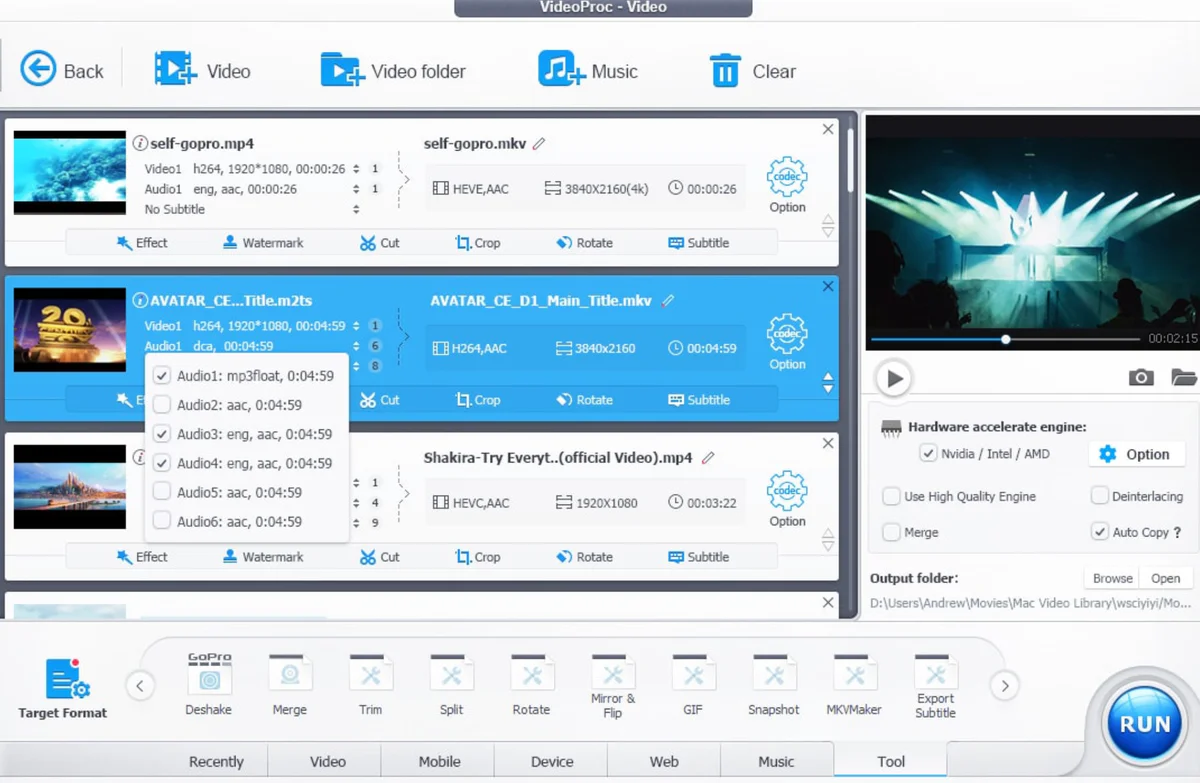
On macOS, video conversion is very simple. Just add your video, select the format, and click Run. VideoProc Converter keeps good quality and finishes the job quickly, even with big files.
Compress Videos on Mac
If your video is too large, VideoProc Converter can make it smaller. The video stays clear, and you save space on your Mac or make sharing easier.
Download Online Videos on macOS
The built-in downloader lets you save videos or music from many websites. Just copy the link, paste it, and download in your chosen quality.
Best Alternatives VideoProc Converter
HandBrake
HandBrake is the best and open-source video converter. It helps you change video formats and reduce video size easily. It works best for converting videos for Mac, iPhone and other devices. The interface is simple and the quality stays very good.
Movavi Video Converter
Movavi Video Converter is famous and easy to use for Mac users. It converts videos quickly and keeps good quality. You can also resize videos for social media or Apple devices. This is a good choice for beginners who want simple tools.
Any Video Converter
Any Video Converter works well on Mac for basic video converting tasks. It supports many formats and also allows simple video editing. The layout is easy to understand so new users can use it without any problem.
Final Words
VideoProc Converter for macOS is a great choice foår Mac users who want an easy and fast video tool. It is best for converting, editing, compressing, and downloading videos without any confusion. If you want simple video work on your Mac, this software is worth trying.
How to Use VideoProc Converter on macOS
- Download and install VideoProc Converter on your Mac
- Open the app
- Choose Convert, Download, Edit, or Record
- Add your video or paste a link
- Click Run and wait for it to finish
VideoProc Converter Pros & Cons
Pros
VideoProc Converter
Fast performance
Supports large and 4K videos
Many tools in one app
Cons
Free version has limits
Editing features are basic
System Requirements for MacOS
OS: macOS 10.13 or later
Processor: Intel Mac or Apple Silicon (M1 / M2 / M3)
RAM: Minimum 2 GB
Storage: At least 200 MB free disk space
Network: Required for downloading and updates
VideoProc Converter FAQs
1Is VideoProc Converter made for Mac only?
Yes, VideoProc Converter is especially designed for macOS users.
2Does VideoProc Converter support 4K videos on macOS?
Yes it works nicely with 4K and HD videos on Mac.
3Can I decrease video size on my Mac?
Yes you can creat large videos smaller while keeping good quality.
4Does VideoProc Converter work on M1, M2 and M3 Macs?
Yes, it totally supports Apple Silicon Macs.
Package Size
420 MB
5.0
2 reviews
Direct & Safe Download
Buy License Officially
Virus FreeVerifiedFast
Product Information
File Name
VideoProc Converter 8.7 Download For MacOS
Developer
Digiarty
License
Freeware
Total Downloads
0
Platform
MacOS
Related Tags
Explore more software in these categories
VideoProc Converter 8.7 Download For MacOS Tested & Verified
by FreewareLab Security Team
SECURE
0/72
VirusTotal
Jan 19
Test Date
Win 11
Platform
100%
Trust Score
No MalwareNo AdwareClean InstallFeatures Verified
C
Cem KanerVerifiedTOP
Software Security Analyst at FreewareLab
Our Verification Process
Security Scan
Every file scanned with 72+ antivirus engines via VirusTotal
Installation Test
Clean install verified - no bundleware, adware, or PUPs
Feature Verification
All advertised features tested and confirmed working
5.0
Excellent
2 ratingsRating Breakdown
5
2(100%)
4
0
3
0
2
0
1
0
Write a Review
for VideoProc Converter 8.7 Download For MacOS
0 Reviews
Click to share your experience