3uTools Download for Windows 9.01.012 Free (2026)
9.01.012New
Virus FreeNo AdwareSafe DownloadLab Tested
3uTools Download for Windows is a powerful iOS management tool. It is designed to help users easily control, repair, and optimize their Apple devices. It combines hardware diagnostics, smart flashing
Virus-free • Verified by FreewareLab
Download 3uTools Latest Version for PC - Freeware
3uTools Download for Windows is a powerful iOS management tool. It is designed to help users easily control, repair, and optimize their Apple devices. It combines hardware diagnostics, smart flashing
5.0(3)
2 downloads
Jan 14, 2026
3uTools Download for Windows 9.01.012 Free (2026) Video Overview
Watch this video to learn more about 3uTools Download for Windows 9.01.012 Free (2026) features and how to use it.
3uTools Download for Windows
3uTools Download for Windows is a powerful iOS management tool. It is designed to help users easily control, repair, and optimize their Apple devices. It combines hardware diagnostics, smart flashing, data management, and system utilities. It is the simple interface. If you are a new and advanced user. It makes complex iOS tasks fast and safe.
Quick Overview of 3uTools for Desktop
3uTools is an all-in-one desktop solution. It helps you manage any iOS device on a Windows PC using a stable USB connection. This tool is widely used by developers and normal users to download and install apps, manage files, and control system settings without relying only on the App Store. It supports many versions of the iOS operating system.
How 3uTools Works Securely on Windows
3uTools allows users to unlock devices, change wallpaper, convert media files, and manage data from one securely designed dashboard. It also allows the use of third-party and unofficial tools while helping users avoid malware risks through proper checks.
Device Management Made Simple
It can allow users to manage apps, photos, videos, ringtones, and documents directly from PC. You can transfer files without using cloud services or complex syncing steps. This saves time and keeps your data organized. The software also helps uninstall apps in bulk, which is very useful for cleaning up storage.
iOS Flashing and System Tools
Flashing capability is one of the strongest features of 3uTools. Users can update or restore iOS with guided steps, reducing the risk of errors. It can provide repair options for common issues such as stuck recovery mode or boot loops. It is helpful when a device is not working properly and needs a quick fix.
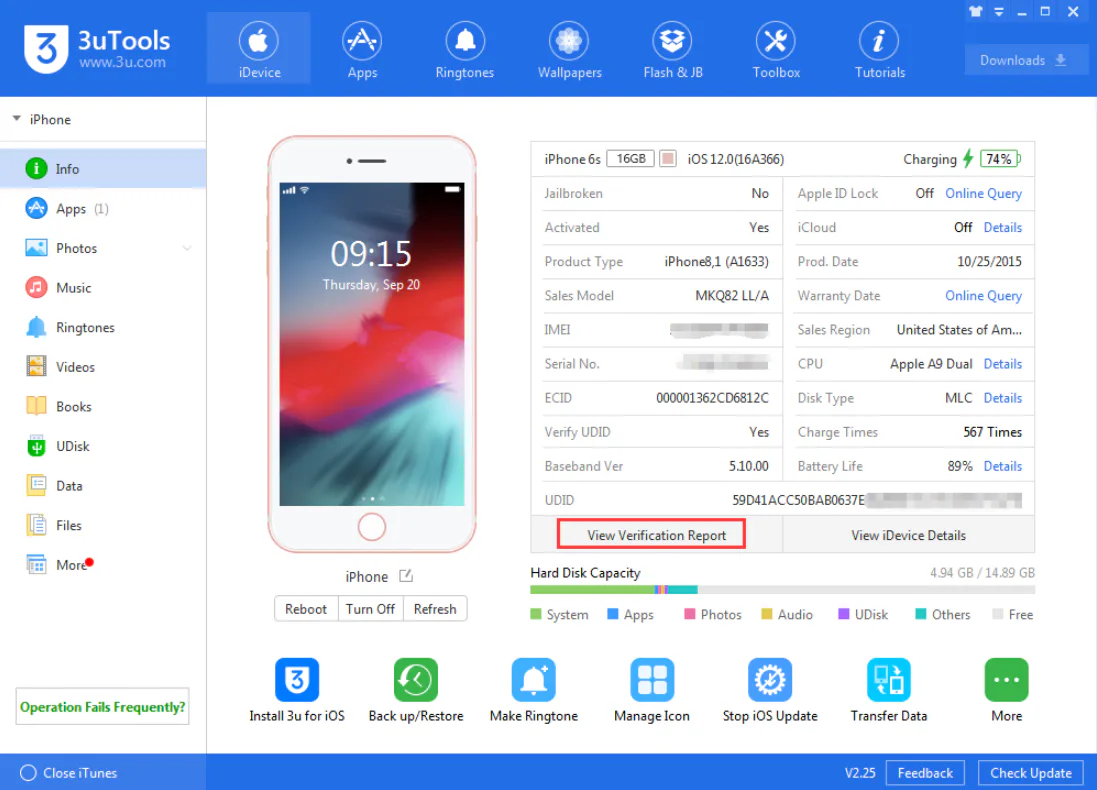
Tools and Utilities 3utools for Windows
- Backup and Restore
- Stop iOS Updates
- Batch Activate and Erase
- Virtual Location
- Real-Time Screen Viewing
- Screen Recording
- iTunes Utility
- Photo Deduplication and Compression
- Make Ringtones
- Transfer Data
- Firmware and IPA Signature
- Jailbreak Support
- Recovery Mode Access
- Face ID Testing
- Crash Analysis
- Audio Tag Editing
- Format Conversion
- Real-Time Logs
- Accessibility Tools
Why 3uTools Is a Smart Choice for iOS Users
3uTools for Windows combines speed, safety, and simplicity in one complete platform. The flashing to data management and advanced utilities. It removes the complexity of iOS maintenance. It offers a user-friendly design. 3uTools delivers a reliable and efficient experience for every user.
Best Alternatives to 3uTools
iMazing: It is a reliable iOS management tool for Windows and Mac. It helps users back up data, transfer files, and manage apps without using iTunes.
AnyTrans: It is the best solution for transferring data between an iPhone and a computer. It supports photos, videos, music, and app data.
Dr. Fone Toolkit: It is the top software for fixing iOS issues and recovering lost data. It is useful for unlocking devices and safely restoring important files.
Tenorshare iCareFone: It is a lightweight tool for managing files and backups on iOS devices.
Final Thoughts
It is a reliable Windows software. It is best to control their iPhone iPad or iPod. It combines powerful features with a simple design. It is suitable for new and advanced users. If you are looking for a complete iOS management solution on Windows. It is a strong choice.
How to Download and Use 3uTools for Windows
- You can click the download button.
- Wait for the setup file to finish downloading
- Open the installer and complete the installation
- Connect your iPhone, iPad, or iPod using a USB cable
- Unlock your device and tap Trust when asked
- Launch 3uTools on your Windows PC
- Start managing apps, files, backups, and iOS tools
3uTools Pros & Cons
Pros
Free to use with many advanced tools
Beginner-friendly interface
Supports many iOS versions
Fast backup and flashing options
Cons
Windows-only software
Requires iTunes drivers
Some advanced options may confuse new users
3uTools System Requirements
OS: Windows 7, Windows 8 / 8.1, Windows 10, Windows 11
Processor: Intel or AMD CPU with at least 1 GHz speed
RAM: 2 GB RAM
Storage: At least 300 MB free disk space for installation
Other: Stable USB cable to connect iOS device to your PC
Network: Internet access to download, updates, and apps
3uTools Frequently Asked Questions (FAQs)
1What is 3uTools used for
It is used to manage iPhone, iPad, and iPod devices on Windows.
2Is 3uTools free to use
It is completely free and offers many useful features.
3Is 3uTools safe for Windows?
It is safe when downloaded from our website and used with the original USB cables.
4Does 3uTools work on Windows 11?
It supports all Windows versions, including Windows 11.
5Do I need iTunes to use 3uTools
You do not need iTunes itself, but iTunes drivers must be installed for device detection.
6Can 3uTools unlock an iPhone?
It offers tools to manage and repair devices, but unlocking depends on device status and iOS version.
Package Size
183.94 MB
5.0
3 reviews
Direct & Safe Download
Buy License Officially
Virus FreeVerifiedFast
Product Information
File Name
3uTools Download for Windows 9.01.012 Free (2026)
Developer
3uTools Team
License
Freeware
Total Downloads
2
Platform
Windows
1
Related Apps
Similar software you'll love

3uTools Download for Windows 9.01.012 Free (2026) Tested & Verified
by FreewareLab Security Team
SECURE
0/72
VirusTotal
Jan 14
Test Date
Win 11
Platform
100%
Trust Score
No MalwareNo AdwareClean InstallFeatures Verified
A
Ash ColemanVerifiedTOP
Software Security Analyst at FreewareLab
Our Verification Process
Security Scan
Every file scanned with 72+ antivirus engines via VirusTotal
Installation Test
Clean install verified - no bundleware, adware, or PUPs
Feature Verification
All advertised features tested and confirmed working
5.0
Excellent
3 ratingsRating Breakdown
5
3(100%)
4
0
3
0
2
0
1
0
Write a Review
for 3uTools Download for Windows 9.01.012 Free (2026)
0 Reviews
Click to share your experience