Debut Video Capture 12.06 Screen Recorder for Windows (2026)
12.06New
Virus FreeNo AdwareSafe DownloadLab Tested
Download Debut Video Capture, the latest version by NCH Software. Easily record screen, webcam, and audio in HD quality. Simple, fast, and beginner-friendly screen recording tool for Windows.
Virus-free • Verified by FreewareLab
Download Debut Video Capture Latest Version - Freewarelab
Download Debut Video Capture, the latest version by NCH Software. Easily record screen, webcam, and audio in HD quality. Simple, fast, and beginner-friendly screen recording tool for Windows.
5.0(2)
2 downloads
Apr 15, 2026
Debut Video Capture 12.06 Screen Recorder for Windows (2026) Video Overview
Watch this video to learn more about Debut Video Capture 12.06 Screen Recorder for Windows (2026) features and how to use it.
Debut Video Capture
Debut Video Capture is a simple yet powerful screen recording and video capture software. It is designed by NCH Software. It allows you to record your computer screen and your webcam. It also helps you to record video from external devices like security cameras or VHS tapes.
If you want to make tutorials and record gameplay. This software makes everything very easy to save video calls.
Overview of Debut Video Capture Software
It is mainly used for YouTube videos and online classes. It is best for gameplay recordings and business presentations. It supports multiple video formats. It also allows audio recording from both the microphone and the system sound.
It has a simple interface and easy controls. Even users with basic computer knowledge can quickly start recording without any difficulty. Capture video and save content from their screen in a fast and easy way.
Key Features of Debut Video Capture Free Download
- You can record your full screen or just a selected area.
- It is useful for tutorials and online classes.
- It allows you to record videos using your webcam.
- Perfect for YouTube videos or video messages.
- You can record from devices like USB cameras and capture cards.
- Record sound from your microphone or system audio.
- You can also record both at the same time.
- Save your videos in formats like MP4 AVI WMV MOV MPG and more.
- Add effects like text captions or watermarks to your videos.
- Set a timer to start and stop recording automatically.
Best Uses of Debut Video Capture for Windows
- Record YouTube videos for tutorials, vlogs, or gaming content
- Create online class recordings and step-by-step learning tutorials
- Capture gameplay videos for sharing, editing, or streaming
- Record video calls, meetings, or online interviews for later review
- Prepare business presentations, demos, and software walkthroughs for clients
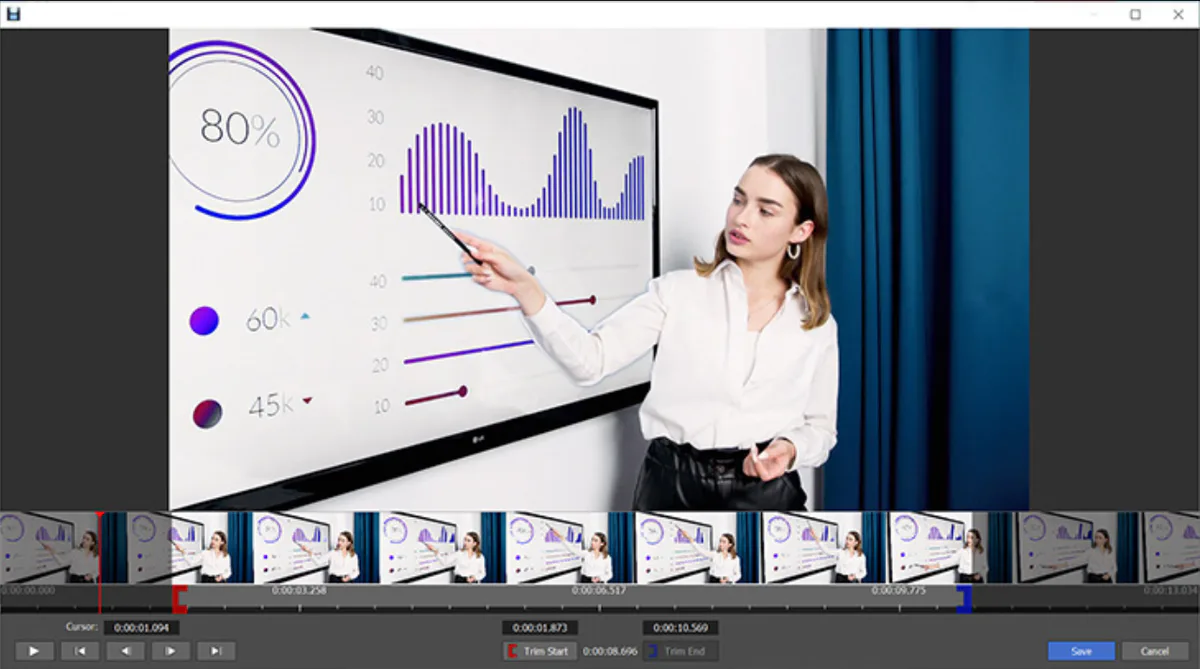
Why People Use Debut Video Capture
- Very easy to use, even for beginners with no technical skills
- Allows screen, webcam, and external device recording in one tool
- Works smoothly on low-end computers with less system load
- It supports multiple video formats for easy saving and sharing
- It is useful for creating tutorials, YouTube videos, and online classes
- Helps users record meetings, calls, and presentations for later use
- Offers basic effects like text, timestamps, and simple adjustments
- It has a free version that is enough for basic recording needs
Best Alternatives to Debut Video Capture
OBS Studio: A free and powerful tool for screen recording and live streaming. It is best for advanced users.
Bandicam: A lightweight screen recorder. It offers high quality gameplay and desktop recording.
Camtasia: A premium software. It includes both screen recording and professional video editing features.
Final Thoughts
If you want to record your screen simply. Download Debut Video Capture software, which is the best choice and is lightweight. It is the top choice for new and professional users for basic recording needs.
If you need advanced editing features, you may need another tool, but for recording, it works very well.
How to Download and Use Debut Video Capture
How to Download
- Click on the download button
- Install the software on your PC
- Open and start using it
How to Use
- Open the software
- Choose recording type (Screen, Webcam, or Device)
- Select audio settings
- Click the Record button
- Click Stop when finished
- Save your video
Debut Video Capture Pros and Cons
Pros
Easy to use for beginners
Supports many formats
Records screen and webcam
Lightweight software
Free version available
Cons
Limited features in free version
Basic editing options
Watermark in free version
Debut Video Capture System Requirements
OS: Windows 7/8/10/11
RAM: 2GB or more
Storage: At least 100MB free space
Processor: Basic CPU works fine
Debut Video Capture Frequently Asked Questions (FAQs)
1Is Debut Video Capture free?
It has a free version, but some features are limited.
2Can I record audio with video?
You can record both the microphone and system sound.
3 Does it support HD recording?
You can record high-quality HD videos.
4Is it good for beginners?
It is very simple and easy to use.
5Does it add a watermark?
The free version may add a watermark.
Package Size
3.86 MB
5.0
2 reviews
Direct & Safe Download
Buy License Officially
Virus FreeVerifiedFast
Product Information
File Name
Debut Video Capture 12.06 Screen Recorder for Windows (2026)
Developer
NCH Software
License
Freeware
Total Downloads
2
Platform
Windows
4
Related Apps
Similar software you'll love
#1
Adobe Lightroom 15.3 Download for Windows 2026
Download Adobe Lightroom for Windows Full Version is the best photo editing software to help you make your pictures look better in just a few clicks. You can fix colors add filters adjust light.
v15.3125.0
#2
Adobe Photoshop Download 27.5 for Windows (2026)
Download Adobe Photoshop for Windows and edit photos like a pro. Create, retouch, design, and enhance images with the world’s most powerful image-editing software used by professionals worldwide.
v27.56564.5
#3
DaVinci Resolve Download v20.3.1 Latest Version
Create professional videos, cinematic effects, and stunning motion graphics with DaVinci Resolve for Windows. Edit, color grade, add VFX, and export high-quality videos easily.
v20.3.1125.0
#4
Cyberlink PhotoDirector 17.3.1614.0 for Windows (2026)
CyberLink PhotoDirector is a smart AI photo editor that lets you edit photos fast using powerful AI tools. Create high-quality images easily and get a direct download link to start right away.
v17.3.1614.0105.0
Related Tags
Explore more software in these categories
Debut Video Capture 12.06 Screen Recorder for Windows (2026) Tested & Verified
by FreewareLab Security Team
SECURE
0/72
VirusTotal
Apr 15
Test Date
Win 11
Platform
100%
Trust Score
No MalwareNo AdwareClean InstallFeatures Verified
A
Ash ColemanVerifiedTOP
Software Security Analyst at FreewareLab
Our Verification Process
Security Scan
Every file scanned with 72+ antivirus engines via VirusTotal
Installation Test
Clean install verified - no bundleware, adware, or PUPs
Feature Verification
All advertised features tested and confirmed working
5.0
Excellent
2 ratingsRating Breakdown
5
2(100%)
4
0
3
0
2
0
1
0
Write a Review
for Debut Video Capture 12.06 Screen Recorder for Windows (2026)
0 Reviews
Click to share your experience