Adobe InDesign 21.2 for Windows (2026)
21.2Updated
Virus FreeNo AdwareSafe DownloadLab Tested
Download Adobe InDesign for Windows is the best design tool. It is a very helpful application for creating the beautiful layout and digital content. If you want to write a book, make a magazine,
Virus-free • Verified by FreewareLab
Download Adobe InDesign Desktop Publishing Software - Freewarelab
Download Adobe InDesign for Windows is the best design tool. It is a very helpful application for creating the beautiful layout and digital content. If you want to write a book, make a magazine,
5.0(1)
144 downloads
Jan 27, 2026
Adobe InDesign 21.2 for Windows (2026) Video Overview
Watch this video to learn more about Adobe InDesign 21.2 for Windows (2026) features and how to use it.
Adobe InDesign
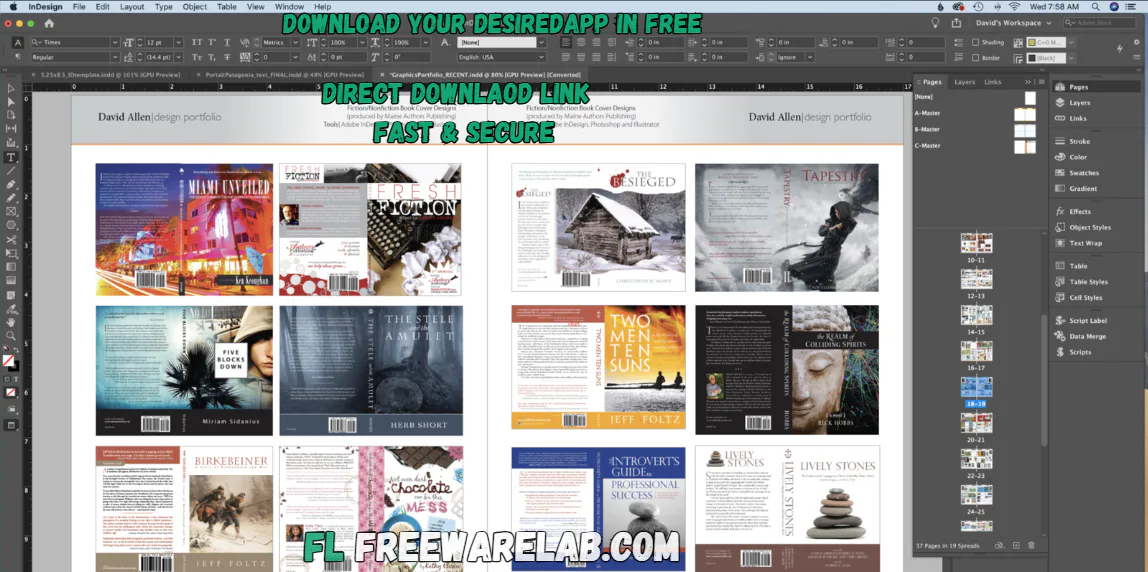
Adobe InDesign is the best design tool. It is a very helpful application for creating the beautiful layouts and digital content. If you want to write a book, make a magazine, create brochures flyer make your work progress report, and make a professional looking PDF file. Adobe InDesign is the top choice. It offers strong layout control clean typography and professional results.
Adobe InDesign Overview
It is a desktop publishing application. It helps users design multi page documents by combining text images and graphics in a clean and organized way. It is very useful for print media and digital publications. You know where layout is very important.
Key Features of Adobe InDesign
- It comes with many powerful features that make professional design easy.
- Advanced page layout tools
- Strong typography and font control
- Master pages for consistent design
- Support for print and digital publishing
- Interactive PDF and eBook creation
- Easy image and text alignment
- Smooth integration with Photoshop and Illustrator
Adobe InDesign Download
Adobe InDesign the latest version offers the best performance and gives a smoother workflow. It is the best professional desktop publishing software. It can improve stability for designers working on print and digital layouts. It is designed to handle complex multi-page documents.
Adobe InDesign is widely used by graphic designers, publishers, marketers, and businesses to create professional magazines, books, brochures, catalogs, flyers, and interactive PDFs.
What New in Adobe InDesign v21.2
- It focuses on improving speed, usability, and overall design experience.
- Improved performance and faster loading
- Better text alignment and layout handling
- Enhanced stability for large documents
- Smoother font and typography management
- Improved compatibility with the latest OS updates
- Bug fixes and workflow optimizations
Key Benefits of Adobe InDesign
- Professional-quality page layouts
- Perfect text and image placement
- Ideal for print and digital publishing
- Supports interactive elements and links
- Reliable for large and complex projects
- Industry-standard software
Uses of Adobe InDesign
- It is used in many creative and professional fields.
- It can designing magazines and newspapers
- You can use it for creating books and eBooks
- It help to making brochures, flyers, and posters
- Designing catalogs and business reports
- Creating interactive PDFs and digital documents
Adobe InDesign Alternatives
Affinity Publisher: A modern and easy tool for making books, magazines, and layouts.
Scribus: A free and open-source program for basic page design and printing.
QuarkXPress: A professional layout software used for print and digital publishing.
Canva: It is a user friendly online tool for quick and simple designs.
Who Should Use Adobe InDesign?
- It is perfect for:
- Graphic designers
- Publishers and editors
- Marketing professionals
- Students learning design
- Businesses creating professional layouts
Final Words
It is best tool for publishing and layout design. IT can provide the powerful features. It gives a user friendly interface with clean typography and full control over page design. You can get the best quality print and awesome digital layouts.
How to Download and Use Adobe InDesign
How to Download
- Follow these simple steps to download Adobe InDesign safely:
- You can click the Download or Install button.
- Wait for the download to complete.
- After downloading, the installer will open on its own
- Follow the on-screen instructions
- Choose your language and install location (optional)
- Wait a few minutes for installation to finish
- Click Finish when done
How to Use Adobe InDesign
Open Adobe InDesign
- Double-click the Adobe InDesign icon on your desktop.
- Or open it from the Start Menu (Windows) / Applications folder (Mac)
Create a New Document
- Click Create New
- Select document type (Print, Web, or Mobile)
- Set page size, margins, and number of pages
- Click Create
Add Text
- Use the Text Tool (T)
- Draw a text box on the page
- Type or paste your content
- Adjust font, size, and color from the top menu
Add Images
- Click File → Place
- Select an image from your computer
- Click on the page to place it
- Resize and align the image as needed
Design Your Layout
- Arrange text and images
- Use guides and grids for alignment
- Apply colors and styles
- Use master pages for repeated layouts
Save Your Work
- Click File → Save
- Choose a location on your computer
- Save in .INDD format for editing
Adobe InDesign Pros and Cons
Pros
Industry-standard publishing software
Excellent layout and text control
Best for print and digital designs
Professional-quality output
Cons
Paid subscription required
Learning curve for beginners
Needs a good system to run smoothly
Adobe InDesign System Requirements
OS: Windows 10 (64-bit)
Processor: Intel or AMD 64-bit processor
RAM: 8 GB
Storage: 3.5 GB free space for installation
Display: 1280 × 800
Graphics: GPU with DirectX 12 support
Adobe InDesign Frequently Asked Questions (FAQs)
1Is Adobe InDesign free to use?
No, Adobe InDesign is a paid software available through Adobe Creative Cloud.
2Can beginners learn Adobe InDesign?
Yes, a new user can learn it, but it takes some time due to the advanced features.
3Is Adobe InDesign available for Mac?
Adobe InDesign works on both Windows and macOS.
4What is Adobe InDesign mainly used for?
It is mainly used for designing magazines, books, brochures, and digital publications.
Adobe InDesign v21.2 Changelog
Latest version changes and improvements
- Improved overall performance and speed
- Fixed bugs causing app crashes and freezes
- Better stability while working with large documents
- Improved text editing and layout handling
- Minor UI fixes and smoother workspace experience
- General improvements for print and digital exports
Previous Versions
Adobe InDesign Adobe InDesign 21.1
Dec 24, 20251.2 GB
Package Size
1.28 GB
5.0
1 review
Direct & Safe Download
Buy License Officially
Virus FreeVerifiedFast
Product Information
File Name
Adobe InDesign 21.2 for Windows (2026)
Developer
Adobe
License
Freeware
Total Downloads
144
Platform
Windows
4
Related Apps
Similar software you'll love
#1
Adobe Photoshop 7.0 Download Classic Photo Editor 2026
Adobe Photoshop 7.0 Download stands as one of the well-known and lightweight editions of Photoshop. Now a lot of users continue to rely on it due to its smooth
v7.0515.0
#2

SketchUp Pro for Windows v26.1.189 Download
Download the latest SketchUp for Windows. A powerful yet easy-to-use 3D modeling software for architects, designers, engineers, and beginners. Create, design, and visualize projects with precision.
v26.1.189225.0
#3

Adobe Photoshop 7.0 Download for Windows (Classic Version)
Adobe Photoshop 7.0 is a classic image editing software with powerful layers, color correction, filters, and improved performance for smooth photo editing.
v7.0985.0
#4
CorelDRAW Graphics Suite 26.2.0.171 for Windows (2026)
Create stunning vector graphics, layouts, and typography with CorelDRAW Graphics Suite. The direct download link is available on our website. A complete professional design toolkit for print, web,
v26.2.0.171335.0
Related Tags
Explore more software in these categories
Adobe InDesign 21.2 for Windows (2026) Tested & Verified
by FreewareLab Security Team
SECURE
0/72
VirusTotal
Jan 27
Test Date
Win 11
Platform
100%
Trust Score
No MalwareNo AdwareClean InstallFeatures Verified
A
Ash ColemanVerifiedTOP
Software Security Analyst at FreewareLab
Our Verification Process
Security Scan
Every file scanned with 72+ antivirus engines via VirusTotal
Installation Test
Clean install verified - no bundleware, adware, or PUPs
Feature Verification
All advertised features tested and confirmed working
5.0
Excellent
1 ratingRating Breakdown
5
1(100%)
4
0
3
0
2
0
1
0
Write a Review
for Adobe InDesign 21.2 for Windows (2026)
0 Reviews
Click to share your experience