Agisoft Metashape 2.3.1 Build 22070 for Windows (2026)
2.3.1 Build 22070Updated
Virus FreeNo AdwareSafe DownloadLab Tested
Agisoft Metashape is a professional photogrammetry software for processing digital images and creating accurate 3D models and spatial data. Free download for Windows PC.
Virus-free • Verified by FreewareLab
Download Agisoft Metashape Professional Latest version - Freewarelab
Agisoft Metashape is a professional photogrammetry software for processing digital images and creating accurate 3D models and spatial data. Free download for Windows PC.
5.0(2)
8 downloads
Feb 11, 2026
Agisoft Metashape 2.3.1 Build 22070 for Windows (2026) Video Overview
Watch this video to learn more about Agisoft Metashape 2.3.1 Build 22070 for Windows (2026) features and how to use it.
Agisoft Metashape
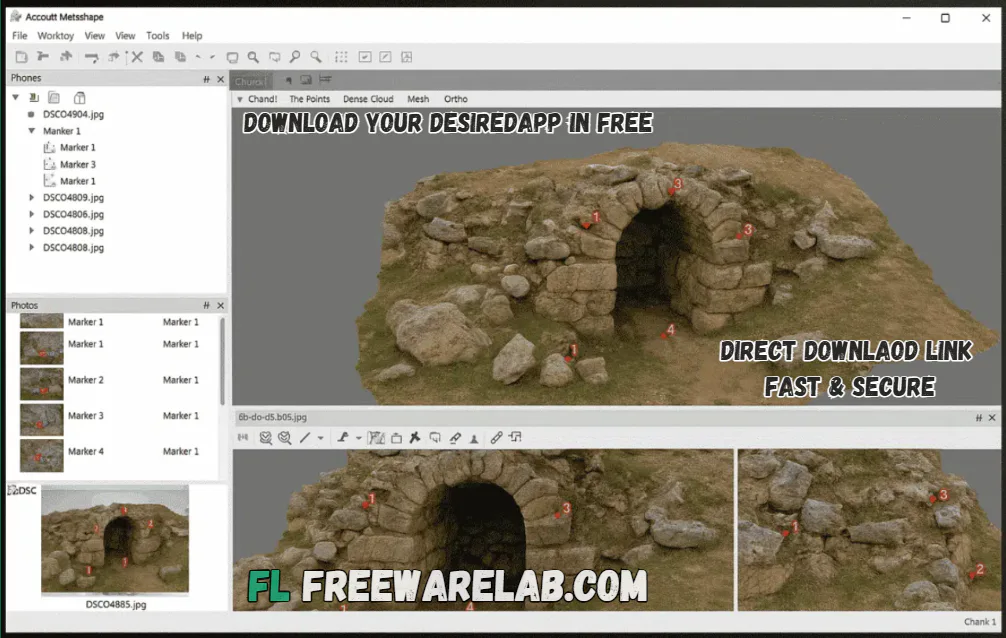
Agisoft Metashape is a smart software. It helps you make 3D models from photos. You take many pictures of an object or place. The software turns them into a detailed 3D shape. These photos can be taken using a normal camera or a drone.
It is best for all types of users in the modern world. It used student researcher and game developers.
What Is Photogrammetry and How Agisoft Metashape Works
Photogrammetry helps to make 3D models and maps using photos taken from various angles. Agisoft Metashape works by identifying common points across photos. It estimates their positions and builds a detailed 3D model.
Simple workflow:
Photos → Align images → Create point cloud → Build 3D model → Generate maps
What You Can Do with Agisoft Metashape
- It can creating 3D models of buildings and objects
- Mapping land and landscapes
- Archaeology and historical site recording
- Drone mapping and surveys
- Games, movies, and visual effects
- Education and research projects
- It helps people save real-world objects in digital form.
Key Features of Agisoft Metashape Professional
- Creates 3D models from photos
- Supports drone and camera images
- Builds detailed point clouds
- Generates textured 3D models
- Creates maps and orthomosaics
- Supports panorama stitching
- Works for small and large projects
- Allows export to other 3D and GIS software
How Agisoft Metashape Creates 3D Models from Images
- You add your photos to the software
- The software aligns the photos
- A rough 3D shape is created
- A detailed point cloud is built
- A 3D mesh model is generated
- Texture is added for realism
- The final model or map is exported
Supported File Formats
- It supports many formats.
- Image formats: JPG, PNG, TIFF
- Export formats: OBJ, FBX, LAS, DEM, GeoTIFF
- Compatible with CAD and GIS software
Standard Edition vs Professional Edition
Standard Edition
- Best for beginners and small projects
- Creates basic 3D models
- Supports photo alignment and texturing
- Good for media and learning purposes
Professional Edition
- Best for large and advanced projects
- Supports GIS mapping and measurements
- It works with GPS drone and survey data
- Supports multispectral thermal and LiDAR data
- Includes automation scripting and cloud processing
Agisoft Metashape vs Other Photogrammetry Software
It is known for its accuracy and flexibility. Compared to many other tools. It gives users more control over processing and produces highly detailed results. It is a strong choice for professional work.
Best Alternatives to Agisoft Metashape Pro
Pix4D
Pix4D is a popular photogrammetry software mainly used for drone mapping and land surveying. It helps users create accurate maps and 3D models from aerial images and is widely trusted by professionals.
RealityCapture
RealityCapture is a powerful tool known for its very fast processing speed. It can handle large numbers of images easily, making it a great choice for users who work on big and complex projects.
Meshroom
Meshroom is a free and open-source photogrammetry tool. It allows users to create detailed 3D models from photos without paying any license fee, which makes it perfect for beginners and students.
DroneDeploy
DroneDeploy is an easy-to-use, cloud-based mapping platform designed mainly for drone users. It helps create maps, models, and reports quickly without needing advanced technical skills.
Final Word
It is the best choice for anyone who needs accurate 3D models and maps from photos. It is reliable powerful and trusted by professionals worldwide. If you work with drones, mapping, or 3D reconstruction. It is definitely worth using.
How to Download and Use Agisoft Metashape
How to Download
- You can click the Download button.
- Save the setup file on your computer.
- Open the downloaded setup file.
- Follow the on-screen installation steps.
- Accept the license agreement.
- Complete the installation process.
- Launch Agisoft Metashape from the desktop or applications folder
How to Use
Add Photos
- Open Agisoft Metashape.
- Click Add Photos.
- Select all images taken from your drone or camera.
Align Photos
- Click Workflow → Align Photos.
- The software will analyze and connect images.
- A basic 3D structure will be created.
Build Dense Point Cloud
- Click Workflow → Build Dense Cloud.
- This step adds more detail to your model.
Build Mesh
- Click Workflow → Build Mesh.
- A full 3D model shape is generated.
Build Texture
- Click Workflow → Build Texture.
- This adds colors and realistic details.
Export Your Results
- Export your 3D model, map, or point cloud.
- Choose the format you need (OBJ, FBX, GeoTIFF, etc.)
Agisoft Metashape Pros and Cons
Pros
Very accurate results
Professional-grade outputs
Works with drones and cameras
Widely trusted worldwide
Cons
Needs a powerful computer
Takes time to learn for beginners
Agisoft Metashape System Requirements
OS: Windows 10/11 (64-bit), macOS, or Linux
Processor: 64-bit CPU (Intel or AMD)
RAM: 8 GB
Storage: At least 10 GB free disk space
Display: 1280 × 1024 screen resolution
Agisoft Metashape Frequently Asked Questions (FAQs)
1Is Agisoft Metashape free?
It is paid version but it offers a free trial version.
2Does it support drone images?
It is works perfectly with drone photos.
3Is Agisoft Metashape good for beginners?
Yes, new user can learn it with practice but it is more powerful for professionals.
4Which edition should I choose?
You can choose Standard edition for basic use. You want the advanced project to choose Professional.
Agisoft Metashape Professional 2.3.1 Build 22070 Changelog
Latest version changes and improvements
- Improved 3D model reconstruction speed and overall performance
- Better point cloud processing with enhanced accuracy
- Optimized mesh generation for large and complex projects
- Improved texture blending and color correction results
- Enhanced support for drone and aerial image datasets
- Fixed minor bugs causing crashes during alignment
- General UI improvements and stability fixes
Package Size
190 MB
5.0
2 reviews
Direct & Safe Download
Buy License Officially
Virus FreeVerifiedFast
Product Information
File Name
Agisoft Metashape 2.3.1 Build 22070 for Windows (2026)
Developer
Agisoft LLC
License
Freeware
Total Downloads
8
Platform
Windows
4
Related Apps
Similar software you'll love
#1
SOLIDWORKS Download 2026 SP1.1 for Windows
SOLIDWORKS is the industry-standard software for design and engineering. Direct download link available. Build advanced 3D CAD, simulation, manufacturing, and product development skills
v2026 SP1.185.0
#2

Download AutoCAD 2026.1.1 for Windows Latest Version
Download AutoCAD for Windows. Create precise 2D and 3D designs with powerful CAD tools used by architects, engineers, and professionals worldwide.
v2026.1.145.0
#3
Adobe Substance 3D Painter 11.1.2.5115 Download for Windows 2026
Adobe Substance 3D Painter is the best 3D design tool for creating realistic 3D textures and materials. It is mostly used for game animation and product design.
v11.1.2.511595.0
#4

Maxon Cinema 4D 2026.1.2 For Windows
Maxon Cinema 4D is a powerful and user-friendly 3D software for modeling, animation, simulation, and rendering. Direct download link available. Create professional motion graphics and high-quality 3D
v2026.1.265.0
Related Tags
Explore more software in these categories
Agisoft Metashape 2.3.1 Build 22070 for Windows (2026) Tested & Verified
by FreewareLab Security Team
SECURE
0/72
VirusTotal
Feb 11
Test Date
Win 11
Platform
100%
Trust Score
No MalwareNo AdwareClean InstallFeatures Verified
A
Ash ColemanVerifiedTOP
Software Security Analyst at FreewareLab
Our Verification Process
Security Scan
Every file scanned with 72+ antivirus engines via VirusTotal
Installation Test
Clean install verified - no bundleware, adware, or PUPs
Feature Verification
All advertised features tested and confirmed working
5.0
Excellent
2 ratingsRating Breakdown
5
2(100%)
4
0
3
0
2
0
1
0
Write a Review
for Agisoft Metashape 2.3.1 Build 22070 for Windows (2026)
0 Reviews
Click to share your experience