AOMEI Backupper 8.1.0 for Windows (2026)
8.1.0Updated
Virus FreeNo AdwareSafe DownloadLab Tested
AOMEI Backupper 8.1.0 is the best and reliable backup solution. It can keep your system and data safe. If you can lose important data due to regular backup and system failure.
Virus-free • Verified by FreewareLab
Download Best Backup Software Latest Version - Freewarelab
AOMEI Backupper 8.1.0 is the best and reliable backup solution. It can keep your system and data safe. If you can lose important data due to regular backup and system failure.
5.0(2)
0 downloads
Jan 9, 2026
AOMEI Backupper 8.1.0 for Windows (2026) Video Overview
Watch this video to learn more about AOMEI Backupper 8.1.0 for Windows (2026) features and how to use it.
AOMEI Backupper
AOMEI Backupper 8.1.0 is the best and reliable backup solution. It can keep your system and data safe. If you can lose important data due to regular backup and system failure. It can provide the basic and advanced features to protect your system. It protects from system crashes accidental deletion viruses or hardware problems.
Complete Backup, Restore, and Clone Solution
It supports system disk partition file and folder backups along with restore and cloning options. You can back up your entire system. It allows you to choose only specific files and data, depending on your needs.
It helpful features such as scheduled backups incremental and differential backups NAS and network backups dynamic disk volume support and GPT disk backup. It works well with both legacy BIOS and UEFI-based systems.
Advanced Tools for Better Data Protection
AOMEI Backupper Standard offers advanced tools that make backup management safer and more convenient. It supports SSD alignment to improve performance during restore or cloning. You can turn on email notifications, manage backup logs, rename backup tasks, change backup image locations, and export or import backup tasks.
It also allows backing up or restoring files from one network location to another. It is especially useful for office users and NAS environments. It work together to provide complete and dependable data protection.
AOMEI Backupper Standard for Windows PC
It is a user-friendly backup software. It is a Windows application and runs on 11, 10, 8, and 7 (all editions, 32-bit and 64-bit). It is suitable for new users. Who wants simple protection. It is also perfect for advanced users who need powerful backup tools.
You can also create bootable media for Windows PE or Linux. It helps to restore your system. While creating Windows PE media, you can manually add extra drivers if needed.
Free Backup Software for Windows: Easy, Safe, and Fast
Backup Everything
You can automatically back up your Windows system, hard drives, files, folders, and Outlook emails. It is using full, incremental, or differential backup methods to keep your data secure at all times.
Save to Anywhere
Follow the 3-2-1 backup rule by saving your backups to local disks, external hard drives, USB drives, network shares, NAS devices, or cloud storage.
Rapid Restore
You can quickly restore your system to its previous working state. You can get back a file or folder after hardware failures, system crash, and a virus attack.
Features and Highlights
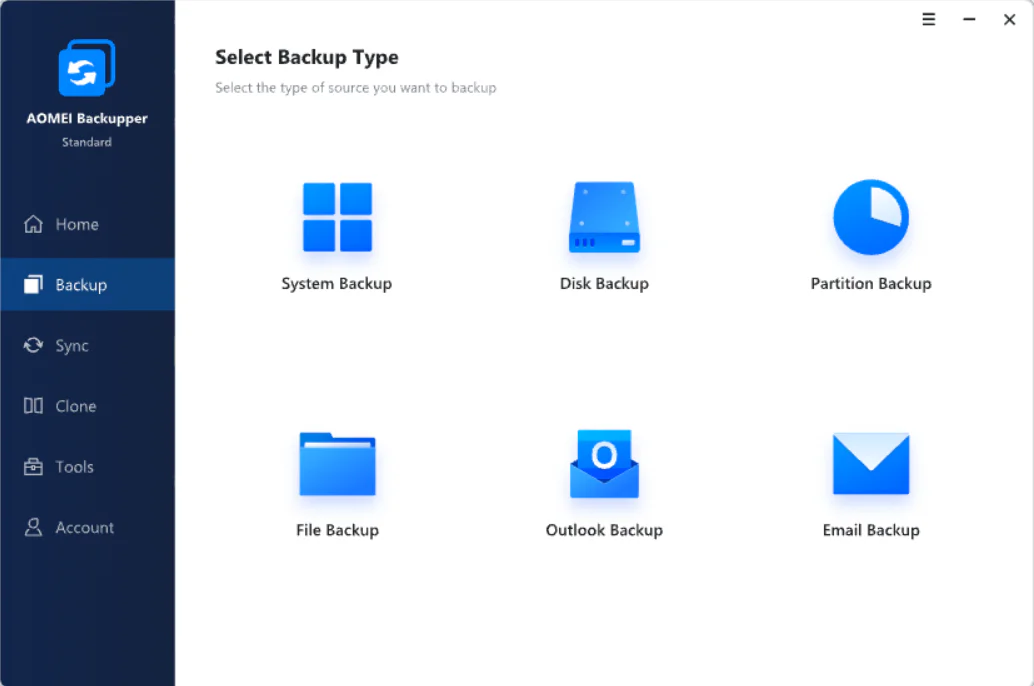
- System Backup: You can create a one-click backup of your entire system including Windows installed programs and personal settings—without interrupting your work.
- Files and Folders Backup: It helps to back up your important files like personal photos, videos, emails, documents and games safely. It also supports backing up data between network or NAS locations.
- Disk Backup: Back up all types of storage devices, including basic disks, dynamic disks, MBR and GPT disks, external hard drives, and USB devices recognized by Windows.
- Partition Backup: Back up selected partitions or dynamic volumes instead of the whole disk. The backup is stored as a compressed image to save storage space.
- File Sync: It can automatically sync files and folders on a schedule to local disks shared network folders USB flash drives, NAS devices, or external drives.
Best Alternatives to AOMEI Backupper
A popular backup tool with a user-friendly interface and strong system backup features. It helps users create system backups, disk backups, and file backups without technical knowledge.
Macrium Reflect
Known for fast disk imaging and reliable cloning options, especially for advanced users. It is mainly used by advanced users and IT professionals who need strong control over backup and recovery tasks.
Acronis True Image
A premium solution that combines backup, cloning, and cybersecurity features. It offers full system backup, disk cloning, cloud backup, and extra security tools like ransomware protection.
A simple backup and restore tool suitable for basic home and office needs. It allows users to back up files, folders, and systems with just a few clicks.
Who Should Use AOMEI Backupper?
- AOMEI Backupper is suitable for a wide range of users:
- Home users who want to protect personal files and family data.
- Office users who need regular backups for work documents.
- It is best for new users looking for an easy backup tool.
- IT support users: who manage system backups and disk cloning.
Conclusion
It is known for its reliable data protection. It uses secure backup methods to ensure your system, files, and disks are properly backed up and can be restored when needed. Many users rely on it for system recovery after crashes or hardware failures.
How to Download and Use AOMEI Backupper
How to Download
- Click on the Download button.
- The setup file will start downloading automatically.
- Once the download is complete, open the setup file with WinRAR.
- Double-click the downloaded installer file.
- Click Install and wait for the process to finish.
- After installation, click Finish to launch the software.
- AOMEI Backupper will now open on your screen.
How to Use
Create a Backup
- Open AOMEI Backupper.
- Click on Backup from the left menu.
- Choose the backup type (System Backup, Disk Backup, or File Backup).
- Select the source and backup destination.
- Click Start Backup to begin.
Restore a Backup
- Open AOMEI Backupper.
- Click Restore from the menu.
- Select the backup file you want to restore.
- Follow the on-screen steps.
- Click Start Restore to recover your data.
Clone a Disk (Optional)
- Click Clone from the main menu.
- Choose Disk Clone or System Clone.
- Select the source and target disk.
- Start the cloning process and wait until it finishes.
AOMEI Backupper Pros & Cons
Pros
Simple interface that beginners can navigate without confusion.
Supports system backup, disk backup, file backup, and partition backup.
Helps restore your system and data quickly in case of failure.
You can clone a hard drive or SSD without losing data.
AOMEI Backupper Standard offers many useful features at no cost.
Cons
Some advanced tools are only in the paid versions.
Very large backups can take longer than expected.
Free version sometimes suggests upgrading to paid plans.
AOMEI Backupper System Requirements
OS: Windows 11, Windows 10, Windows 8 / 8.1, Windows 7
Processor: At least a 500 MHz processor
RAM: 512 MB
Storage: Enough free space for installation
Other: Administrative rights for backup and restore
AOMEI Backupper Frequently Asked Questions (FAQs)
1Is AOMEI Backupper free?
Yes, AOMEI Backupper Standard is free for personal use and includes essential backup and restore features.
2Can it back up Windows system files?
Yes, it can back up the entire Windows system, including system files, installed programs, and settings.
3Does it support SSD cloning?
Yes, AOMEI Backupper supports SSD cloning and includes alignment options to improve SSD performance.
4Is it safe for personal data?
Yes, the software is designed to protect personal data and does not access or share your files without permission.
5Is AOMEI Backupper Safe & Trusted?
It is safe and trusted by users worldwide. The software is malware-free and does not contain viruses, spyware, or unwanted ads.
Package Size
190 MB
5.0
2 reviews
Direct & Safe Download
Buy License Officially
Virus FreeVerifiedFast
Product Information
File Name
AOMEI Backupper 8.1.0 for Windows (2026)
Developer
AOMEI
License
Freeware
Total Downloads
0
Platform
Windows
4
Related Apps
Similar software you'll love
#1

Ashampoo Backup Pro 27.5.41 Download for Windows 2026
Download Ashampoo Backup Pro Full Version for Windows is the best backup software that helps keep your important files safe. It allows you to back up your entire system or just files and folders.
v27.5.4165.0
#2
EaseUS Todo Backup 16.4.0 Download for Windows 2026
Download EaseUS Todo Backup with a Direct Link is an easy backup software that helps keep your important files safe on a Windows computer. You can use it to back up files folders or your whole system.
v16.4.05.0
#3
MiniTool ShadowMaker 4.8.0 Download for Windows 2026
Download MiniTool ShadowMaker with a Direct Link is the best backup software for keeping your files system safe. You can readily back up your documents folders hard drive or the whole Windows system.
v 4.8.0 5.0
#4

Macrium Reflect Free 10.0.8754 for Windows (2026)
Macrium Reflect uses a proven imaging engine to create fast, reliable system backups and disk clones. It available with direct download link. Safely image or clone your HDD and partitions—even while
v10.0.87545.0
AOMEI Backupper 8.1.0 for Windows (2026) Tested & Verified
by FreewareLab Security Team
SECURE
0/72
VirusTotal
Jan 9
Test Date
Win 11
Platform
100%
Trust Score
No MalwareNo AdwareClean InstallFeatures Verified
A
Ash ColemanVerifiedTOP
Software Security Analyst at FreewareLab
Our Verification Process
Security Scan
Every file scanned with 72+ antivirus engines via VirusTotal
Installation Test
Clean install verified - no bundleware, adware, or PUPs
Feature Verification
All advertised features tested and confirmed working
5.0
Excellent
2 ratingsRating Breakdown
5
2(100%)
4
0
3
0
2
0
1
0
Write a Review
for AOMEI Backupper 8.1.0 for Windows (2026)
0 Reviews
Click to share your experience