AutoRebar 3.4.2 Download for Windows 2026
3.4.2New
Virus FreeNo AdwareSafe DownloadLab Tested
AutoRebar is the best helpful software for AutoCAD users who work on concrete and steel bar drawings. It helps you draw edit and manage rebars in an easy way.
Virus-free • Verified by FreewareLab
Download AutoRebar Latest Version for Windows
AutoRebar is the best helpful software for AutoCAD users who work on concrete and steel bar drawings. It helps you draw edit and manage rebars in an easy way.
5.0(1)
0 downloads
Jun 3, 2026
AutoRebar 3.4.2 Download for Windows 2026 Video Overview
Watch this video to learn more about AutoRebar 3.4.2 Download for Windows 2026 features and how to use it.
AutoRebar
AutoRebar is the best helpful software for AutoCAD users who work on concrete and steel bar drawings. It helps you draw edit and manage rebars in an easy way. You can use it for beams columns slabs foundations and other civil engineering projects. AutoRebar also helps create bar marks callouts and Bar Bending Schedules automatically so users can save time and avoid mistakes.
AutoRebar Overview
AutoRebar is a useful plugin for AutoCAD that helps users create rebar drawings in an easy way. It is made for civil engineers structural engineers CAD designers and students who work with reinforced concrete projects. AutoRebar users can draw steel bars add bar marks create callouts and prepare rebar details inside AutoCAD.
Why Use AutoRebar for AutoCAD?
AutoRebar is helpful because it saves time and reduces manual work. In normal AutoCAD rebar detailing can take a lot of time because users need to draw and edit everything by hand. AutoRebar makes this work easier by giving special tools for rebar drawings. It helps users manage bar shapes spacing sizes and labels in a better way.
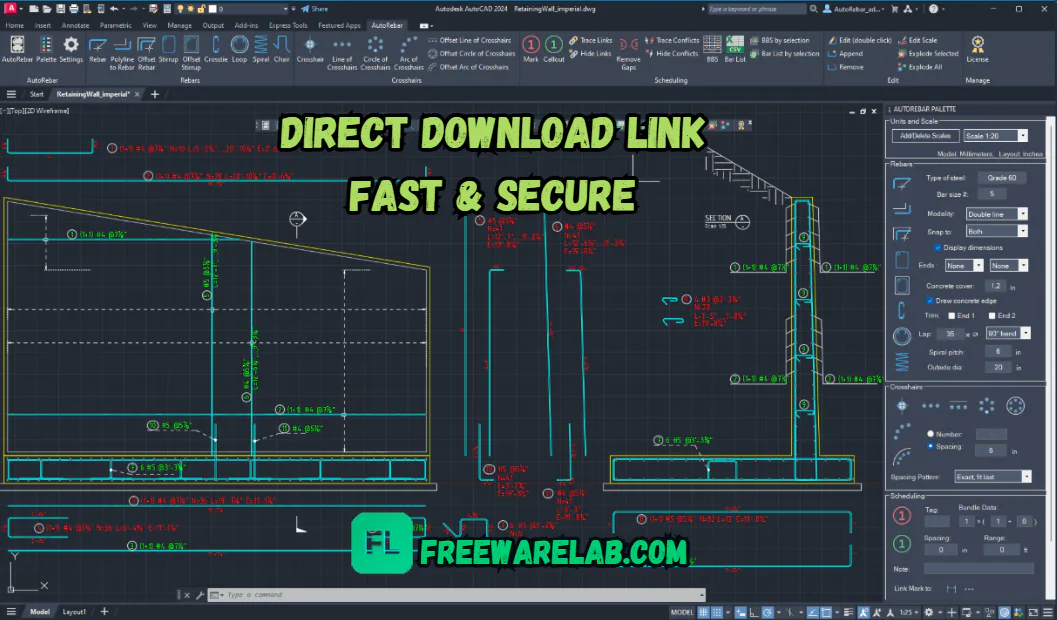
Main Features of AutoRebar
- Helps create rebar drawings inside AutoCAD.
- Supports smart rebar objects for easy editing.
- Creates Bar Bending Schedules quickly.
- Adds rebar marks and labels easily.
- Supports callouts for clear drawing details.
- Helps manage bar size length and shape.
- Useful for beams columns slabs and foundations.
- Saves time on manual rebar detailing work.
- Reduces common drawing and calculation mistakes.
- Makes reinforcement drawings clean and professional.
AutoRebar for Smart Rebar Drawings
AutoRebar is a useful AutoCAD plugin that helps users create smart rebar drawings in an easy way. It is made for people who work with reinforced concrete drawings steel bars and construction plans. AutoRebar users can draw and manage rebars faster inside AutoCAD. It helps make drawings clean clear and professional.
Easy Reinforcement Detailing in AutoCAD
AutoRebar makes reinforcement detailing easier for AutoCAD users. Instead of drawing every steel bar manually users can use AutoRebar tools to create rebar details quickly. It helps in adding bar shapes labels marks and callouts. This makes the detailing work simple for civil engineers CAD designers and students.
Create Rebar Drawings with Less Effort
AutoRebar users can create rebar drawings with less effort and less manual work. It helps save time by making common rebar detailing tasks easier. Users can edit bar size spacing shape and other details without starting the drawing again. This helps improve work speed and reduces common drawing mistakes.
Benefits of Using AutoRebar
- Saves time on rebar detailing work.
- Makes rebar drawings easier in AutoCAD.
- Helps create clean and professional drawings.
- Reduces manual drawing mistakes.
- Creates Bar Bending Schedules faster.
- Makes rebar marking and labeling simple.
- Helps manage bar size shape and length.
- Useful for civil and structural engineers.
- Improves workflow for concrete projects.
- Good for beams columns slabs and foundations.
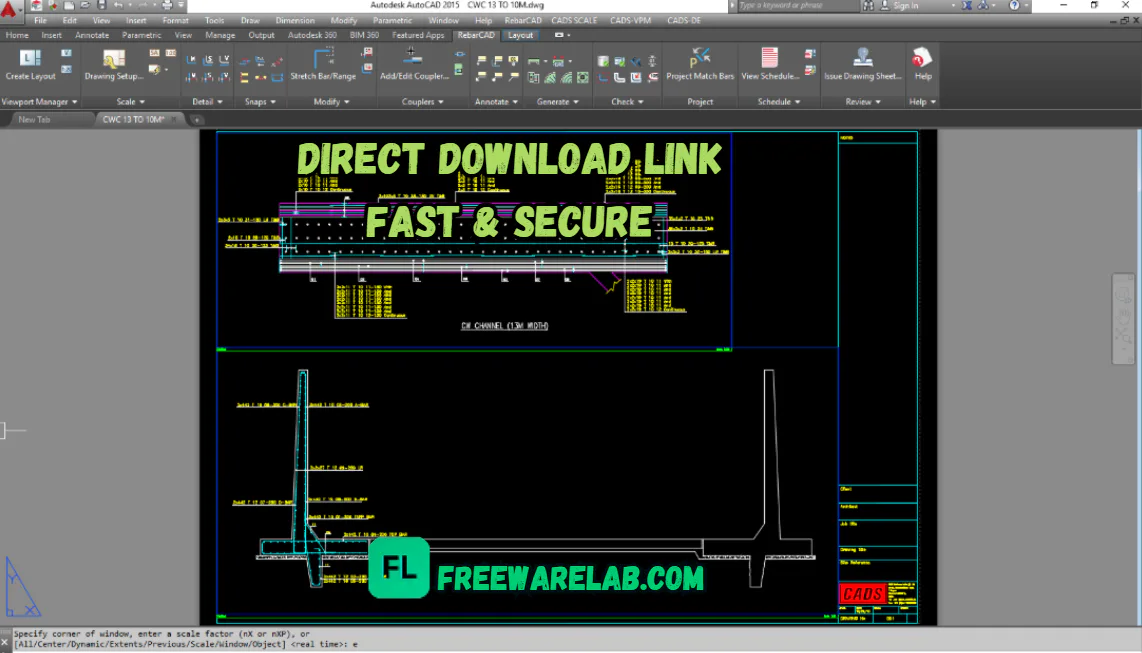
AutoRebar for Beams Columns and Slabs
AutoRebar can be used for different concrete parts like beams columns slabs and foundations. These parts need proper reinforcement drawings to show where steel bars should be placed. AutoRebar helps users create these drawings in a simple and accurate way. It is useful for both small and large construction projects.
Better Control Over Rebar Shapes and Sizes
AutoRebar gives users better control over rebar shapes and sizes. Users can change bar diameter spacing shape length and other details when needed. This makes editing easier and helps keep the drawing updated. Better control also helps users prepare more accurate reinforcement plans.
Make Professional Rebar Drawings Easily
AutoRebar helps users make professional rebar drawings without making the process too hard. It gives useful tools for drawing marking and scheduling rebars. The final drawings look clean and easy to understand. This makes AutoRebar a good choice for engineers and designers who want better results in AutoCAD.
Best Alternatives to AutoRebar
- Tekla Structures: Best for 3D rebar detailing and BIM-based concrete projects.
- Autodesk Revit: Good for structural modeling rebar design and BIM drawings.
- CADS RC / RebarCAD: Useful for AutoCAD-based rebar detailing and Bar Bending Schedules.
- SOFiCAD: Helpful for reinforced concrete drawings and rebar plans.
- ProtaStructure: Good for structural design concrete detailing and engineering projects.
How to Download and Use AutoRebar
- Click the Download button from a trusted website.
- Wait for the AutoRebar setup file to download.
- Open the downloaded setup file on your computer.
- Follow the installation steps shown on the screen.
- Make sure AutoCAD is already installed on your PC.
- After installation open AutoCAD.
- Find the AutoRebar tools inside AutoCAD.
- Start drawing rebars for beams, columns, slabs, or foundations.
- Add bar marks labels and callouts to your drawing.
- Create a Bar Bending Schedule to manage rebar details easily.
- Save your project after completing the rebar drawing.
- Restart AutoCAD if the plugin does not appear after installation.
AutoRebar Pros & Cons
Pros
Easy to use inside AutoCAD.
Helps create rebar drawings faster.
Saves time on manual detailing work.
Creates Bar Bending Schedules easily.
Reduces common drawing mistakes.
Good for beams columns slabs and foundations.
Cons
Requires AutoCAD to work.
Beginners may need some practice.
Some advanced tools can take time to learn.
Mainly useful for rebar and concrete detailing only.
May not be needed for very small projects.
AutoRebar System Requirements
OS: Windows 10 or Windows 11.
Processor: Intel or AMD processor recommended.
RAM: 4 GB RAM minimum, 8 GB or more recommended.
Storage: Free disk space needed for installation.
Display: Good screen resolution for clear CAD drawings.
Network: Needed for download, updates, or license activation.
AutoRebar Frequently Asked Questions (FAQs)
1What is AutoRebar used for?
AutoRebar is used to create rebar drawings and Bar Bending Schedules inside AutoCAD.
2Does AutoRebar work with AutoCAD?
Yes AutoRebar works as a plugin inside AutoCAD.
3Can AutoRebar create Bar Bending Schedules?
Yes it helps users create Bar Bending Schedules quickly and easily.
4Who can use AutoRebar?
Civil engineers structural engineers CAD designers students and construction professionals can use AutoRebar.
Package Size
7.9 MB
5.0
1 review
Direct & Safe Download
Buy License Officially
Virus FreeVerifiedFast
Product Information
File Name
AutoRebar 3.4.2 Download for Windows 2026
Developer
Paolo Locatelli
License
Freeware
Total Downloads
0
Platform
Windows
4
Related Apps
Similar software you'll love
#1
IObit Uninstaller Pro 15.4.0.1 free for Windows (2026)
IObit Uninstaller Pro helps you fully remove unwanted programs and browser extensions, clean leftovers, and keep your PC fast. Download the latest version with a direct link.
v15.4.0.1 35.0
#2

Glary Utilities Pro 6.38.0.42 For Windows (2026)
Glary Utilities Pro is an all-in-one Windows utility with 20+ tools to clean junk files, fix errors, manage startup apps, and optimize your PC for faster, smoother performance.
v6.38.0.42125.0
#3

Advanced SystemCare 19.3.0.200 Download for Windows 2026
Download Advanced SystemCare with a Direct Link is the best software for keeping your Windows PC clean fast and safe. Advanced removes unwanted files fixes small system problems helps your pc.
v19.3.0.200215.0
#4

CCleaner Pro 7.04.1172 for Windows (2026)
CCleaner Pro is the world’s #1 PC optimization tool to remove junk files, free up space, boost speed, and fix PC issues. Download CCleaner Professional Plus full version with direct link, standalone o
v7.04.11721445.0
Related Tags
Explore more software in these categories
AutoRebar 3.4.2 Download for Windows 2026 Tested & Verified
by FreewareLab Security Team
SECURE
0/72
VirusTotal
Jun 3
Test Date
Win 11
Platform
100%
Trust Score
No MalwareNo AdwareClean InstallFeatures Verified
A
Alan PageVerifiedTOP
Software Security Analyst at FreewareLab
Our Verification Process
Security Scan
Every file scanned with 72+ antivirus engines via VirusTotal
Installation Test
Clean install verified - no bundleware, adware, or PUPs
Feature Verification
All advertised features tested and confirmed working
5.0
Excellent
1 ratingRating Breakdown
5
1(100%)
4
0
3
0
2
0
1
0
Write a Review
for AutoRebar 3.4.2 Download for Windows 2026
0 Reviews
Click to share your experience