Camtasia Download 26.0.2.14963 for Windows (2026)
26.0.2.14963Updated
Virus FreeNo AdwareSafe DownloadLab Tested
Download Camtasia for Windows – a powerful screen recorder and video editor. Record your screen, webcam, and audio, edit videos easily, and export in HD quality.
Virus-free • Verified by FreewareLab
Download Camtasia Screen Recording software - Freewarelab
Download Camtasia for Windows – a powerful screen recorder and video editor. Record your screen, webcam, and audio, edit videos easily, and export in HD quality.
5.0(5)
8 downloads
Feb 11, 2026
Camtasia Download 26.0.2.14963 for Windows (2026) Video Overview
Watch this video to learn more about Camtasia Download 26.0.2.14963 for Windows (2026) features and how to use it.
Camtasia Download
Camtasia is powerful video editing and screen recording software. It is a user friendly interface and design to help anyone create and edit high quality video. If you are teachers, YouTubers, marketers, and office users. You can easily record the video from WeCam with original audio.
Camtasia is the best application and works well and smoothly with Windows and Mac. It is a perfect solution for creating training videos, beautiful presentations, and demo tutorials. It can provide everything in one place without advanced skills.
Why Choose Camtasia Screen Recorder
Camtasia is built for creators. It can deliver the best results with less effort. It gives you all the tools needed to tell your story clearly and effectively. It can easily screen captures to full video projects.
- It can allow you to record screen, webcam, and audio in a few clicks
- Edit videos with drag-and-drop simplicity
- Add effects, transitions, text, and animations easily
- Export and share videos on almost any device
What’s New in the Latest Version of Camtasia 2026
- Camtasia 2026 introduces smarter workflows and powerful AI tools.
- It saves time and improves video quality.
- Accelerated Video Creation with Camtasia
- Record, edit, and share videos in minutes
- Quickly change layouts and visual effects
- AI-assisted background removal without green screen
- AI-Powered Editing with Camtasia Audiate
- Generate scripts and natural AI voiceovers
- Transcribe, translate, and caption audio automatically
- Edit video by simply editing text
Enhanced Assets Library
- Access a large royalty-free library of video, audio, and images
- Built-in AI image generation
- No hidden limits or extra costs
- Seamless Sharing with Screencast
- Export directly from Camtasia
- Share videos instantly and collect feedback
- Enable comments, viewing, and auto-transcription
Key Features of Camtasia Video Editor
- 75+ new smooth and professional transition effects
- Motion Blur for realistic movement
- Corner Rounding for clean, modern visuals
- Customizable media clips and elements
- Proxy video editing for smooth performance on large files
- Improved timeline grouping and asset organization
- Emphasize Audio effect for clear voice and music balance
- VU audio meter inside the editor (Windows)
- Easy narration editing with TechSmith Audiate
- Lottie (JSON) animation support
- Custom assets for teams with Quick Properties
- Standalone project files for easy sharing and backup
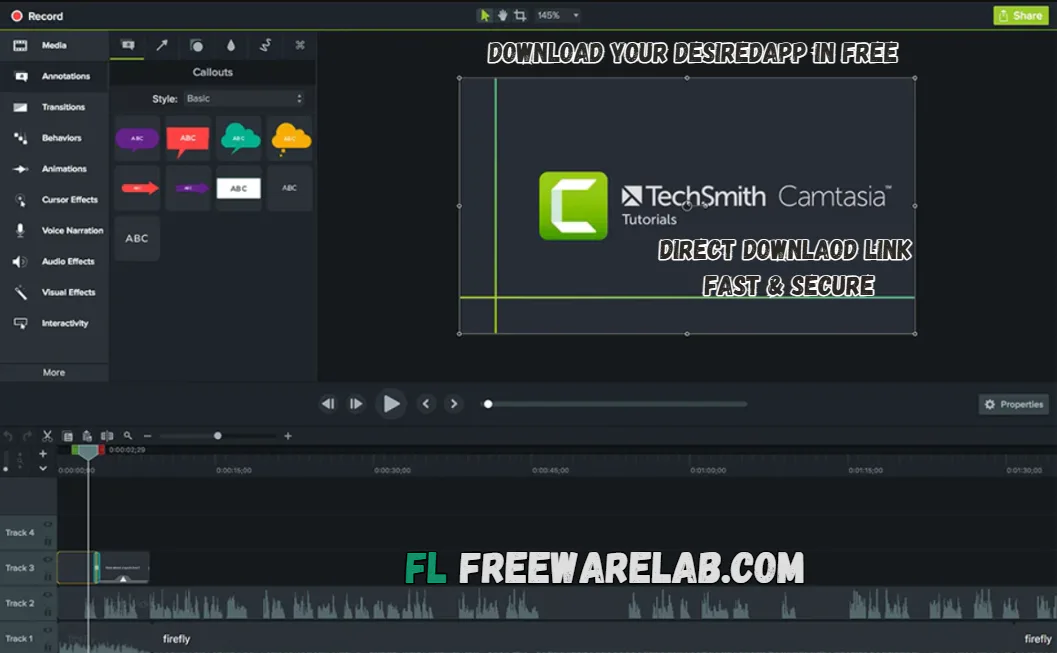
Video Editing Tools Explained
- Camtasia editor has an easy timeline editor.
- You can cut and trim videos.
- Zoom in and zoom out
- Easily crop unwanted parts
- Allow to add text and titles
- Insert images and icons
Audio Recording & Voice-Over
- You can record voice-overs directly in Camtasia.
- It also allows audio editing to remove noise.
- Audio features include:
- Microphone recording
- Audio level control
- Noise reduction
- Fade in and fade out
Export Formats & Sharing Options
- Camtasia supports different formats
- MP4 (best for YouTube) HD 4k 8k
- Local file saving
- Direct upload to YouTube
- Custom video settings
AI-Driven Video Creation Features
- AI background removal
- Text-based video editing
- AI script writing and voiceovers
- Automatic filler-word removal
- Audio transcription and captions
- AI translation in multiple languages
- AI image creation
- Auto-generated video titles and chapters
- AI avatars (coming soon)
Best Alternatives to Camtasia
Wondershare Filmora
Filmora is the best video editor with built in screen recording. It is perfect for new and professional users. It can allow editing video without spending a lot of time.
Movavi Video Editor
Movavi is a lightweight, fast tool for video editing, screen recording, and audio recording. You can use it without any technical knowledge and with a minimal system load.
Shotcut
It is a free and open source video editor app that can be installed without a license. It does not ask for an upgrade. It offers basic editing tools without any cost.
Bandicam is the best screen recorder platform. It is known for high quality video and smooth performance.
Adobe Premiere Pro
Premiere Pro is professional level video editing software. It is used to create films and YouTube videos. It is also helpful for making the online tutorials.
Final Verdict
It is a perfect screen recording and video editing application. It can provide a simple interface and powerful AI features. It can also give the advanced features of a professional user. It is the best choice for educators marketers and YouTubers. It allows exporting video in the best quality.
How to Download and Use Camtasia on Windows
How to Download
- You can click the download button.
- Wait for the setup file to download.
- Open the downloaded setup file.
- Open it and unzip with WinRAR.
- Click Next to start installation.
- Accept the license agreement.
- Click Install and wait.
- Click Finish to open Camtasia.
How to Use
- Open Camtasia on your PC.
- You can click New Recording.
- Select the screen area (full or custom).
- Turn on the Microphone or System Audio if needed.
- Click the Record button.
- Do your work on screen.
- Press Stop to end recording.
Camtasia Pros and Cons
Pros
It is very easy to use
Provide a High-quality screen recording
Built-in video editor
Great learning resources
Works on Windows & Mac
Cons
Limited advanced cinematic tools
Uses more system resources
Watermark in free trial
Camtasia System Requirements for Windows
OS: Windows 10 (64-bit) 20H2 or later
Processor: Intel 8th Gen / AMD Ryzen 2000 or newer
RAM: 8GB RAM
Storage: 4GB free disk space
Graphics: 2GB GPU memory
Camtasia Frequently Asked Questions (FAQs)
1Can I try Camtasia for free?
It is paid software but offers a free trial with limited features with a watermark.
2Is Camtasia good for beginners?
It is designed for beginners while still being powerful enough for professionals.
3Does Camtasia support AI features?
It includes AI tools for editing voiceover transcription and more.
4Can Camtasia record webcam?
It can support webcam recording.
5Is Camtasia good for YouTube?
It is perfect for YouTube videos.
Camtasia 26.0.2.14963 Changelog
Latest version changes and improvements
Improved overall performance and faster project loading
Fixed minor bugs that caused random crashes
Better timeline stability while editing large videos
Improved screen recording quality and smoother capture
Enhanced audio sync accuracy
Fixed export issues for MP4 and YouTube formats
Improved cursor effects and animations
Package Size
313.9 MB
5.0
5 reviews
Direct & Safe Download
Buy License Officially
Virus FreeVerifiedFast
Product Information
File Name
Camtasia Download 26.0.2.14963 for Windows (2026)
Developer
TechSmith
License
Freeware
Total Downloads
8
Platform
Windows
4
Related Apps
Similar software you'll love
#1
Wondershare Filmora 15.2.5.17803 for Windows (2026)
Wondershare Filmora is an easy-to-use, AI-powered video editor for Windows that helps anyone create professional videos fast. The direct download link is available on our website.
v15.2.5.17803395.0
#2

Adobe Premiere Elements v26.1.0 for Windows (2026)
Download Adobe Premiere Elements for Windows is an easy video editing software for beginners, featuring AI-powered tools, Guided Edits, and automated effects to create stunning videos fast.
v26.1.0324.8
#3
CyberLink PowerDirector 24.2.1404.0 Download for Windows 2026
Download CyberLink PowerDirector with a Direct Link is the best video editing software for easily creating videos. You can cut videos add music text effects and transitions without any hard steps.
v24.2.1404.025.0
#4
Movavi Video Editor 26.8.0 for Windows (2026)
Movavi Video Editor is a powerful and easy video editing tool for PC. Create professional videos with effects, transitions, and smart tools. Download Movavi Video Editor directly & secure link.
v26.8.024.5
Related Tags
Explore more software in these categories
Camtasia Download 26.0.2.14963 for Windows (2026) Tested & Verified
by FreewareLab Security Team
SECURE
0/72
VirusTotal
Feb 11
Test Date
Win 11
Platform
100%
Trust Score
No MalwareNo AdwareClean InstallFeatures Verified
A
Ash ColemanVerifiedTOP
Software Security Analyst at FreewareLab
Our Verification Process
Security Scan
Every file scanned with 72+ antivirus engines via VirusTotal
Installation Test
Clean install verified - no bundleware, adware, or PUPs
Feature Verification
All advertised features tested and confirmed working
5.0
Excellent
5 ratingsRating Breakdown
5
5(100%)
4
0
3
0
2
0
1
0
Write a Review
for Camtasia Download 26.0.2.14963 for Windows (2026)
0 Reviews
Click to share your experience