DVDFab for Windows (2026) Free Powerful DVD Tool
13.0.5.4New
Virus FreeNo AdwareSafe DownloadLab Tested
DVDFab is a powerful Windows software to copy, rip, convert, and back up DVDs, Blu-ray, and 4K UHD discs with high quality and fast speed.
Virus-free • Verified by FreewareLab
Download DVDFab 13.0.5.4 Blu-ray Copy for PC - Freewarelab
DVDFab is a powerful Windows software to copy, rip, convert, and back up DVDs, Blu-ray, and 4K UHD discs with high quality and fast speed.
4.8(4)
0 downloads
Jan 6, 2026
DVDFab for Windows (2026) Free Powerful DVD Tool Video Overview
Watch this video to learn more about DVDFab for Windows (2026) Free Powerful DVD Tool features and how to use it.
DVDFab
DVDFab is a professional and powerful multimedia tool. It is designed to copy, back up, rip, burn, and clone. It converts DVDs, Blu-rays, and 4K UHD discs with ease. It is perfect for users. If you want full control over their movie collections while maintaining high quality and fast performance.
It can support for multiple copy modes, advanced compression, and GPU acceleration. It can makes disc management simple for both beginners and advanced users.
Flexible DVD Copy Modes
- DVDFab offers 6 powerful copy modes, allowing you to copy discs exactly the way you want:
- Full Disc – Copy everything, including menus
- Main Movie – Copy only the main movie
- Customize – Select titles, audio & subtitles
- Split – Divide one DVD into two discs
- Merge – Combine multiple DVDs into one
- Clone/Burn – Make a 1:1 exact copy
What You Can Do with DVDFab 2026
- DVDFab makes every DVD and Blu-ray task simple:
- Back up discs as ISO files or movie folders
- Clone DVDs with 1:1 original quality
- Burn videos from HDD to blank discs
- Compress DVD-9 to DVD-5 without quality loss
- Merge or split discs easily
- Support all disc formats: DVD±R/RW, DVD±R DL
All-in-One Multimedia Solution
- Back up your movie collection.
- Convert discs to digital formats.
- Create custom DVDs or Blu-rays.
- Recover content from scratched discs.
- DVDFab has you covered.
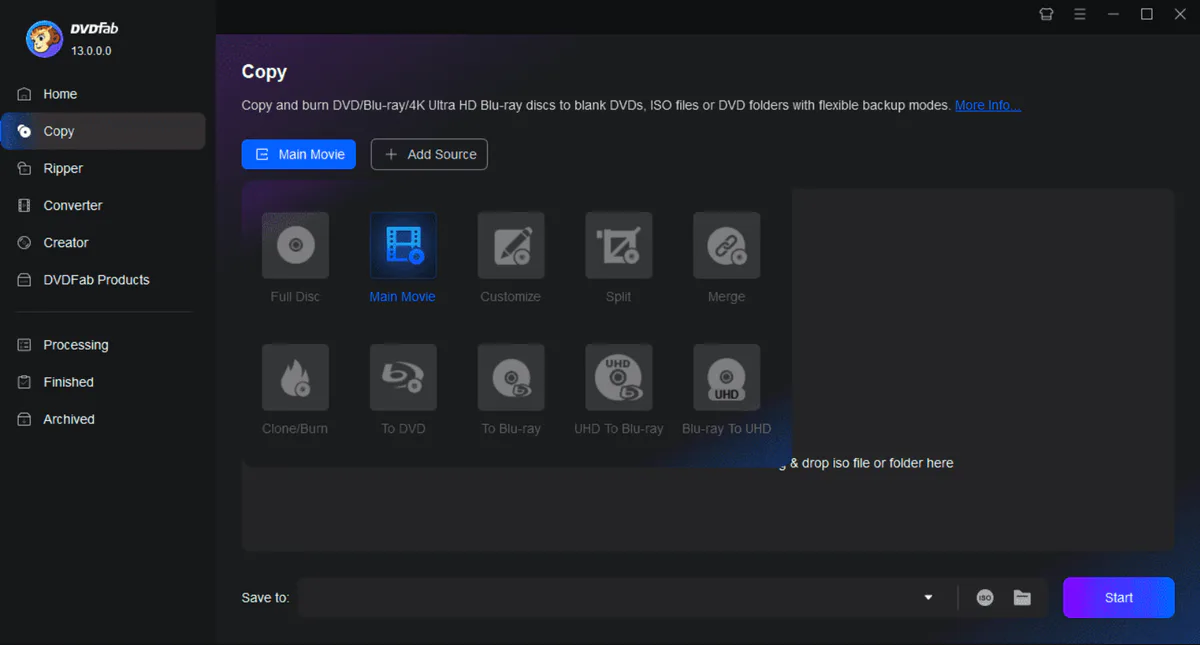
Key Highlights DVDFab: The Best DVD/Blu-ray Ripper
- You can copy DVDs, Blu-rays, and 4K UHD discs to your hard drive or blank discs safely.
- It converts discs into MP4, MKV, AVI, and other formats for PC, mobile, or tablet playback.
- Convert video and audio files into your preferred formats quickly and easily.
- Easily download videos and music from YouTube Facebook Instagram Vimeo, and 1000+ sites.
- Play DVD Blu-rays and 4K UHD discs with full menu support.
- Create professional DVD movie, Blu-rays, and UHD discs for home viewing.
Why Choose DVDFab Latest Version 2026?
It combines many tools into one program. You do not need separate software for copying, ripping, or converting. Everything works from one dashboard. It is perfect for Windows users. who want simplicity and power together.
Core Features Explained
- Copy DVDs and Blu-ray discs in various modes while maintaining high video quality.
- Change discs into popular digital formats for easy playback.
- It can create your own DVDs with custom menus, subtitles, and audio tracks.
- Uses GPU support to speed up copying and conversion.
- Automatically adds posters, movie details, and cast information.
- Preview videos before copying, converting, or burning.
DVDFab Modules Explained
DVD Copy
Allows you to copy DVD discs to your hard drive or blank discs while keeping the original quality.
Blu-ray Copy
Helps back up Blu-ray movies and compress them to save space.
DVD Ripper
Converts DVDs into digital video formats for easy playback on PCs, mobiles, and TVs.
Blu-ray Ripper
Turns Blu-ray movies into popular formats without complex steps.
Video Converter
Converts video files from one format to another quickly and smoothly.
Best DVDFab Alternatives
HandBrake
HandBrake is a free and open-source video ripper. It works well for basic DVD and video conversion. It supports many popular formats. It is a good choice for users. Those who want a simple and cost-free solution, though it cannot copy-protect DVDs by default.
MakeMKV
MakeMKV is a simple tool designed mainly for ripping DVDs and Blu-ray discs to the MKV format. It keeps the original video quality and audio tracks. It is ideal for users who want high-quality backups without complicated settings.
WinX DVD Ripper
WinX DVD Ripper is known for its fast DVD conversion speed. It supports many output formats and works well on Windows PCs with low system resources. It is a good option for users who want quick results with minimal setup.
AnyDVD HD
It runs quietly in the background and automatically removes DVD and Blu-ray protections. It allows other programs to copy or rip discs freely. It is suitable for advanced users who want full control over disc content.
Final Verdict
It is the most powerful and reliable DVD Blu-ray and 4K UHD solutions available today. It has a wide range of tools excellent performance and flexible copy options. It is an ideal choice for anyone who wants to back up convert or create discs professionally.
How to Download and Use DVDFab
How to Download
- You can click on the Download button.
- Wait for the setup file to finish downloading.
- Open the downloaded file and unzip it with WinRAR.
- Double-click the setup file.
- Choose your language.
- Accept the license agreement.
- Click Install and wait for completion.
How to Use
- Open DVDFab on your Windows PC.
- Choose a module (Copy, Ripper, or Converter).
- Insert your DVD or Blu-ray disc into the drive.
- Select output format and settings.
- Choose the save location.
- Click Start to begin the process.
DVDFab Pros & Cons
Pros
Complete DVD & Blu-ray solution
Easy-to-use interface
GPU acceleration support
High-quality output
Automatic metadata fetching
Cons
Full suite is expensive
Advanced tools may take time to learn
DVDFab System Requirements for Windows
OS: Windows 11 / 10 / 8.1 / 8 / 7 (32-bit & 64-bit)
Processor: Pentium II 500 MHz or higher
RAM: 2 GB RAM
Storage: 20 GB free hard disk space
Other: DVD or Blu-ray drive
Network: Internet connection for activation
DVDFav Frequently Asked Questions (FAQs)
1What is DVDFab used for?
It is used to copy, rip, and convert DVDs and Blu-ray discs into digital video formats.
2Is DVDFab Media Player safe?
It is safe to use when downloaded from our website.
3What is the difference between DVDFab and StreamFab?
DVDFab is made for DVDs and Blu-ray discs. StreamFab is used to download videos from online streaming platforms.
4Is DVDFab HD Decrypter really free?
It is free but has fewer features than the paid version.
5How much does DVDFab cost?
DVDFab prices usually start around $59.99, depending on the module and license you choose.
6How to download DVDFab safely?
You can download DVDFab safely from our website to ensure you're getting the latest and most secure version.
Package Size
431 MB
4.8
4 reviews
Direct & Safe Download
Buy License Officially
Virus FreeVerifiedFast
Product Information
File Name
DVDFab for Windows (2026) Free Powerful DVD Tool 13.0.5.4
Developer
Fengtao Software
License
Freeware
Total Downloads
0
Platform
Windows
4
Related Apps
Similar software you'll love
#1

Bandicam 8.3.0.2533 Latest Version Free Download
Bandicam 8.3.0.2533 is the best screen recording software for Windows helping you record your computer screen games and webcam.
v8.3.0.253335.0
#2
Wondershare UniConverter 17.2.1.497 Download for Windows 2026
Download Wondershare UniConverter with a Direct Link is the best software for working with videos without any trouble. You can change videos into different formats make large files smaller.
v17.2.1.49725.0
#3
Topaz Video Enhance AI 7.1.6.01 For Windows (2026)
Experience high-quality video enhancement with Topaz Video Enhance AI. Instantly turn blurry videos into crystal-clear HD and 4K using advanced AI. Download the latest version via a fast, direct link
v7.1.6.0125.0
#4
Adobe Dimension 4.1.7.4712 Download for Windows 2026
Download Adobe Dimension with a Direct Link is the best 3D design software for creating realistic product images packaging designs and brand visuals. It allows you place your own logos and graphics.
v4.1.7.47125.0
DVDFab for Windows (2026) Free Powerful DVD Tool Tested & Verified
by FreewareLab Security Team
SECURE
0/72
VirusTotal
Jan 6
Test Date
Win 11
Platform
100%
Trust Score
No MalwareNo AdwareClean InstallFeatures Verified
A
Ash ColemanVerifiedTOP
Software Security Analyst at FreewareLab
Our Verification Process
Security Scan
Every file scanned with 72+ antivirus engines via VirusTotal
Installation Test
Clean install verified - no bundleware, adware, or PUPs
Feature Verification
All advertised features tested and confirmed working
4.8
Excellent
4 ratingsRating Breakdown
5
3(75%)
4
1(25%)
3
0
2
0
1
0
Write a Review
for DVDFab for Windows (2026) Free Powerful DVD Tool
0 Reviews
Click to share your experience