Foxit PDF Reader 14.0.2.33402 Free Download for Windows (Latest Version)
14.0.2.33402New
Virus FreeNo AdwareSafe DownloadLab Tested
Foxit PDF Reader 14.0.2.33402 is the best and lightest PDF software for Windows. Foxit PDF help you open read and print PDF files easily. You can highlight text, add notes, fill forms, and sign a
Virus-free • Verified by FreewareLab
Download Foxit PDF Reader for Windows 2026 full version
Foxit PDF Reader 14.0.2.33402 is the best and lightest PDF software for Windows. Foxit PDF help you open read and print PDF files easily. You can highlight text, add notes, fill forms, and sign a
5.0(1)
0 downloads
Jan 4, 2026
Foxit PDF Reader 14.0.2.33402 Free Download for Windows (Latest Version) Video Overview
Watch this video to learn more about Foxit PDF Reader 14.0.2.33402 Free Download for Windows (Latest Version) features and how to use it.
Foxit PDF Reader
Foxit PDF Reader 14.0.2.33402 is the best and lightest PDF software for Windows. Foxit PDF helps you open read and print PDF files easily. You can highlight text add notes fill forms and sign documents with just a few clicks. Foxit PDF runs smoothly and does not slow down your computer. Foxit PDF Reader Pro also keeps your files secure with strong security measures. Its simple design makes it perfect for students office work everyday PDF use.
Foxit PDF Reader Overview
Foxit PDF Reader is a free PDF reader to allow users to view and work with PDF documents. You can read files add notes highlight text fill forms and sign documents easily. Foxit PDF is designed for people who want a simple but powerful PDF tool.
Why Choose Foxit PDF Reader?
Foxit PDF Reader is popular for its speed security user friendliness. Unlike basic PDF readers it offers useful tools for editing and sharing files. It works smoothly even on low end computers and has a clean interface that anyone can understand.
Fast & Lightweight PDF Reader for Windows
Foxit PDF Reader is the best lightweight PDF software to Windows. It opens PDF files quickly works smoothly even on low end computers. It does not use much system memory so your PC stays fast while reading PDFs.
Simple Way to Open and Read PDF Files
Foxit PDF Reader makes reading PDF files very easy. You open the file scroll through the pages zoom in or out and read clearly. The layout is clean so even first time users feel comfortable.
Smart Tools for PDF Viewing and Notes
This software provides smart tools for working with PDFs. You can mark important content and keep notes for later.
- Highlight text.
- Add notes and comments.
- Underline or mark key lines.
- These tools are helpful for study and office work.
Edit Highlight and Comment on PDFs Easily
Foxit PDF Reader lets you make small edits without any trouble. You can add text write comments and highlight important parts in just a few clicks. No special skills are needed.
Fill Forms and Sign PDFs Without Effort
You can easily fill out PDF forms using Foxit PDF Editor. It also allows you to sign documents digitally.
- Fill text fields.
- Tick checkboxes.
- Add your signature.
Safe and Secure PDF Reading Experience
Foxit PDF Reader focuses on security. It helps protect your system from unsafe PDF files. Regular updates improve safety and keep your files protected.
Cloud Support and Team Collaboration
Foxit PDF Reader supports cloud features that help you store and share PDF files online. You can also work with others on the same document which is useful for teams and offices.
Useful Free Add Ons and Language Support
Foxit provides free add-ons to improve the software experience.
- Spell check support.
- Multiple language support.
- Security plugins.
- File search tools.
Works Smoothly on Low End PCs
Foxit PDF Reader is optimized to run well on older or low spec pcs. Even if your PC has limited RAM the software still performs smoothly.
Easy Interface for Beginners
The interface is simple and easy to understand. All tools are clearly visible so to beginners can use them without confusion. No training is required.
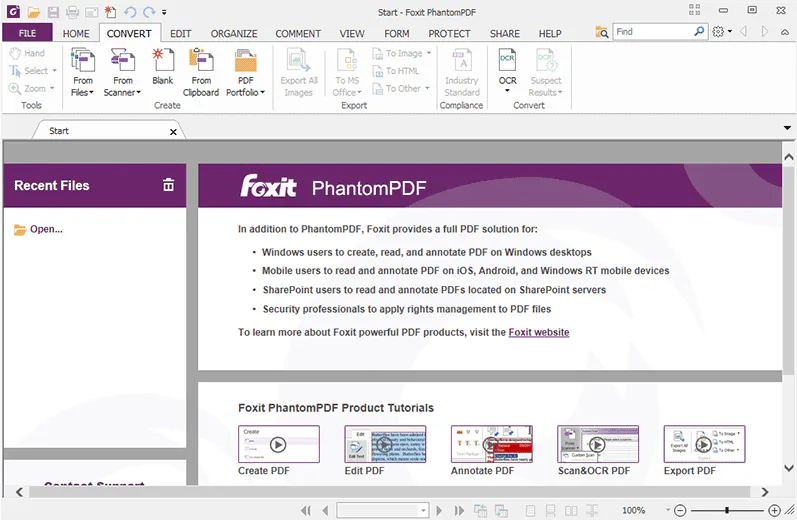
Ideal PDF Tool for Students and Office Work
- Foxit PDF Reader is perfect for daily use.
- Students can read and mark the study material.
- Office users can fill out forms and sign files.
- Teachers can add notes and comments.
Why Foxit PDF Reader Is a Popular Choice
Foxit PDF Reader is popular because it is fast easy to use secure and free. It offers all basic PDF tools in one simple package making it a trusted PDF reader for everyday use.
Best Alternatives to Foxit PDF Reader
Adobe Acrobat Reader DC
- Adobe Acrobat Reader DC is one of the most popular PDF readers in the world. It lets you open view print and annotate PDF files easily. It also supports comments signing and form filling making it a strong choice for everyday PDF use.
Nitro PDF
- Nitro PDF is another strong PDF tool that lets you read and edit PDF files. It has many features such as annotations form handling and document merging. Nitro works well for both personal and business use.
PDF XChange Editor
- PDF XChange Editor is a lightweight PDF reader and editor that works fast on Windows. You can view annotate and edit PDFs with ease. It’s known for smooth scrolling and is great for reading and light editing.
SumatraPDF
- SumatraPDF is a very light and simple PDF reader that opens documents quickly. It doesn’t have many extra features but if you want a fast, clean reader this is a good option.
ABBYY FineReader PDF
- ABBYY FineReader is a powerful PDF reader and editor. It also includes OCR (text recognition) so you can turn scanned images into editable text. This is very useful if you often work with scanned documents.
Foxit PDF Reader Key Features
- Fast and lightweight PDF reader that opens files quickly without slowing your computer down.
- Easily open read and view all types of PDF documents with clear text and smooth scrolling.
- Highlight important text underline lines and mark key points while reading PDFs.
- Add notes comments and annotations to explain or remember important information.
- Fill out interactive PDF forms directly on your computer without printing.
- Digitally sign PDF documents to save time and paper.
- Print PDF files with good quality and flexible print settings.
- Built in security features that help protect against unsafe or malicious PDF files.
- Supports cloud storage allowing you to save and access PDFs online.
- Share PDF files easily and collaborate with others in real time.
- Free add ons available including spell check language support and security plugins.
- Clean and simple user interface that is easy for beginners to understand.
- Works smoothly on low end and older Windows computers.
- Regular updates to improve performance features and security.
- Developed and trusted by Foxit Software a well known PDF solutions provider.
How to Download Install and Use Foxit PDF Reader
How to Download
- Open your web browser.
- Go to our Foxit website.
- Find Foxit PDF Reader.
- Click on the Download button.
- Wait for the file to finish downloading.
How to Install
- Open the downloaded setup file.
- Click Next to start installation.
- Accept the license agreement.
- Choose install location (or keep default).
- Click Install.
- Wait a few seconds for the installation to complete.
- Click Finish to close the setup.
How to Use
- Open Foxit PDF Reader.
- Click File > Open to open a PDF.
- Read the PDF easily on your screen.
- Use tools to highlight text or add notes.
- Fill forms or sign documents if needed.
- Save or print the PDF when done.
Foxit PDF Reader Pros & Cons
Pros
Free to download and use
Fast and lightweight software
Easy and clean user interface
Supports highlighting and comments
Allows filling and signing PDF forms
Works smoothly on low-end PCs
Good security features
Cons
Advanced editing needs paid version
Shows upgrade or promo messages
Limited features in free version
Not available for all operating systems
Foxit PDF Reader System Requirements
OS: Windows 7, Windows 8, Windows 10, or Windows 11
Processor: 1.0 GHz or faster
RAM: 512 MB or more
Storage: At least 500 MB
Display: 1024 × 768 or higher
Network: Needed for updates and cloud features
Foxit PDF Reader Frequently Asked Questions {FAQs}
1Is Foxit PDF Reader free to use?
Yes Foxit PDF Reader is free for basic use like reading printing and annotating PDF files.
2Is Foxit PDF Reader safe?
Yes it is safe to use. It includes security features that help protect your system from unsafe PDF files.
3Can I edit PDFs with Foxit PDF Reader?
You can add comments highlights notes and signatures. Full editing features need the paid version.
4Does Foxit PDF Reader support cloud storage?
Yes it supports cloud features for saving and sharing PDF files online.
5Is Foxit PDF Reader good for beginners?
Yes it has a simple interface and is easy to use even for first time users.
Package Size
1.03 GB
5.0
1 review
Direct & Safe Download
Buy License Officially
Virus FreeVerifiedFast
Product Information
File Name
Foxit PDF Reader 14.0.2.33402 Free Download for Windows (Latest Version)
Developer
foxit
License
Freeware
Total Downloads
0
Platform
Windows
4
Related Apps
Similar software you'll love
#1

Microsoft Office 2007 Free Download for Windows (2026)
Microsoft Office 2007 Free Download is the most popular application. It is a widely used software developed by Microsoft. It offer the lightweight fast interface and easy to use.
v200725.0
#2
Wondershare PDFelement 12.1.9.4002 for Windows (2026)
Wondershare PDFelement is a fast, all-in-one PDF editor to create, edit, convert, merge, split, protect, and sign PDF files with ease. Edit any PDF in seconds and scan documents.
v12.1.9.4002135.0
#3
PDF-XChange Editor Plus 10.8.2 For Windows (2026)
PDF-XChange Editor Plus is a complete PDF editing solution for Windows. Create, edit, OCR, secure, and convert PDFs easily with fast performance and professional-grade tools.
v10.8.2.40725.0
#4

Microsoft Office 2019 for Windows Download
Microsoft Office 2019 for Windows with Word, Excel, PowerPoint, and Outlook. One-time purchase, offline use, and trusted productivity tools.
v201954.7
Foxit PDF Reader 14.0.2.33402 Free Download for Windows (Latest Version) Tested & Verified
by FreewareLab Security Team
SECURE
0/72
VirusTotal
Jan 4
Test Date
Win 11
Platform
100%
Trust Score
No MalwareNo AdwareClean InstallFeatures Verified
A
Alan PageVerifiedTOP
Software Security Analyst at FreewareLab
Our Verification Process
Security Scan
Every file scanned with 72+ antivirus engines via VirusTotal
Installation Test
Clean install verified - no bundleware, adware, or PUPs
Feature Verification
All advertised features tested and confirmed working
5.0
Excellent
1 ratingRating Breakdown
5
1(100%)
4
0
3
0
2
0
1
0
Write a Review
for Foxit PDF Reader 14.0.2.33402 Free Download for Windows (Latest Version)
0 Reviews
Click to share your experience