GIMP Photo Editor 3.0.8 For Windows (2026)
3.0.8New
Virus FreeNo AdwareSafe DownloadLab Tested
GIMP is a powerful cross-platform image editor for Windows, macOS, and Linux. It is completely free and open-source software used to edit images and photos with professional tools. The direct download
Virus-free • Verified by FreewareLab
Download GIMP Photo Editor Latest Version - Freewarelab
GIMP is a powerful cross-platform image editor for Windows, macOS, and Linux. It is completely free and open-source software used to edit images and photos with professional tools. The direct download
5.0(2)
2 downloads
Jan 26, 2026
GIMP Photo Editor 3.0.8 For Windows (2026) Video Overview
Watch this video to learn more about GIMP Photo Editor 3.0.8 For Windows (2026) features and how to use it.
GIMP Photo Editor
GIMP Photo Editor is a free and open source image editing software that's been around for years, when working with Windows. Coming from the world of Unix, it's now widely used for photo editing, graphic design, digital painting, and image retouching.
As a beginner, a student, or a professional. GIMP is a fantastic option if you want to work with a free photo editor that offers anything but basic editing tools, think social media graphics, artwork and anything in between.
Why GIMP Is a Good Choice for Image Editing
Layers, masks, filters, and plugins will handle any edit you need, from simple to really complex. It is basically improved by a community of users from all over the globe. GIMP is so popular because it offers advanced editing features for free.
It runs beautifully on Windows, and knows how to handle lots of different image types, including JPG, PNG, PSD, TIFF and GIF.
Key Features of GIMP Photo Editor
- Advanced photo retouching tools
- Layer-based editing with masks
- Custom brushes, patterns, and gradients
- Support for PSD and RAW files
- Powerful color correction and filters
- Plugin and extension support
- Fully customizable interface
What’s New in GIMP (Latest Version 2026)
- Faster performance on Windows
- Improved text and font handling
- Better layer organization tools
- Enhanced color management
- Updated UI for smoother workflow
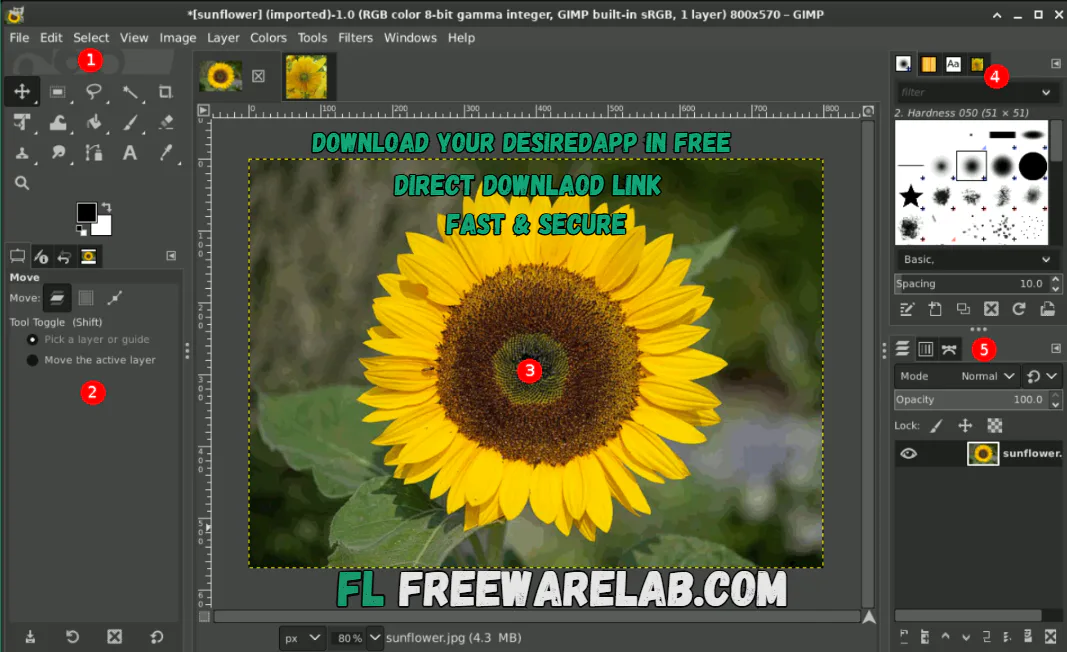
Benefits of Using GIMP Photo Editor
- GIMP is a free and powerful image editor for desktop users
- GIMP stands for GNU Image Manipulation Program
- It helps you create and edit images, icons, and digital designs
- Works smoothly on Windows and Linux systems
- Used for editing images and photos, and quality photo editing
- Supports many image formats including JPEG
- Offers wide format support for importing and exporting files
- Allows users to transform images and improve composition
- Includes advanced painting tools like airbrush and brush controls
- A clean menu layout makes it easy to use GIMP
- GIMP image editor supports layers and detailed editing
- Ideal for photo and image retouching tasks
Best GIMP Alternatives
Adobe Photoshop: It is a professional photo editing software used for advanced image editing, graphic design, and digital art. It offers powerful tools but requires a paid subscription.
Paint.NET: It is a lightweight and easy photo editor for Windows. It is perfect for basic image editing, simple designs, and quick photo fixes.
Krita: It is a free drawing and painting program designed primarily for digital artists. It is best for illustrations, sketches, and creative artwork.
Affinity Photo: It is a fast and modern image editing tool for professionals. It provides advanced features like Photoshop but with a one-time purchase.
Photopea: It is an online photo editor that works in your web browser. It supports PSD files and is useful for quick edits without installing software.
Final Verdict
It is the best free image editing software. It is the best option available for Windows. It delivers powerful tools and flexibility. It gives professional results without any cost. If you are looking for a reliable Photoshop alternative for photo editing, graphic design, or digital art. It is absolutely worth trying.
How to Download & Use GIMP on Windows
How to Download
- You can click the download button
- Save the installation setup from the system
- Open the zip file with WinRAR
- Run the installer file
- Follow the on-screen installation steps
- Launch GIMP and start editing
How to Use
- Open GIMP on your PC
- Import an image using File > Open
- Use basic tools like Crop, Brush, and Text
- Work with layers for better control
- Export your final image in your desired format
GIMP Photo Editor Pros and Cons
Pros
100% free and open-source
Professional-level editing tools
Supports many file formats
Active community and tutorials
Cons
Interface may feel complex at first
Learning curve for beginners
No built-in cloud storage
GIMP System Requirements
OS: Windows 10 / 11 (64-bit)
Processor: Intel or AMD (2 GHz or higher)
RAM: Minimum 4 GB (8 GB recommended)
Storage: Around 500 MB free space
Graphics: Standard GPU support
GIMP Photo Editor Frequently Asked Questions (FAQs)
1Is GIMP free for Windows?
Yes, GIMP is completely free to download and use.
2Can GIMP open Photoshop files?
Yes, GIMP supports PSD files with good compatibility.
3Is GIMP good for beginners?
Yes, with basic practice and tutorials, beginners can learn it easily.
4Does GIMP support plugins?
Yes, GIMP supports many plugins to extend its features.
5Is GIMP safe to install?
It is safe and secure. You can download from our website.
What's New in GIMP Photo Editor 3.0.8 For Windows (2026) 3.0.8
Latest version changes and improvements
Package Size
289 MB
5.0
2 reviews
Direct & Safe Download
Buy License Officially
Virus FreeVerifiedFast
Product Information
File Name
GIMP Photo Editor 3.0.8 For Windows (2026)
Developer
GIMP Team
License
Freeware
Total Downloads
2
Platform
Windows
4
Related Apps
Similar software you'll love
#1
Adobe Lightroom 15.1 Download for Windows 2026
Download Adobe Lightroom for Windows Full Version is the best photo editing software to help you make your pictures look better in just a few clicks. You can fix colors add filters adjust light.
v15.125.0
#2
Adobe Photoshop Download 27.3.1 for Windows (2026)
Download Adobe Photoshop for Windows and edit photos like a pro. Create, retouch, design, and enhance images with the world’s most powerful image-editing software used by professionals worldwide.
v27.3.11144.7
#3
DaVinci Resolve Download v20.3.1 Latest Version
Create professional videos, cinematic effects, and stunning motion graphics with DaVinci Resolve for Windows. Edit, color grade, add VFX, and export high-quality videos easily.
v20.3.115.0
#4
Cyberlink PhotoDirector 17.1.1327.0 for Windows (2026)
CyberLink PhotoDirector is a smart AI photo editor that lets you edit photos fast using powerful AI tools. Create high-quality images easily and get a direct download link to start right away.
v17.1.1327.045.0
Related Tags
Explore more software in these categories
GIMP Photo Editor 3.0.8 For Windows (2026) Tested & Verified
by FreewareLab Security Team
SECURE
0/72
VirusTotal
Jan 26
Test Date
Win 11
Platform
100%
Trust Score
No MalwareNo AdwareClean InstallFeatures Verified
A
Ash ColemanVerifiedTOP
Software Security Analyst at FreewareLab
Our Verification Process
Security Scan
Every file scanned with 72+ antivirus engines via VirusTotal
Installation Test
Clean install verified - no bundleware, adware, or PUPs
Feature Verification
All advertised features tested and confirmed working
5.0
Excellent
2 ratingsRating Breakdown
5
2(100%)
4
0
3
0
2
0
1
0
Write a Review
for GIMP Photo Editor 3.0.8 For Windows (2026)
0 Reviews
Click to share your experience