IceCream Screen Recorder 7.45 For Windows (2026)
7.45Updated
Virus FreeNo AdwareSafe DownloadLab Tested
Download IceCream Screen Recorder 7.45 for Windows with a fast and secure direct download link. Easily record your screen, gameplay, tutorials, and on-screen activities with free, lightweight
Virus-free • Verified by FreewareLab
Download IceCream Screen Recorder Pro Latest Version - Freewarelab
Download IceCream Screen Recorder 7.45 for Windows with a fast and secure direct download link. Easily record your screen, gameplay, tutorials, and on-screen activities with free, lightweight
5.0(3)
2 downloads
Feb 4, 2026
IceCream Screen Recorder 7.45 For Windows (2026) Video Overview
Watch this video to learn more about IceCream Screen Recorder 7.45 For Windows (2026) features and how to use it.
IceCream Screen Recorder
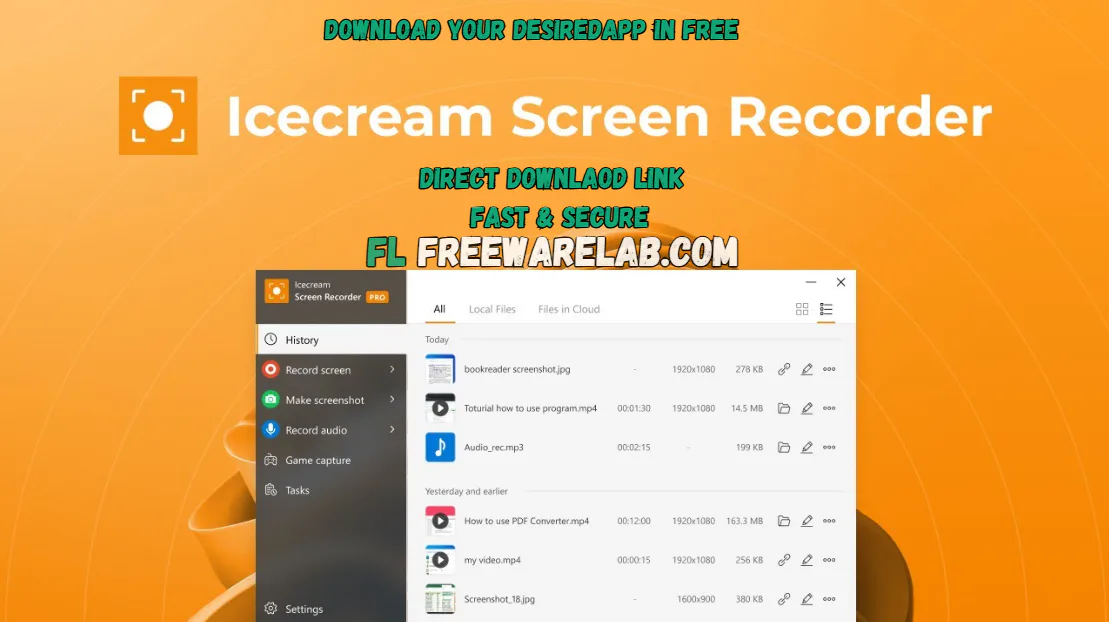
Icecream Screen Recorder is an effortless screen recorder with audio. It allows users to capture computer screens, online videos, video calls, tutorials, and gameplay with sound. It is best suited to lean recordings with simple settings. It is perfect for new users and professionals. It is a reliable solution for daily screen recording tasks.
Why IceCream Screen Recorder Is Popular Among Windows Users
IceCream Screen Recorder for Windows stands out for its simplicity and practical features. You don’t need technical skills to start recording. You can record your entire screen or a specific area. It works well on the operating system. It is suitable for students, office users, teachers, and content creators.
Screen Recording Modes Explained
- Record full screen for meetings and presentations
- Capture a custom area for tutorials
- Record a specific window or app
- Take instant screenshots anytime
Audio and Webcam Recording Support
The software supports multiple audio sources. It is useful for tutorials and voiceovers. Users can record system sound, microphone audio, or both at the same time. Webcam recording is also available. It allows face-cam videos for YouTube and online classes.
Simple Tools That Improve Productivity
It gives all the basic tools on the screen to save your time. You can draw, add text, highlight areas, and mark important points while recording. It is very useful for clearly explaining steps without additional video editing software.
Key Features of IceCream Screen Recorder Pro
- Full-screen and custom area record screen
- System sound and microphone support
- Webcam recording option
- Icecream apps allow screen capture with record audio
- Screenshot capture tool
- Icecream Screen Recorder free version best for webinars
- On-screen drawing and annotations
- Easy video saving and sharing
Top Alternatives to IceCream Screen Recorder 7.45
OBS Studio: It is a free screen recording software for Windows. It is mainly used for screen recording and live streaming.
Bandicam: It is a lightweight screen recorder. It records video high quality with a small file size. It is widely used to record gameplay and tutorials.
ShareX is a free tool mainly used for screenshots and short screen recordings. It includes a range of capture options and sharing tools.
Camtasia: It is a professional screen recorder with built in video editing tools. It is best for creating tutorials and presentations. It is paid software with a free trial version.
Final Verdict
It is reliable screen recording software for Windows users. It gives simple controls and smooth performance. It is ideal for tutorials, meetings, online classes, and basic content creation. If you need an easy, practical screen recorder with no complex setup. It is a solid choice.
How to Download & Use IceCream Screen Recorder
How to Download
- You can click the Download button
- Wait for the file to download
- Open the setup file with WinRAR
- Run for installation and follow the on-screen instructions
- Wait for the installation to complete, then launch it.
How to use
- Open IceCream Screen Recorder on your PC
- Choose Screen Recording or Screenshot
- Select full screen or a custom area
- Turn on the microphone or system sound if needed
- Click the Record button
- Do your work on the screen
- Click Stop when finished
- Save the video to your computer
IceCream Screen Recorder Pros & Cons
Pros
Very easy to use
Lightweight and fast
Good video and audio quality
Suitable for beginners
Cons
Free version has time limits
Advanced features require paid version
IceCream Screen Recorder System Requirements for Windows
OS: Windows 7 / 8 / 10 / 11
Processor: Intel or AMD processor
RAM: 2 GB or higher
Storage: 150 MB free space
Other: Microphone required for voice recording
IceCream Screen Recorder Frequently Asked Questions (FAQs)
1Is IceCream Screen Recorder free to use?
It is a paid version without limits. Free version available. You can record your screen and audio, but there are some limits.
2Can I record my screen with sound?
You can record system audio, microphone audio, or both at the same time. It is perfect for tutorials and online classes.
3Does it work on Windows 11?
It works well with all operating systems and supports all Windows versions.
4Can I record my webcam and screen?
It allows you to record your webcam and the screen. It is helpful for YouTube videos and presentations.
5Is IceCream Screen Recorder easy for beginners?
It provides a simple and easy-to-use interface. New users easily start recording with just a few clicks.
Icecream Screen Recorder 7.45 Changelog
Latest version changes and improvements
- Improved overall screen recording stability
- Fixed minor bugs reported in previous versions
- Better compatibility with the latest Windows updates
- Enhanced audio recording performance
- Small UI improvements for a smoother user experience
- Optimized export process for faster saving
Previous Versions
IceCream Screen Recorder 7.44
Jan 30, 202627.8
Package Size
27.9 MB
5.0
3 reviews
Direct & Safe Download
Buy License Officially
Virus FreeVerifiedFast
Product Information
File Name
IceCream Screen Recorder 7.45 For Windows (2026)
Developer
Icecream Ltd
License
Freeware
Total Downloads
2
Platform
Windows
4
Related Apps
Similar software you'll love
#1

Bandicam 8.3.0.2533 Latest Version Free Download
Bandicam 8.3.0.2533 is the best screen recording software for Windows helping you record your computer screen games and webcam.
v8.3.0.253335.0
#2
Wondershare UniConverter 17.2.1.497 Download for Windows 2026
Download Wondershare UniConverter with a Direct Link is the best software for working with videos without any trouble. You can change videos into different formats make large files smaller.
v17.2.1.49725.0
#3

Topaz Video Enhance AI 7.1.6.01 For Windows (2026)
Experience high-quality video enhancement with Topaz Video Enhance AI. Instantly turn blurry videos into crystal-clear HD and 4K using advanced AI. Download the latest version via a fast, direct link
v7.1.6.0125.0
#4
Adobe Dimension 4.1.7.4712 Download for Windows 2026
Download Adobe Dimension with a Direct Link is the best 3D design software for creating realistic product images packaging designs and brand visuals. It allows you place your own logos and graphics.
v4.1.7.47125.0
Related Tags
Explore more software in these categories
IceCream Screen Recorder 7.45 For Windows (2026) Tested & Verified
by FreewareLab Security Team
SECURE
0/72
VirusTotal
Feb 4
Test Date
Win 11
Platform
100%
Trust Score
No MalwareNo AdwareClean InstallFeatures Verified
A
Ash ColemanVerifiedTOP
Software Security Analyst at FreewareLab
Our Verification Process
Security Scan
Every file scanned with 72+ antivirus engines via VirusTotal
Installation Test
Clean install verified - no bundleware, adware, or PUPs
Feature Verification
All advertised features tested and confirmed working
5.0
Excellent
3 ratingsRating Breakdown
5
3(100%)
4
0
3
0
2
0
1
0
Write a Review
for IceCream Screen Recorder 7.45 For Windows (2026)
0 Reviews
Click to share your experience