iTop Screen Recorder 6.2.0.62 Download For Windows (2026)
6.2.0.62New
Virus FreeNo AdwareSafe DownloadLab Tested
Download iTop Screen Recorder for Windows PC to record screen, gameplay, online meetings, tutorials, and webcam videos in HD quality. Fast, easy, and secure screen recording software for 2026.
Virus-free • Verified by FreewareLab
Download iTop Screen Recorder Latest Version - Freewarelab
Download iTop Screen Recorder for Windows PC to record screen, gameplay, online meetings, tutorials, and webcam videos in HD quality. Fast, easy, and secure screen recording software for 2026.
5.0(3)
0 downloads
May 15, 2026
iTop Screen Recorder 6.2.0.62 Download For Windows (2026) Video Overview
Watch this video to learn more about iTop Screen Recorder 6.2.0.62 Download For Windows (2026) features and how to use it.
iTop Screen Recorder
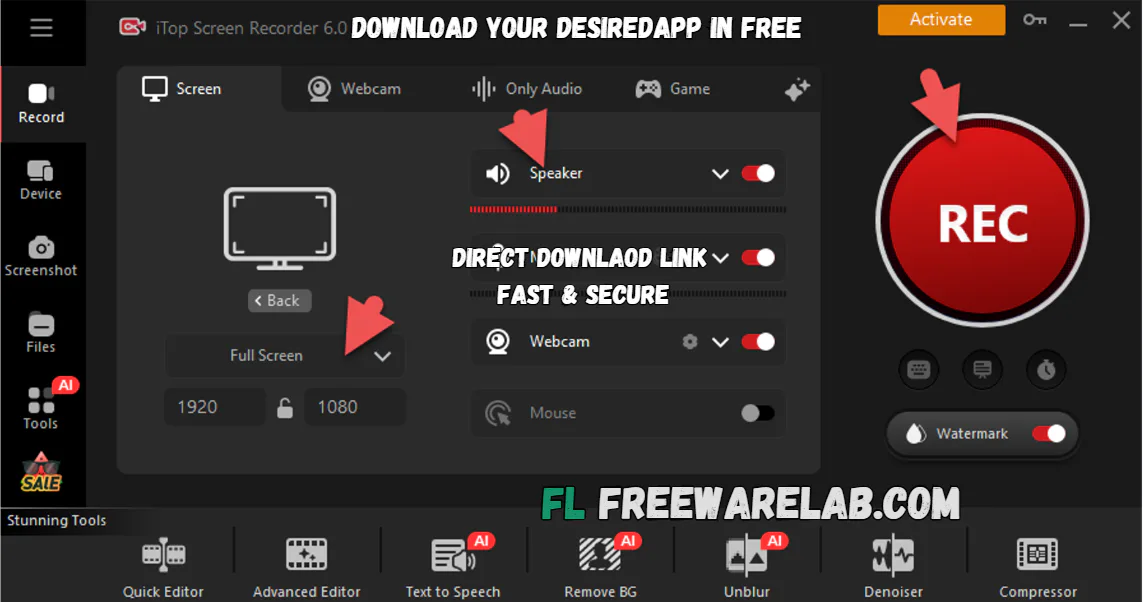
iTop Screen Recorder is a perfect application for Windows. It is used to record their own screen easily. It can help you to record desktop screens, online meetings, gameplay, live streams, tutorials, and webcam videos in high quality.
It is designed for new professionals. If you want an easy way to capture videos without complicated settings. It gives a smooth recording performance and built-in video editing tools. It also supports the audio recording. It has become one of the most popular screen recorder tools for Windows.
Why Choose iTop Screen Recorder Pro in 2026
iTop Screen Recorder offers a clean interface with powerful features for gamers and students. If you are a teacher and an office user. It is the best way to record online tutorials and meetings.
It give the more options to record the screen. You can choose the full screen, selected areas, and webcam. It also records the system audio without any complications. It provide the all the popular formats, HD to 4K recording.
Key Features of iTop Screen Recorder For Windows
- Record full screen or selected area easily
- Capture gameplay videos without lag
- Record webcam and microphone together
- Save videos in HD and 4K quality
- Take screenshots anytime during recording
- Record system sound and voice clearly
- Built-in video editor for quick editing
- Easy and simple interface for beginners
- Supports online classes and meetings
- Export videos in different formats
- Low CPU usage for smooth performance
- No watermark option available
Benefits of Using the Best Free Screen Recorder
- Easy for beginners to use
- Lightweight and fast performance
- Supports HD and 4K recording
- Perfect for gaming videos and tutorials
- Built-in editing tools save time
- Records audio clearly without noise
- Useful for online meetings and classes
- Smooth recording with low CPU usage
Best Alternatives to iTop Screen Recorder
OBS Studio: It is a free screen recording and live streaming app.
Bandicam: It is the best computer screen capture application and allows to share files.
Camtasia: It is a powerful screen recorder and video editor. Record your screen and audio with a few clicks from your PC.
ShareX: It is the best and easy software for Windows that helps you take screenshots and record your screen without any cost.
Movavi Screen Recorder: You can use it to record videos online classes meetings tutorials or anything you see.
Final Thoughts
It is a great screen recording tool for Windows users. If you want simple and high quality video capture software. It is perfect for gaming, tutorials, online classes, meetings, and YouTube content creation. With easy controls and powerful features. It remains the best screen recording software in 2026.
How to Download and Use iTop Screen Recorder
- Click the download button
- Save the setup file on your PC
- Open the installer with WinRAR
- Run the file and complete the installation
- Launch the software and start recording
How to Use
- Launch iTop Screen Recorder after installation.
- Choose full screen, custom screen area, or webcam mode.
- Turn on the microphone or system sound if needed.
- Click the REC button to begin screen recording.
- Stop recording and save your video.
- You can also edit it using built-in tools.
iTop Screen Recorder Pros and Cons
Pros
Simple and clean interface
High-quality video recording
Supports webcam and audio recording
Built-in video editor included
Good performance for gaming videos
Cons
Some advanced features require premium version
Free version has limited tools
Large video files may take more storage
iTop Screen Recorder System Requirements
OS: Windows 7, 8, 10, 11
Processor: Intel or AMD Dual-Core CPU
RAM: 2 GB
Storage: 500 MB free disk space
Network: Required for updates and activation
Frequently Asked Questions (FAQs)
1Is iTop Screen Recorder free?
It offers a free version with basic recording features.
2Can I record gameplay videos?
The software includes a special game recording mode.
3Does it support webcam recording?
You can record webcam videos easily.
4Can I record audio with screen video?
It supports microphone and system audio recording.
5Is iTop Screen Recorder safe?
It is safe to install and use on Windows PCs.
Package Size
157.53 MB
5.0
3 reviews
Direct & Safe Download
Buy License Officially
Virus FreeVerifiedFast
Product Information
File Name
iTop Screen Recorder 6.2.0.62 Download For Windows (2026)
Developer
iTop
License
Freeware
Total Downloads
0
Platform
Windows
4
Related Apps
Similar software you'll love
#1

KMPlayer Download 4.2.3.31 for Windows (2026)
KMPlayer Download is a popular Windows media player. It is designed to play almost every audio and video format without extra codecs. It is lightweight fast, and easy to use.
v4.2.3.3125.0
#2
Stellar Repair for Video 6.8.2.0 For Windows (2026)
Stellar Repair for Video is a powerful Windows video repair tool to fix inaccessible, damaged, and corrupted videos from cameras, mobile phones, and drones. It supports MP4, MOV, WMV, ASF, 3GP, 3G2,
v 6.8.2.0 25.0
#3
Any Video Converter 10.3.7 for Windows (2026)
Any Video Converter is a powerful and free video converter, compressor, and editor for Windows. Convert multiple video formats easily and get a direct, safe download link for the latest version
v10.3.745.0
#4

Wondershare DVD Creator 6.6.1.2 for Windows (2026)
Download Wondershare DVD Creator latest version for Windows & Mac. Burn videos, photos, and music to DVD or Blu-ray with built-in editor, animated menus, and powerful DVD tools.
v6.6.1.285.0
Related Tags
Explore more software in these categories
iTop Screen Recorder 6.2.0.62 Download For Windows (2026) Tested & Verified
by FreewareLab Security Team
SECURE
0/72
VirusTotal
May 15
Test Date
Win 11
Platform
100%
Trust Score
No MalwareNo AdwareClean InstallFeatures Verified
A
Ash ColemanVerifiedTOP
Software Security Analyst at FreewareLab
Our Verification Process
Security Scan
Every file scanned with 72+ antivirus engines via VirusTotal
Installation Test
Clean install verified - no bundleware, adware, or PUPs
Feature Verification
All advertised features tested and confirmed working
5.0
Excellent
3 ratingsRating Breakdown
5
3(100%)
4
0
3
0
2
0
1
0
Write a Review
for iTop Screen Recorder 6.2.0.62 Download For Windows (2026)
0 Reviews
Click to share your experience