Macrium Reflect Free 10.0.8754 for Windows (2026)
10.0.8754New
Virus FreeNo AdwareSafe DownloadLab Tested
Macrium Reflect uses a proven imaging engine to create fast, reliable system backups and disk clones. It available with direct download link. Safely image or clone your HDD and partitions—even while
Virus-free • Verified by FreewareLab
Download Macrium Reflect Latest Version - Freewarelab
Macrium Reflect uses a proven imaging engine to create fast, reliable system backups and disk clones. It available with direct download link. Safely image or clone your HDD and partitions—even while
5.0(1)
0 downloads
Jan 29, 2026
Macrium Reflect Free 10.0.8754 for Windows (2026) Video Overview
Watch this video to learn more about Macrium Reflect Free 10.0.8754 for Windows (2026) features and how to use it.
Macrium Reflect
Macrium Reflect is a trusted Windows backup and disk cloning application. It helps you create full system images and clone hard drives. It is designed to keep your system and files safe. You can restore your PC quickly if Windows crashes or a disk fails. It is useful for small businesses and IT professionals. It is fast and accurate.
Why Many Windows Users Trust Macrium Reflect
Data safety is the main goal of Macrium Reflect. It used the advanced imaging technology to create and copy backup of all system files. If you lose or delete anything on your system. You can able to get back without stress. It offers a smooth and fast workflow in modern systems. It also supports HDD and SSD.
Macrium Reflect Highlight
- It can create a full system image backup
- Incremental and differential backups
- Fast backup and restore speed
- Rescue media for system recovery
- Secure backup with encryption support
- The backup software copies the partition of the operating systems
- Schedule automatic backups easily
- Disk cloning for HDD to SSD upgrades
How Macrium Reflect Keeps Your System Safe
It can create an exact copy of your Windows system. It means Macrium Reflect clones your system, saves your apps and settings. It can save all data and boot files into external storage. If your Windows fails. You can boot using rescue media and restore the backup in a few simple steps.
Macrium Reflect Editions Explained
Macrium Reflect Free Edition: The free version is best for backing up files and folders. It is perfect for creating disk image backups and disk cloning. It gives limited features.
Macrium Reflect Home: The home edition is designed for personal and family use. It offers greater control and flexibility than the free version. It offers automatic regular backups.
Macrium Reflect Workstation: It is built for professionals and office users. If you want the strongest security and advanced backup management. Use the workstation version. It defends against crashes and ransomware.
Macrium Reflect Server: This edition is made for Windows Server systems. It is best for small and business server backups.
Macrium Reflect Technician: It is created for IT technicians and support teams. It allows backups and restores on multiple computers using one license.
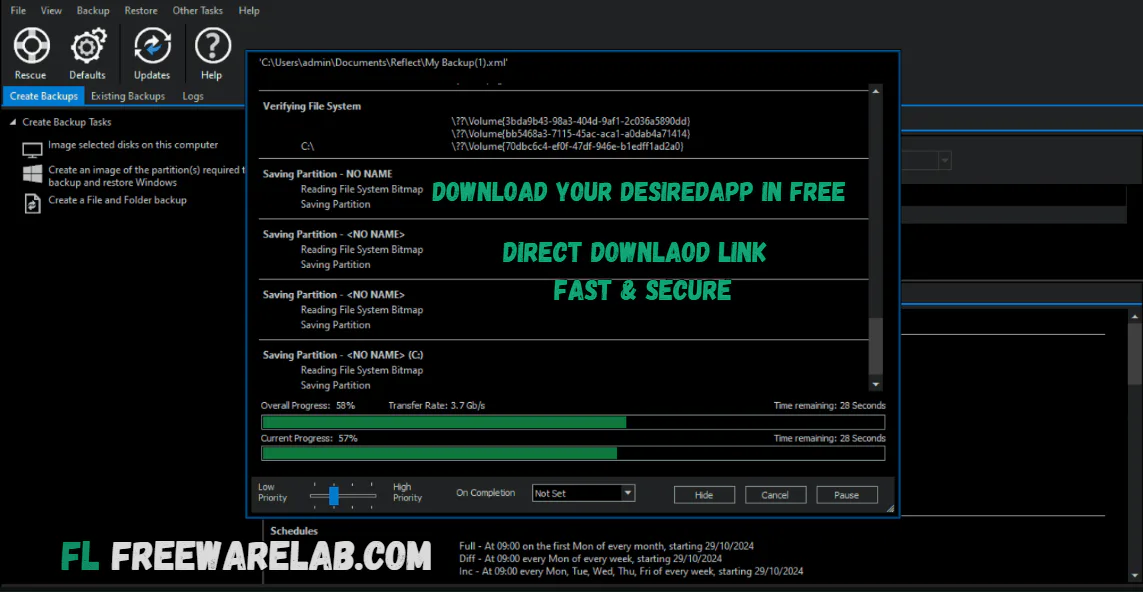
Backup & Clone Types Explained
- Full Backup: It help you to create a complete copy of your entire Windows system
- Incremental Backup: It saves only the new changes made after the last backup
- Differential Backup: You can easily save all changes since the last full backup
- Bare Metal Restore: Restores Windows on a brand-new or empty hard drive
Top Alternatives
AOMEI Backupper: It is a user friendly backup tool. It helps you back up files, system, and disks with just a few clicks.
EaseUS Todo Backup: It is a popular Windows backup software. It allow you to create system backups and restore data easily.
Acronis True Image: It give the advanced backup solution and protects your data. It also includes security features like ransomware protection.
MiniTool ShadowMaker: It is a simple backup program. It allows you to create system images and schedule automatic backups on Windows.
Paragon Backup & Recovery: It is perfect backup and recovery tool designed for safe system and disk management tasks.
Final word
It is the best Windows backup and disk cloning tool. It is a perfect solution for data protection. It is reliable and fast. If you find a simple and strong backup solution for Windows. Macrium Reflect is a smart and safe choice for 2026.
How to Download and Use Macrium Reflect
How to Download
- You can click the download button
- Save the setup file on your PC
- Unzip the installation with WinRAR
- Open the setup file and run the installation
- Follow the screen instructions to complete the installation
How to Use
Create a System Backup
- Open Macrium Reflect
- Select your system disk
- Click Create an image of this disk
- Choose a backup location (USB, external drive, or network)
- Click Start Backup
Clone a Hard Drive
- Select the source disk
- Click Clone this disk
- Choose the target drive
- Start the cloning process
Restore a Backup
- Connect your backup drive
- Boot using Macrium rescue media
- Select the backup image
- Click Restore and follow the steps
Macrium Reflect Pros & Cons
Pros
Very reliable and accurate backups
Fast disk cloning performance
Clean and professional interface
Ideal for system recovery and upgrades
Cons
Free version has limited features
Advanced options may feel complex for beginners
Macrium Reflect System Requirements
OS: Windows 11, 10, 8.1, 7 (64-bit recommended)
RAM: 1 GB RAM
Storage: 500 MB free disk space for installation
Other: External drive or network storage for backups
Macrium Reflect Frequently Asked Questions (FAQs)
1Is Macrium Reflect free?
It is a paid application and gives a free version for personal use.
2Can I clone my HDD to an SSD?
It gives the best performance for cloning HDD and SSD migration.
3Does it support Windows 11?
It work perfectly on the latest hardware and supports Windows 11.
4Is Macrium Reflect safe to use?
It is trusted and widely used for secure backups.
Package Size
279.6 MB
5.0
1 review
Direct & Safe Download
Buy License Officially
Virus FreeVerifiedFast
Product Information
File Name
Macrium Reflect Free 10.0.8754 for Windows (2026)
Developer
Macrium Software
License
Freeware
Total Downloads
0
Platform
Windows
4
Related Apps
Similar software you'll love
#1
AOMEI Backupper 8.1.0 for Windows (2026)
AOMEI Backupper 8.1.0 is the best and reliable backup solution. It can keep your system and data safe. If you can lose important data due to regular backup and system failure.
v8.1.0 5.0
#2
Ashampoo Backup Pro 27.5.41 Download for Windows 2026
Download Ashampoo Backup Pro Full Version for Windows is the best backup software that helps keep your important files safe. It allows you to back up your entire system or just files and folders.
v27.5.4165.0
#3
EaseUS Todo Backup 16.4.0 Download for Windows 2026
Download EaseUS Todo Backup with a Direct Link is an easy backup software that helps keep your important files safe on a Windows computer. You can use it to back up files folders or your whole system.
v16.4.05.0
#4
MiniTool ShadowMaker 4.8.0 Download for Windows 2026
Download MiniTool ShadowMaker with a Direct Link is the best backup software for keeping your files system safe. You can readily back up your documents folders hard drive or the whole Windows system.
v 4.8.0 5.0
Related Tags
Explore more software in these categories
Macrium Reflect Free 10.0.8754 for Windows (2026) Tested & Verified
by FreewareLab Security Team
SECURE
0/72
VirusTotal
Jan 29
Test Date
Win 11
Platform
100%
Trust Score
No MalwareNo AdwareClean InstallFeatures Verified
A
Ash ColemanVerifiedTOP
Software Security Analyst at FreewareLab
Our Verification Process
Security Scan
Every file scanned with 72+ antivirus engines via VirusTotal
Installation Test
Clean install verified - no bundleware, adware, or PUPs
Feature Verification
All advertised features tested and confirmed working
5.0
Excellent
1 ratingRating Breakdown
5
1(100%)
4
0
3
0
2
0
1
0
Write a Review
for Macrium Reflect Free 10.0.8754 for Windows (2026)
0 Reviews
Click to share your experience