Movavi Video Converter 24.4.0 For Windows (2026)
24.4.0New
Virus FreeNo AdwareSafe DownloadLab Tested
Download Movavi Video Converter for Windows and easily convert videos and audio into any format. Fast, simple, and high-quality video conversion tool for beginners and professionals.
Virus-free • Verified by FreewareLab
Download Movavi Video Converter Latest Version - Freewarelab
Download Movavi Video Converter for Windows and easily convert videos and audio into any format. Fast, simple, and high-quality video conversion tool for beginners and professionals.
5.0(1)
0 downloads
May 19, 2026
Movavi Video Converter 24.4.0 For Windows (2026) Video Overview
Watch this video to learn more about Movavi Video Converter 24.4.0 For Windows (2026) features and how to use it.
Movavi Video Converter
If you want a fast and simple way to convert videos on your Windows PC. Movavi Video Converter is a great option. It helps you change video formats and compress large files. It helps to edit videos without losing quality. It is made for beginners as well as advanced users. It is a perfect application for anyone to use easily.
Overview Movavi Video Converter
It is a Windows software tool. It lets you convert video and audio files into different formats like MP4, AVI, MKV, MOV, MP3, and more.
- It is mainly used for:
- Changing video formats
- Reducing video size
- Converting audio files
- Preparing videos for mobile or social media
- The interface is simple, so you do not need technical skills.
Key Features of Movavi Video Converter
- Here are the main features explained in easy words:
- Fast video conversion speed
- Supports 180+ formats
- High-quality output with no loss
- Built-in video compression tool
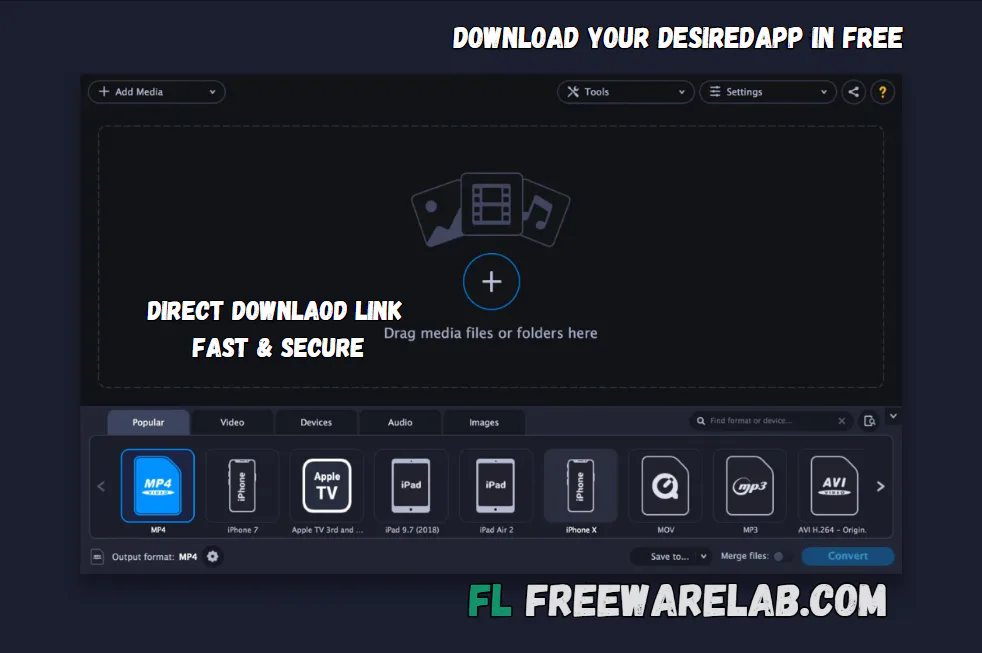
- Simple drag-and-drop interface
- Basic editing tools (trim, rotate, crop)
- AI-powered enhancements (in newer versions)
- Ready-made presets for phones and devices
Supported Formats
- Movavi Video Converter supports many popular formats:
- Video Formats: MP4, AVI, MKV, MOV, WMV, FLV
- Audio Formats: MP3, WAV, AAC, FLAC, OGG
- Image Formats (extra support): JPG, PNG, BMP
Best Alternatives
HandBrake: It is a versatile video converter designed for ripping and converting video files to formats compatible with various devices.
Wondershare UniConverter: It is the best software for working with videos without any trouble. You can change videos into different formats and make large files smaller.
Any Video Converter: It is a powerful and free video converter, compressor, and editor for Windows.
Freemake Video Converter: It is the best software for converting videos to different formats without any difficulty.
VLC Media Player: It is a free and open source cross-platform multimedia player and framework.
Why Choose Movavi Video Converter?
- This software is perfect for users who want:
- Quick video format changes
- Easy file compression
- Simple interface without complexity
- Reliable output quality
Conclusion
It is a simple and powerful tool for Windows users. If you want fast video conversion without technical difficulty. It supports many formats and works smoothly even on basic PCs. If you need an easy solution for converting or preparing videos for different devices and social media platforms. It is a reliable choice.
How to Download and Use Movavi Video Converter
How to Download
- Click the download button
- Wait for the download setup on your system
- Open the setup file
- Follow the installation steps
- Launch the software after installation
- Activate it using your license (if purchased)
How to Use
- Open the program
- Click “Add Media” and upload your file
- Choose output format (MP4, MP3, etc.)
- Select quality settings if needed
- Click “Convert”
- Save the converted file to your PC
Movavi Video Converter Pros and Cons
Pros
Very easy to use
Fast conversion speed
Supports many formats
Clean and simple interface
Cons
Free version has limitations
Requires paid license for full features
No advanced professional editing tools
Movavi Video Converter System Requirements
OS: Windows 10 / 11
Processor: Intel or AMD processor
RAM: 2 GB
Storage: At least 250MB free storage
Network: Stable internet connection for activation
Movavi Video Converter Frequently Asked Questions (FAQs)
1Is Movavi Video Converter free?
It offers a free trial, but full features require a paid version.
2Does it work on Windows 11?
It works smoothly on all Windows versions.
3Is it safe to use?
It is a trusted and safe software.
4Can it convert large videos?
It can handle large video files easily.
5Does it reduce video quality?
No, it keeps good quality if settings are properly chosen.
Package Size
50 MB
5.0
1 review
Direct & Safe Download
Buy License Officially
Virus FreeVerifiedFast
Product Information
File Name
Movavi Video Converter 24.4.0 For Windows (2026)
Developer
Movavi Software
License
Freeware
Total Downloads
0
Platform
Windows
4
Related Apps
Similar software you'll love
#1
IObit Uninstaller Pro 15.4.0.1 free for Windows (2026)
IObit Uninstaller Pro helps you fully remove unwanted programs and browser extensions, clean leftovers, and keep your PC fast. Download the latest version with a direct link.
v15.4.0.1 35.0
#2

Glary Utilities Pro 6.38.0.42 For Windows (2026)
Glary Utilities Pro is an all-in-one Windows utility with 20+ tools to clean junk files, fix errors, manage startup apps, and optimize your PC for faster, smoother performance.
v6.38.0.42125.0
#3
Advanced SystemCare 19.3.0.200 Download for Windows 2026
Download Advanced SystemCare with a Direct Link is the best software for keeping your Windows PC clean fast and safe. Advanced removes unwanted files fixes small system problems helps your pc.
v19.3.0.200215.0
#4

CCleaner Pro 7.04.1172 for Windows (2026)
CCleaner Pro is the world’s #1 PC optimization tool to remove junk files, free up space, boost speed, and fix PC issues. Download CCleaner Professional Plus full version with direct link, standalone o
v7.04.11721445.0
Related Tags
Explore more software in these categories
Movavi Video Converter 24.4.0 For Windows (2026) Tested & Verified
by FreewareLab Security Team
SECURE
0/72
VirusTotal
May 19
Test Date
Win 11
Platform
100%
Trust Score
No MalwareNo AdwareClean InstallFeatures Verified
A
Ash ColemanVerifiedTOP
Software Security Analyst at FreewareLab
Our Verification Process
Security Scan
Every file scanned with 72+ antivirus engines via VirusTotal
Installation Test
Clean install verified - no bundleware, adware, or PUPs
Feature Verification
All advertised features tested and confirmed working
5.0
Excellent
1 ratingRating Breakdown
5
1(100%)
4
0
3
0
2
0
1
0
Write a Review
for Movavi Video Converter 24.4.0 For Windows (2026)
0 Reviews
Click to share your experience