Wise Data Recovery 6.2.2 For Windows (2026)
6.2.2New
Virus FreeNo AdwareSafe DownloadLab Tested
Download Wise Data Recovery for Windows PC and recover deleted photos, videos, documents, and files easily. Fast, lightweight, safe, and beginner-friendly recovery software for Windows.
Virus-free • Verified by FreewareLab
Download Wise Data Recovery Latest Version - Freewarelab
Download Wise Data Recovery for Windows PC and recover deleted photos, videos, documents, and files easily. Fast, lightweight, safe, and beginner-friendly recovery software for Windows.
5.0(2)
1 downloads
May 12, 2026
Wise Data Recovery 6.2.2 For Windows (2026) Video Overview
Watch this video to learn more about Wise Data Recovery 6.2.2 For Windows (2026) features and how to use it.
Wise Data Recovery
Wise Data Recovery is a simple file recovery tool. It helps you recover deleted photos, videos, documents, and emails. It allows you to recover other important files from your PC, USB drive, memory card, and external hard disk.
It is fast and perfect for beginners who want to restore lost data without complicated steps. Wise Data Recovery supports many file formats and works smoothly on all windows version. It gives the best performance.
Overview Wise Data Recovery 6.2.2.520
It is perfect for restoring deleted and lost files quickly. It can recover files removed accidentally and lost after formatting. Items removed from the recycle bin may be retrieved through it.
Among storage options, compatibility includes hard disk drives, solid state units, USB sticks, digital cameras, and portable memory cards. Simplicity in layout allows straightforward access to lost data, particularly beneficial when experience is limited.
Main Features of Wise Data Recovery for Windows 11
- Recover deleted photos, videos, and documents
- Fast scanning for quick file recovery
- Deep scan mode for lost files
- Supports USB drives and memory cards
- Preview recoverable files before restoring
- Lightweight and fast performance
- Easy-to-use interface for beginners
- Supports many Windows versions
Recover Deleted Files Easily
Clicking just a few times brings back deleted files using Wise Data Recovery. Lost items pop up quickly when hunted by name or kind. Mistakes happen, files vanish after wrong moves, broken systems, or wiped drives, and this helps fix that.
Fast and Deep Scan Modes
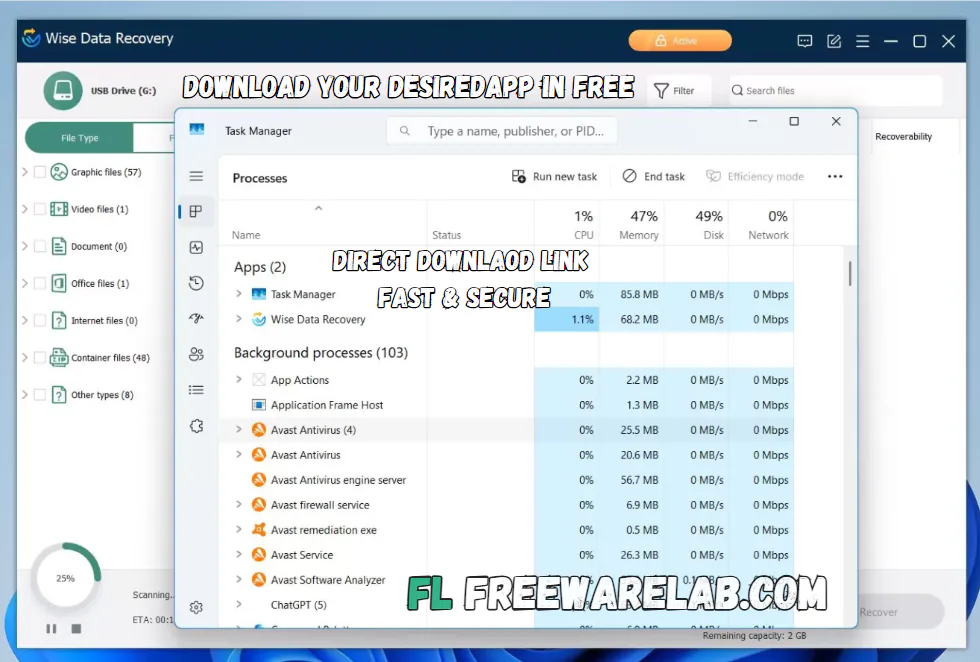
The software offers two scan options. Fast Scan quickly finds recently deleted files, while Deep Scan searches storage devices more carefully to recover older or hidden files. This gives users a better chance of restoring important data.
It give the clean and easy interface. All recovery tools are clearly organized. So users can start scanning and recovering files without confusion.
Supported Storage Devices
- Internal hard drives
- External hard drives
- USB flash drives
- SD cards
- Digital cameras
- Portable storage devices
Why Choose Wise Data Recovery?
It is a simple applcaition and many people perfer for relibale revcory. It is perfect for windows and works well for all types of users. It works in the background without slowing down your pc. It is a good choice for recovering important personal or work files safely.
Benefits of Using Wise Data Recovery
- Quick recovery process
- Easy for beginners
- Supports many file formats
- Works with multiple storage devices
- Lightweight software size
- Fast scan performance
- Clean and simple design
Best Alternatives to Wise Data Recovery
Recuva: It is the best software for recovering files you deleted by mistake.
MiniTool Power Data Recovery: It is a powerful and comprehensive file recovery software designed to help users retrieve lost or deleted files from various storage devices.
Stellar Data Recovery: It can recover photos videos documents and other data from your computer USB drive memory card or hard disk.
Disk Drill: It is the best data recovery software for Windows. Recover deleted files on any storage device, with multiple data recovery methods.
EaseUS Data Recovery Wizard: It is the best application to fix all your lost data. It helps you recover lost, deleted, or formatted files from hard drives.
Final Thoughts
It is reliable file recovery software. It offers fast scanning and easy recovery tools. It supports many storage devices. If you accidentally deleted files or lost important data. It provides a quick and beginner friendly solution for recovering your files safely.
How to Download and Use Wise Data Recovery
How to Download
- Click the download button
- Save the Wise Data Recovery setup file
- Open the installer
- Follow the installation steps
- Launch the software after installation
How to Use
- Select the drive you want to scan
- Start Fast Scan or Deep Scan
- Preview the recoverable files
- Choose the files you want to restore
- Save recovered files to another drive
Wise Data Recovery Pros & Cons
Pros
Easy to use
Fast scanning speed
Lightweight software
Supports many file types
Free version available
Cons
Deep scan can take time
Limited advanced features in free version
Recovery success depends on file condition
Wise Data Recovery System Requirements
OS: Windows 7, 8, 10, 11
Processor: Intel or AMD Processor
RAM: 2 GB
Storage: 100 MB free space
Network: Required for download and updates
Wise Data Recovery Frequently Asked Questions (FAQs)
1Is Wise Data Recovery free?
It offers a free version with basic recovery features.
2Can Wise Data Recovery recover formatted files?
Deep Scan can help recover files from formatted drives.
3Does Wise Data Recovery support USB recovery?
It supports USB flash drives and external devices.
4Is Wise Data Recovery safe to use?
It is safe and lightweight software for Windows.
5Can I recover photos and videos?
The software supports recovery of photos, videos, documents, and more.
Package Size
13.3 MB
5.0
2 reviews
Direct & Safe Download
Buy License Officially
Virus FreeVerifiedFast
Product Information
File Name
Wise Data Recovery 6.2.2 For Windows (2026)
Developer
WiseCleaner
License
Freeware
Total Downloads
1
Platform
Windows
4
Related Apps
Similar software you'll love
#1

Wondershare Recoverit 14.0.14.5 for Windows (2026)
Download Recoverit Data Recovery for Windows to recover deleted files from formatted drives, SD cards, USBs, photos, videos, and documents quickly and safely.
v14.0.14.5255.0
#2
Wondershare Repairit 6.6.3.6 Download for Windows 2026
Download Wondershare Repairit with a Direct Link is the best software for fixing broken or damaged files. It can repair videos photos audio and documents that will not open or play properly.
v6.6.3.6 125.0
#3

R-Studio 9.5 Build 191686 for Windows (2026)
Download the latest RStudio IDE for Windows. A powerful, open-source development environment for R and Python that helps you code faster, analyze data, and boost productivity with advanced tools.
v9.5 Build 191686175.0
#4
Stellar Data Recovery 12.5.0.0 Download for Windows 2026
Stellar Data Recovery with a Direct Link is the best Professional software for recovering deleted files. It can recover photos videos documents and other data.
v12.5.0.055.0
Related Tags
Explore more software in these categories
Wise Data Recovery 6.2.2 For Windows (2026) Tested & Verified
by FreewareLab Security Team
SECURE
0/72
VirusTotal
May 12
Test Date
Win 11
Platform
100%
Trust Score
No MalwareNo AdwareClean InstallFeatures Verified
A
Ash ColemanVerifiedTOP
Software Security Analyst at FreewareLab
Our Verification Process
Security Scan
Every file scanned with 72+ antivirus engines via VirusTotal
Installation Test
Clean install verified - no bundleware, adware, or PUPs
Feature Verification
All advertised features tested and confirmed working
5.0
Excellent
2 ratingsRating Breakdown
5
2(100%)
4
0
3
0
2
0
1
0
Write a Review
for Wise Data Recovery 6.2.2 For Windows (2026)
0 Reviews
Click to share your experience