Wondershare DVD Creator 6.6.1.2 for Windows (2026)
6.6.1.2New
Virus FreeNo AdwareSafe DownloadLab Tested
Download Wondershare DVD Creator latest version for Windows & Mac. Burn videos, photos, and music to DVD or Blu-ray with built-in editor, animated menus, and powerful DVD tools.
Virus-free • Verified by FreewareLab
Download Wondershare DVD Creator Latest Version - Freewarelab
Download Wondershare DVD Creator latest version for Windows & Mac. Burn videos, photos, and music to DVD or Blu-ray with built-in editor, animated menus, and powerful DVD tools.
5.0(3)
2 downloads
Feb 11, 2026
Wondershare DVD Creator 6.6.1.2 for Windows (2026) Video Overview
Watch this video to learn more about Wondershare DVD Creator 6.6.1.2 for Windows (2026) features and how to use it.
Wondershare DVD Creator
Wondershare DVD Creator is a powerful and easy DVD burning software for Windows. It allows you to burn videos to DVD and Blu ray Disc. It also helps to ISO files without any complicated steps. If you want to create a movie DVD and back up personal videos. It makes a wedding or birthday DVD with a custom menu. It Software makes everything simple.
The program supports more than 150 video formats including MP4, AVI, MKV, MOV, WMV, and more. You do not need to convert files separately. Just add your videos, customize the menu, and burn your disc in high quality. It is a great solution for users who want professional results with simple controls.
Wondershare DVD Creator Overview
It is a powerful DVD burner that helps you create ISO files on both Windows 10 and Mac OS. It supports DVD+R and DVD-R discs and can burn videos to DVDs and Blu-ray discs easily.
You can convert AVI to DVD, MKV to DVD, and other video formats to DVD without quality loss. The built-in video editor lets you trim clips, add subtitles, and apply special effects before burning.
Main Features of Wondershare DVD Creator
- You can burn videos directly to DVD-5, DVD-9, Blu-ray disc, or save them as ISO files.
- It supports different disc types.
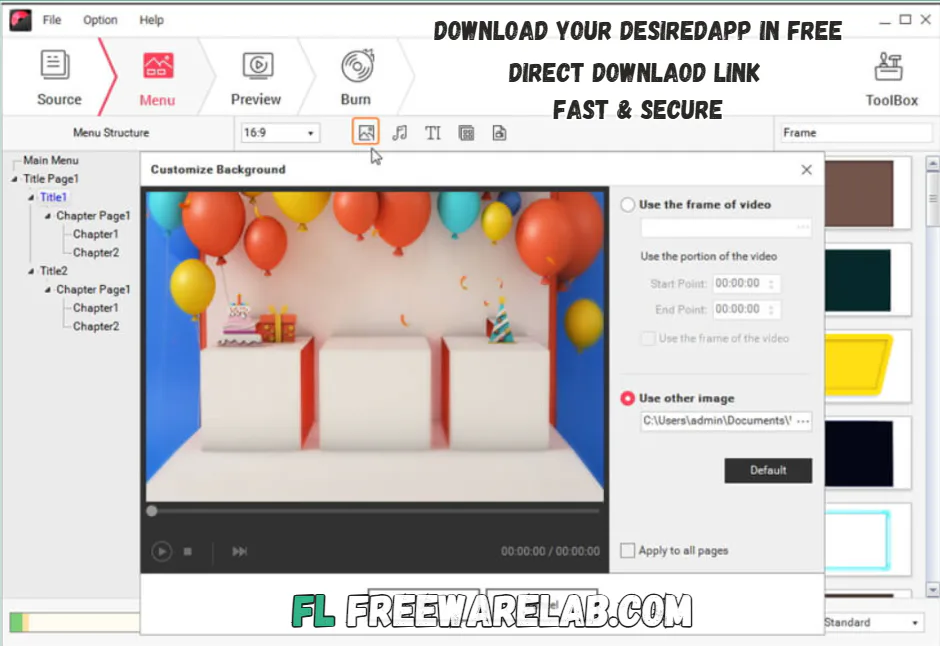
- Choose from stylish and modern DVD menu templates.
- You can change background images, music, text style, and button design.
- Turn your photos and videos into a beautiful slideshow with music and choose a custom thumbnail.
- It uses smart burning technology to ensure smooth and fast disc writing while keeping high video quality.
- Trim unwanted parts
- Crop video screen
- Rotate videos
- Adjust brightness and contrast
- Add watermarks
- Insert subtitles
Why Wondershare DVD Creator Is a Smart Choice
Wondershare DVD Creator provide the clean interface and fast performance. It is a trust that many users choose. It gives a simple layout that is easy to understand, even for beginners. All tools are clearly arranged. You can start burning your DVD within minutes.
It also keeps video quality sharp and clear after burning. You can preview your DVD before finalizing it. It helps avoid mistakes. It is stable and works well with modern Windows systems.
Best Alternatives to Wondershare DVD Creator
Nero Burning ROM: It is a powerful disc burning software for Windows. It allows you to burn CDs, DVDs, and Blu-ray discs with strong security and fast performance.
Ashampoo Burning Studio: It is the best burning software. It helps you create DVDs, back up files, and design custom disc menus.
WinX DVD Author: It is the best free DVD authoring software. It empowers even a novice to burn MP4, MKV, AVI, VOB, FLV, MOV, ISO, and other videos to DVD.
DVDStyler: It is a cross platform free DVD authoring application. It is possible for video enthusiasts to create professional-looking DVDs.
Final Verdict
It is the best DVD burning software available in 2026. It is powerful and perfect for users. It is perfect to create professional DVDs without technical skills. It supports many formats, has beautiful menu templates, and has built-in editing tools. It provides everything needed to create high quality DVDs at home or for business use.
How to Download and Use Wondershare DVD Creator
How to Download
- Click the Download button to get the installer file.
- Open the downloaded file with WinRAR
- After unzipping the setup, run the installation
- Follow the on-screen steps to install it on your computer.
How to Use
- Launch Wondershare DVD Creator on your computer.
- Click “Add Files” to import the videos you want to burn.
- Pick whether you want to: Create a DVD, Make a DVD folder, Save as an ISO file
- Use the built-in video editor to trim, crop, or add special effects before burning
- Put a blank DVD into your DVD drive.
- Click “Burn” to turn your videos into DVDs. Wait until the process finishes.
Wondershare DVD Creator Pros and Cons
Pros
Beginner-friendly interface
Supports many video formats
High-quality DVD output
Customizable DVD menus
Built-in editing tools
Cons
Full version is paid
Limited features in the free trial
Wondershare DVD Creator System Requirements
OS: Windows 7 / 8 / 10 / 11
Processor: 1 GHz processor or higher
RAM: Minimum 512 MB RAM (2 GB recommended)
Storage: 200 MB free hard disk space
Other: DVD drive for disc burning
Wondershare DVD Creator Frequently Asked Questions (FAQs)
1Is Wondershare DVD Creator free?
It offers a free trial version. The full version requires a paid license.
2Can I burn MP4 files to DVD?
It supports MP4 and many other formats.
3Does it support Windows 11?
It works smoothly on Windows 11.
4Can I customize DVD menus?
You can fully customize templates with images, music, and text.
5Is it safe to install?
It is safe and legal to use when download from our website.
Package Size
217.2 MB
5.0
3 reviews
Direct & Safe Download
Buy License Officially
Virus FreeVerifiedFast
Product Information
File Name
Wondershare DVD Creator 6.6.1.2 for Windows (2026)
Developer
Wondershare
License
Freeware
Total Downloads
2
Platform
Windows
3
Related Apps
Similar software you'll love
#1

KMPlayer Download 4.2.3.31 for Windows (2026)
KMPlayer Download is a popular Windows media player. It is designed to play almost every audio and video format without extra codecs. It is lightweight fast, and easy to use.
v4.2.3.3125.0
#2
Stellar Repair for Video 6.8.2.0 For Windows (2026)
Stellar Repair for Video is a powerful Windows video repair tool to fix inaccessible, damaged, and corrupted videos from cameras, mobile phones, and drones. It supports MP4, MOV, WMV, ASF, 3GP, 3G2,
v 6.8.2.0 5.0
#3
Any Video Converter 9.1.6 for Windows (2026)
Any Video Converter is a powerful and free video converter, compressor, and editor for Windows. Convert multiple video formats easily and get a direct, safe download link for the latest version
v9.1.625.0
Related Tags
Explore more software in these categories
Wondershare DVD Creator 6.6.1.2 for Windows (2026) Tested & Verified
by FreewareLab Security Team
SECURE
0/72
VirusTotal
Feb 11
Test Date
Win 11
Platform
100%
Trust Score
No MalwareNo AdwareClean InstallFeatures Verified
A
Ash ColemanVerifiedTOP
Software Security Analyst at FreewareLab
Our Verification Process
Security Scan
Every file scanned with 72+ antivirus engines via VirusTotal
Installation Test
Clean install verified - no bundleware, adware, or PUPs
Feature Verification
All advertised features tested and confirmed working
5.0
Excellent
3 ratingsRating Breakdown
5
3(100%)
4
0
3
0
2
0
1
0
Write a Review
for Wondershare DVD Creator 6.6.1.2 for Windows (2026)
0 Reviews
Click to share your experience