EaseUS Video Downloader 3.0 for Windows (2026)
3.0New
Virus FreeNo AdwareSafe DownloadLab Tested
Download EaseUS Video Downloader for Windows and save online videos, playlists, and audio in simple steps. It is easy to use and supports HD, 4K, MP3, Instagram, Vimeo, and more.
Virus-free • Verified by FreewareLab
Download EaseUS Video Downloader Latest Version - Freewarelab
Download EaseUS Video Downloader for Windows and save online videos, playlists, and audio in simple steps. It is easy to use and supports HD, 4K, MP3, Instagram, Vimeo, and more.
5.0(1)
0 downloads
May 25, 2026
EaseUS Video Downloader 3.0 for Windows (2026) Video Overview
Watch this video to learn more about EaseUS Video Downloader 3.0 for Windows (2026) features and how to use it.
EaseUS Video Downloader
EaseUS Video Downloader is a simple video downloading software. It helps users download videos, music, playlists, and online content from many popular websites. It has a clean interface and easy options. It can also be used without any problem. It is a good choice for downloading videos in high quality and saving them in different formats.
Overview of EaseUS Video Downloader For Windows
It is a powerful video downloader. It helps users download online videos from many platforms. You can save videos, audio files, and playlists directly on your computer. It also supports HD and 4K video quality.
If the original video is available in high quality. Teachers grab lessons, learners keep references, and makers store material. Even regular browsing gets a quiet upgrade. It is a useful application for downloading videos offline.
Download Videos in High Quality
Videos come down in various resolutions. Picking one depends on what you plan to do plus how much storage is left on your device. High definition works just fine, though some go all the way up to 4K. Lower settings help when storage gets tight. That kind of freedom fits nearly everyone pretty well.
Key Features of EaseUS Video Downloader Free Download
- Download YouTube videos with copy the URL.
- You can download multiple videos and audio files.
- Save videos in HD and high quality.
- Download full playlists easily.
- Convert videos into MP3 audio.
- Download many videos at the same time.
- Fast and smooth downloading speed.
- Simple and easy-to-use interface.
- Watch downloaded videos offline anytime.
- Supports different video formats.
- Good for music, lectures, tutorials, and movies.
- Easy copy-and-paste video link option.
- Works well on Windows PC.
Convert Videos to MP3
Got a video but just want the sound? That tool pulls audio out and turns it into an MP3. Works well when grabbing music tracks, talks that inspire, spoken lessons, or long interviews. Once saved, play them any time without internet. Computer stores everything, ready whenever you are.
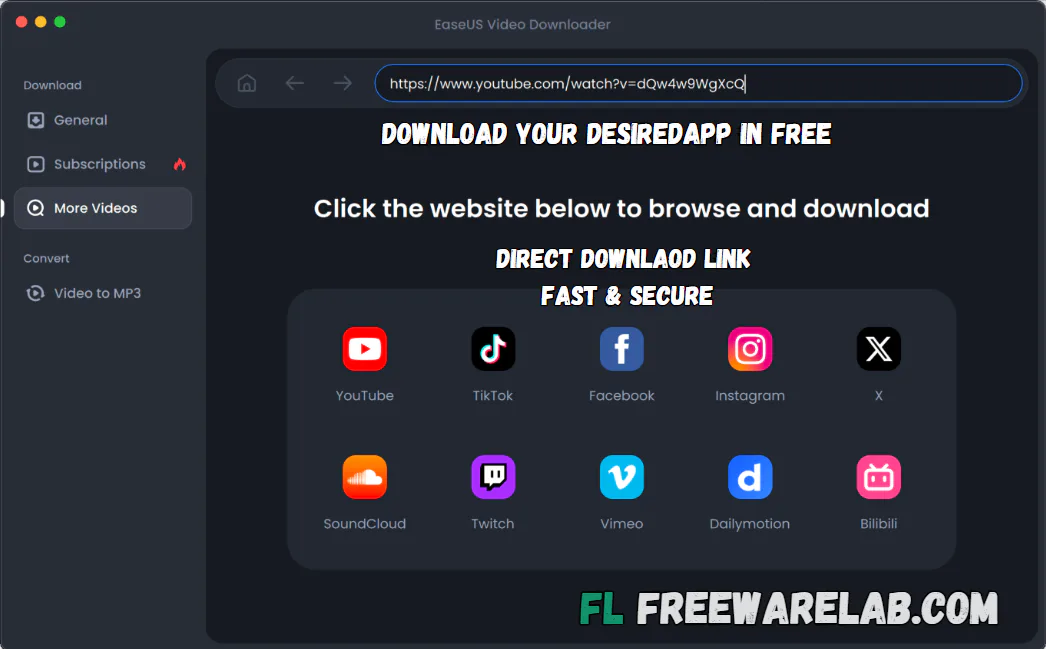
Batch Download Support
The batch download feature saves a lot of time. You can downloading the multiple videos in sametime no need to compy paste one by one. It is perfect for downloading the full playlist. You can easily download the tutorials and course videos. It makes the downloading process faster and more comfortable.
Simple and Clean Interface
It has a very simple and user friendly interface. All options are easy to understand and users. It can quickly find what they need. The software does not look confusing. It is a big benefit for new users. Its clean design helps users download videos without wasting time.
Benefits of EaseUS Video Downloader
- Easy to use video downloader app.
- Helps you download videos from Instagram.
- Supports video downloading from Vimeo.
- Lets users extract audio from videos.
- Good for saving music, lectures, and podcasts.
- You can choose 360p for smaller video size.
- Simple option for users who want to download videos fast.
- Useful for offline watching anytime.
- Best for beginners and normal users.
- Saves videos and audio directly to your device.
Why Use EaseUS Video Downloader for PC?
It is the best application for saving online videos safely and easily. It lets users choose video quality and download speed. It is also helpful when the internet is slow or not available. You can watch downloaded videos offline. You can use it to save videos for study or personal use. It can help you manage downloads in a simple way.
EaseUS Video Downloader for Beginners
It offer the friendly interface and does not require technical knowledge. Paste the video link right into the program. Once done, pick how sharp you want it, then press download. Everything else happens without help. Simple steps like these fit anyone, especially folks new to grabbing videos online.
Best Alternatives to EaseUS Video Downloader
4K Video Downloader Plus: It is a popular tool for downloading videos and subtitles from many websites.
SnapDownloader: It is a good alternative for downloading videos in high quality. It supports many websites up to 8K resolution.
Freemake Video Downloader: A simple tool for saving online videos to your PC.
YTD Video Downloader: It helps users download and convert online videos. It is easy to use and good for saving videos for offline watching.
Internet Download Manager (IDM): It is a fast downloading tool for Windows. It can help download videos and files quickly.
How to Download and Use EaseUS Video Downloader
How to Download
- Click on the Download button.
- Wait for the setup file to download.
- Open the downloaded setup file.
- Follow the installation steps on your screen.
- Complete the installation process.
How to Use
- Open EaseUS Video Downloader on your PC.
- Copy the video link you want to download.
- Paste the video link into the software.
- Choose video quality or audio format.
- Click on the Download button.
- Wait for the download to finish.
EaseUS Video Downloader Pros and Cons
Pros
Easy to use for beginners
Supports high-quality video downloads
Can download videos and audio files
Supports MP3 conversion
Allows batch downloading
Clean and simple interface
Cons
Some advanced features may require a paid version
Download quality depends on the original video source
An internet connection is required for downloading
EaseUS Video Downloader System Requirements
OS: Windows 11, 10, 8, 7
Processor: 1 GHz or faster processor
RAM: 1 GB
Storage: 2 GB free space
Network: Required for downloading online videos
Display: Standard screen resolution supported
EaseUS Video Downloader Frequently Asked Questions (FAQs)
1Is EaseUS Video Downloader free?
It offer a free version with limited features. For full features, users may need to use the paid version.
2Can I download videos in HD quality?
It supports HD video downloads if the original video is available in HD quality.
3Can I convert videos to MP3?
It can convert online videos into MP3 audio format.
4Is EaseUS Video Downloader easy to use?
It has a simple interface and is very easy for beginners.
5Does EaseUS Video Downloader work on Windows?
It is mainly designed for Windows PC users.
Package Size
180 MB
5.0
1 review
Direct & Safe Download
Buy License Officially
Virus FreeVerifiedFast
Product Information
File Name
EaseUS Video Downloader 3.0 for Windows (2026)
Developer
EaseUS
License
Freeware
Total Downloads
0
Platform
Windows
4
Related Apps
Similar software you'll love
#1
Internet Download Manager 6.42 Build 63 for Windows (2026)
Internet Download Manager (IDM) boosts download speeds up to 10x, supports resume and scheduling, and grabs streaming videos easily. Get the latest IDM version with a safe direct download link now!
v6.42 Build 633744.0
#2
4K Video Downloader Plus 26.1.1 for Windows (2026)
Download 4K Video Downloader Plus to save high-quality videos, audio, playlists, and subtitles from YouTube and other websites. Get a fast, secure, ad-free direct download link for Windows.
v26.1.1 465.0
#3
Allavsoft Video Downloader 3.29.0.9575 Download for Windows 2026
Allavsoft Video Downloader Converter is a video downloader and converter for Windows. It allows you copy a video link paste it into the app download the file in your chosen format.
v3.29.0.9575 45.0
#4

TubeMate Video Downloader 6.1.2 for Windows (2026)
TubeMate Video Downloader for Windows is a powerful video downloading application. If you want to download videos from YouTube, Facebook, Dailymotion, and Instagram.
v6.1.2165.0
Related Tags
Explore more software in these categories
EaseUS Video Downloader 3.0 for Windows (2026) Tested & Verified
by FreewareLab Security Team
SECURE
0/72
VirusTotal
May 25
Test Date
Win 11
Platform
100%
Trust Score
No MalwareNo AdwareClean InstallFeatures Verified
A
Ash ColemanVerifiedTOP
Software Security Analyst at FreewareLab
Our Verification Process
Security Scan
Every file scanned with 72+ antivirus engines via VirusTotal
Installation Test
Clean install verified - no bundleware, adware, or PUPs
Feature Verification
All advertised features tested and confirmed working
5.0
Excellent
1 ratingRating Breakdown
5
1(100%)
4
0
3
0
2
0
1
0
Write a Review
for EaseUS Video Downloader 3.0 for Windows (2026)
0 Reviews
Click to share your experience