Flip PDF Plus 7.11.9 for Windows (2026)
7.11.9New
Virus FreeNo AdwareSafe DownloadLab Tested
Download Flip PDF Plus for Windows to turn PDFs and images into interactive flipbooks. Enjoy offline access, mobile support, and powerful publishing tools.
Virus-free • Verified by FreewareLab
Download Flip PDF Plus Convert PDF to Flipbook - Freewarelab
Download Flip PDF Plus for Windows to turn PDFs and images into interactive flipbooks. Enjoy offline access, mobile support, and powerful publishing tools.
5.0(3)
1 downloads
Jan 21, 2026
Flip PDF Plus 7.11.9 for Windows (2026) Video Overview
Watch this video to learn more about Flip PDF Plus 7.11.9 for Windows (2026) features and how to use it.
Flip PDF Plus
Flip PDF Plus is a powerful Windows software. It helps you turn normal PDF files into interactive flipbooks. It is designed to create digital magazines, ebooks, brochures, and catalogs. It also help for make reports with a real page turning effect. It is easy to use, fast, and suitable for new and professional users.
Overview Flip PDF Plus
It is a PDF to flipbook creator for Windows. It converts static PDF files into dynamic digital publications. with animations, sound, links, and multimedia. The final output looks like a real book. It users can flip page by page on a computer, tablet, or mobile device.
Top Reasons Windows Users Love Flip PDF Plus
Flip PDF Plus is a popular software for improving your content presentation. It offers the simple workflow and professional results. You do not need coding or design skills to create attractive flipbooks. It is best for reader engagement and online sharing.
Flexible PDF to eBook Conversion
If you want the fast way to turn your PDF file into an ebook. Flip PDF does it with just a few clicks with original layout, text, images, and formatting exactly as they are. Your content looks clean and polished after conversion.
It can help you to convert PDF files into interactive eBooks. It allows you to add page flip effects and add a clickable link. The software gives you customized themes, backgrounds, and navigation. It can make each eBook match your brand or style. It is also useful for multimedia elements like videos and audio.
Key Features of Flip PDF Plus Pro
- Convert PDF to interactive flipbooks in seconds
- Realistic page-flipping animation
- It help you to add images, videos, audio, buttons, and links
- Built in templates and themes
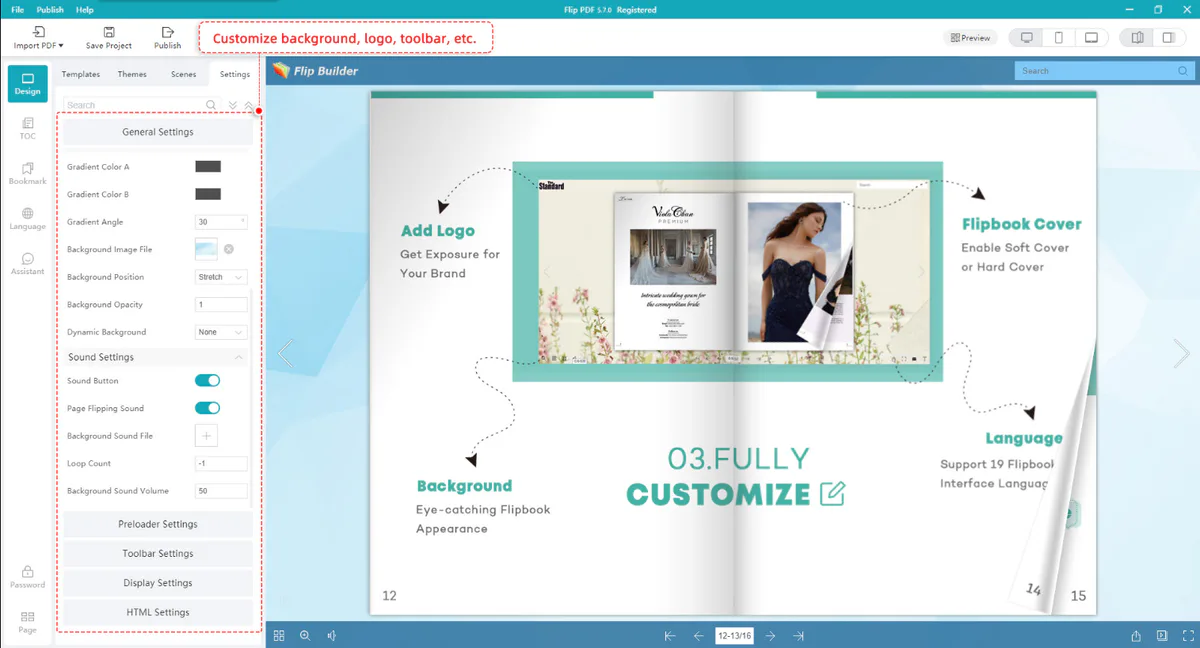
- Custom background, colors, and toolbar
- Offline and online publishing options
- Flip PDF Plus allows you to publish and track page views
- Mobile-friendly HTML5 output
- Supports password protection and watermarking
Flip PDF Plus What’s New
Improvements
- Improved the conversion engine to produce clearer and higher-quality PDF output
- Made the embed code simpler when flipbooks are allowed only on selected websites
Bug Fixes
- Fixed the wrong file extension error when importing PDF files
- Resolved flipbooks not loading after embedding on allowed domains
- Fixed the Table of Contents button not responding
- Corrected overlapping text in the Table of Contents
- Fixed freezing issue during batch PDF import and upload
- Corrected the incorrect expiration date display for the Hosting Add-on
Output Formats Supported
- HTML for websites: Publish flipbooks directly on websites for online viewing
- EXE for Windows offline use: Create standalone files that work without internet
- ZIP for easy sharing: Share projects quickly by email or cloud storage
- Mobile-friendly formats: Works smoothly on phones and tablets
Top Alternatives to Flip PDF Plus
FlippingBook Publisher: A professional tool for creating high-quality flipbooks with advanced design options.
AnyFlip: An easy online platform to turn PDFs into flipbooks and share them on the web.
iSpring Flip: It is the best solution for creating eBooks and flipbooks from PDFs with a clean layout.
Publuu: Itis a web based tool for making interactive flipbooks without installing software. It is best for Google Analytics.
Calaméo: A popular platform for publishing and sharing digital magazines and documents online.
Who Should Use Flip PDF Plus 2026
- Digital marketers creating interactive content
- Ebook creators publishing professional eBooks
- Teachers and students preparing visual learning materials
- Professionals designing business presentations
- Publishers managing online magazines and catalogs
Final Thoughts
It is a reliable Windows software. It is perfect for creating interactive flipbooks from PDF files. It is a powerful publishing application, like a professional, with a fast and simple interface. If you want to present content in a modern way. It is a strong choice for 2026.
How to Download and Use Flip PDF Plus on Windows
How to Download
- Click the download button and save the setup file
- Open the downloaded setup file with WinRAR
- After extracting the file, run the installation
- Click Next and accept the license agreement
- Choose the installation location
- Click Install and wait for completion
- Launch the software after installation
How to Use
- Open Flip PDF Plus on your Windows PC
- Import your PDF file into the software
- Select a flipbook theme and layout
- Customize colors, background, and toolbar
- Add links, images, videos, or audio if needed
- Preview the flipbook
- Export it as HTML, EXE, ZIP, or mobile format
Flip PDF Plus Pros & Cons
Pros
Easy to use interface
Professional flipbook output
Multiple export formats
No coding required
Cons
Paid license required for full features
Large multimedia files may increase size
Flip PDF Plus System Requirements
OS: Windows 7, 8, 10, 11
Processor: Intel or AMD 1 GHz or higher
RAM: 2 GB minimum
Storage: 200 MB free space
Network: Required for online publishing
Flip PDF Plus Frequently Asked Questions (FAQs)
1Is Flip PDF Plus free
The free version avialbe with basic features. Advanced features require a paid license
2Does Flip PDF Plus work offline
Yes, you can create and view offline flipbooks
3Can I add videos to flipbooks
Yes, videos and audio can be embedded easily
4Is it mobile friendly
Yes, HTML5 output works on mobile devices
5What is the purpose of a flipbook?
A flipbook is used to display documents online with page-turning effects, easy navigation, and interactive features.
6Can you edit files in PDF Viewer Plus
Yes, PDF Viewer Plus lets you read, edit, annotate, fill out forms, search text, and share PDF files.
7What is the difference between PDF and PDF Plus
PDF is a fixed, static format, while PDF Plus is lighter, smarter, and more dynamic, with interactive elements.
Package Size
357.90 MB
5.0
3 reviews
Direct & Safe Download
Buy License Officially
Virus FreeVerifiedFast
Product Information
File Name
Flip PDF Plus 7.11.9 for Windows (2026)
Developer
FlipBuilder
License
Freeware
Total Downloads
1
Platform
Windows
4
Related Apps
Similar software you'll love
#1

Microsoft Office 2007 Free Download for Windows (2026)
Microsoft Office 2007 Free Download is the most popular application. It is a widely used software developed by Microsoft. It offer the lightweight fast interface and easy to use.
v200725.0
#2
Wondershare PDFelement 12.1.9.4002 for Windows (2026)
Wondershare PDFelement is a fast, all-in-one PDF editor to create, edit, convert, merge, split, protect, and sign PDF files with ease. Edit any PDF in seconds and scan documents.
v12.1.9.4002135.0
#3

Foxit PDF Reader 14.0.2.33402 Free Download for Windows (Latest Version)
Foxit PDF Reader 14.0.2.33402 is the best and lightest PDF software for Windows. Foxit PDF help you open read and print PDF files easily. You can highlight text, add notes, fill forms, and sign a
v14.0.2.334025.0
#4
PDF-XChange Editor Plus 10.8.2 For Windows (2026)
PDF-XChange Editor Plus is a complete PDF editing solution for Windows. Create, edit, OCR, secure, and convert PDFs easily with fast performance and professional-grade tools.
v10.8.2.40725.0
Related Tags
Explore more software in these categories
Flip PDF Plus 7.11.9 for Windows (2026) Tested & Verified
by FreewareLab Security Team
SECURE
0/72
VirusTotal
Jan 21
Test Date
Win 11
Platform
100%
Trust Score
No MalwareNo AdwareClean InstallFeatures Verified
A
Ash ColemanVerifiedTOP
Software Security Analyst at FreewareLab
Our Verification Process
Security Scan
Every file scanned with 72+ antivirus engines via VirusTotal
Installation Test
Clean install verified - no bundleware, adware, or PUPs
Feature Verification
All advertised features tested and confirmed working
5.0
Excellent
3 ratingsRating Breakdown
5
3(100%)
4
0
3
0
2
0
1
0
Write a Review
for Flip PDF Plus 7.11.9 for Windows (2026)
0 Reviews
Click to share your experience