Freemake Audio Converter 1.1.9 For Windows (2026)
1.1.9New
Virus FreeNo AdwareSafe DownloadLab Tested
Download Freemake Audio Converter for Windows to convert MP3, WAV, AAC, FLAC, WMA, and more. Fast, free, and easy audio conversion with batch processing support.
Virus-free • Verified by FreewareLab
Download Freemake Audio Converter Latest Version - Freewarelab
Download Freemake Audio Converter for Windows to convert MP3, WAV, AAC, FLAC, WMA, and more. Fast, free, and easy audio conversion with batch processing support.
5.0(1)
0 downloads
Jun 1, 2026
Freemake Audio Converter 1.1.9 For Windows (2026) Video Overview
Watch this video to learn more about Freemake Audio Converter 1.1.9 For Windows (2026) features and how to use it.
Freemake Audio Converter
Freemake Audio Converter is a simple audio conversion application. It helps you convert music and audio files into popular formats. It can support all formats like MP3, WMA, WAV, M4A, AAC and FLAC. If you want to play audio files on different devices. It is a useful tool and also reduces file size.
You can extract sound from video or change music format without using complicated software. It give the clean interface for new and professional users.
Overview of Freemake Audio Converter
It is a free audio converter tool. It helps you change audio files from one format to another. It supports many common audio formats and makes the conversion process simple. It is best for converting songs, voice recordings, podcasts, ringtones, and other audio files. It is also helpful when your media player or phone.
It is designed for Windows and gives users an easy way to manage audio conversion. You do not need advanced editing knowledge because the program offers ready-made format buttons and simple settings.
Why Use Freemake Audio Converter?
Most gadgets handle sound files in their own way. Take a phone that runs MP3s without trouble, yet struggles with others. Editing programs often demand WAV or even FLAC instead. This tool shifts your music into whatever type fits best. Change happens fast, no waiting around.
For folks after something straightforward, this fits well. When you just need to change files fast, it works without hassle. Easy steps guide the way through each shift. Most everyday sound types play nicely with it, too.
Main Features of Download Freemake Audio Converter 1.1.10.1
- Converts audio files into MP3, WMA, WAV, M4A, AAC, FLAC, and more
- Supports 50+ audio file formats
- Extracts audio from video files
- Converts music for phones, tablets, media players, and PCs
- Allows batch conversion of multiple files
- Offers simple output quality settings
- Helps reduce audio file size
- Clean and beginner-friendly interface
- Works well for music, podcasts, voice files, and ringtones
Convert Audio to MP3
MP3 is a popular audio format. It works on almost every device. Freemake Audio Converter lets you convert different audio files into MP3 format in a few simple clicks. If you want to play your music on mobile phones, car players, or old media players. It only supports MP3 files.
Convert MP3 to Other Formats
It is not only a simple audio converter into MP3. It allows you to convert MP3 files into different formats like WAV nd FLAC. It is a helpful application for converting audio with best quality. It converts all specific formats for editing.
Extract Audio from Video
It gives the best features to convert audio from video files. If you have a video and only want the sound, music, lecture, or voice from it. It can help you save the audio separately. This is useful for songs, online classes, interviews, tutorials, and recorded videos.
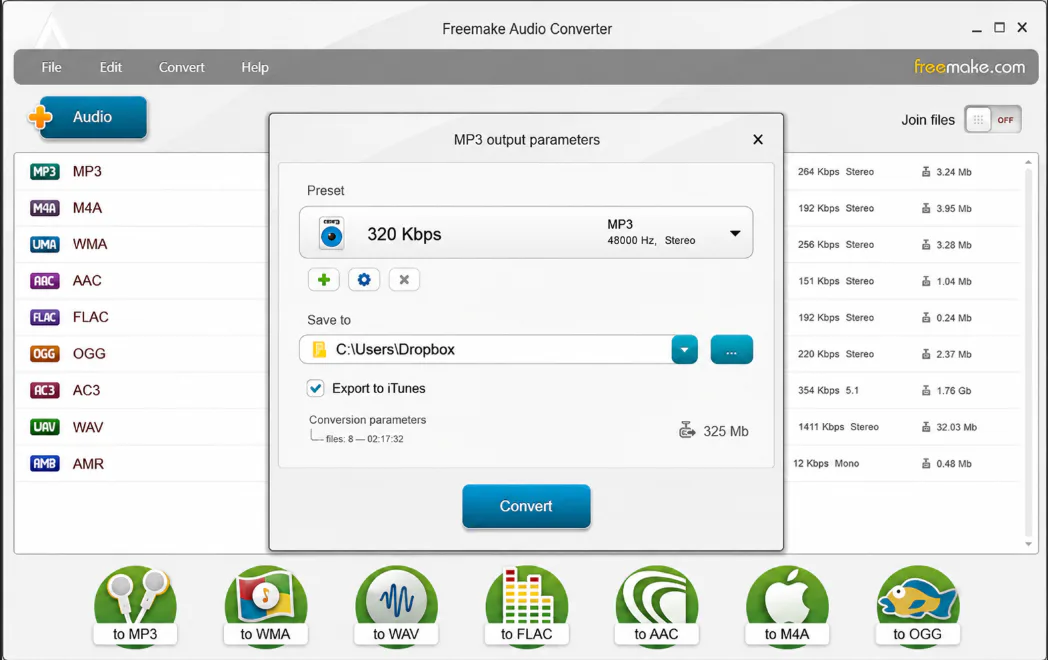
Batch Audio Conversion
It can support batch conversion. It allows you to convert many files at the same time. If you want to convert the entire music playlist and recording. It can save you time to convert all files one by one. It allows you to add all your file who want to convert. It can be completed together.
Easy Interface for Beginners
It provide the simple interface for all type users. You can simply add your audio file and choose the needed format. It gives the option to select the audio quality and click the convert button. It is the best option for students and home users. It is easy audio editing without any complex.
Supported Audio Formats
Freemake Audio Converter supports many popular audio formats, including:
- MP3
- WMA
- WAV
- M4A
- AAC
- FLAC
- OGG
- AMR
- AIFF
- AC3
- M4R
- And many more audio formats
Freemake Audio Converter for Windows
It is mainly designed for Windows. It is a lightweight tool compared to professional audio editing software. So users can install and use it easily. It works best for people who need simple audio conversion instead of advanced audio mixing or editing.
Best Alternatives to Freemake Audio Converter
Audacity: It is a free audio editing and recording tool. It is best for users who want to edit, record, cut, and improve audio files.
Format Factory: It is a file conversion tool that supports audio, video, and image formats. It is useful for users who need an all-in-one converter.
Any Audio Converter: It is another simple tool for converting music files into popular audio formats.
VLC Media Player: It is mainly a media player. It also includes basic conversion options for audio and video files.
MediaHuman Audio Converter: It is a clean and simple audio converter that supports common music formats.
Who Should Use Freemake Audio Converter?
If you want a simple tool to convert audio files. It is useful for students, music lovers, content creators, teachers, office users, and anyone. Who needs to change audio formats. It is also helpful if you want to make audio files compatible with phones or websites.
Final Words
It is a useful and simple audio converter for Windows. It supports popular formats like MP3 WAV WMA AAC, M4A, and FLAC. It can also extract sound from video files. If you need an easy tool to convert music podcasts. It is best for basic audio conversion and everyday use.
How to Download Freemake Audio Converter
How to Download
- Click the download button
- Save the setup file on your computer
- Open the installer after the download is complete
- Follow the installation steps
- Launch the software from your desktop or Start menu
How to Use
- Open Freemake Audio Converter on your PC
- Click the audio button to add your file
- Select the audio file you want to convert
- Choose the output format, such as MP3, WAV, AAC, or FLAC
- Select the output quality or preset
- Choose the folder where you want to save the converted file
- Click the Convert button
- Wait for the process to finish
- Open the converted file and use it on your device
Freemake Audio Converter Pros and Cons
Pros
Very easy to use
Supports many audio formats
Can extract audio from video
Good for beginners
Batch conversion saves time
Clean and simple interface
Cons
Not available for macOS
Limited advanced audio editing tools
May not be suitable for professional audio production
Some features may depend on the version
Freemake Audio Converter System Requirements
OS: Windows 11, 10, 8, 7
Processor: Intel or compatible processor
RAM: 512 MB
Storage: Free disk space for installation and converted files
Network: Required for downloading the installer
Other: Media files for conversion
Freemake Audio Converter Frequently Asked Questions (FAQs)
1Is Freemake Audio Converter free?
It is available as a free audio conversion tool. But some features may depend on the version or official offer.
2Can Freemake Audio Converter convert MP3 files?
It can convert files to MP3 and can also convert MP3 files into other formats like WAV, AAC, WMA, M4A, and FLAC.
3Can I extract audio from video using Freemake Audio Converter?
It can extract audio from video files and save it as a separate audio file.
4Does Freemake Audio Converter work on Windows 11?
Freemake tools are made for Windows, and users can try them on modern Windows versions.
5Is Freemake Audio Converter good for beginners?
It is a beginner-friendly tool because it has a simple interface and easy conversion steps.
Package Size
57 MB
5.0
1 review
Direct & Safe Download
Virus FreeVerifiedFast
Product Information
File Name
Freemake Audio Converter 1.1.9 For Windows (2026)
Developer
Ellora Assets
License
Freeware
Total Downloads
0
Platform
Windows
4
Related Apps
Similar software you'll love
#1
REAPER Download 7.71 For Windows (2026)
REAPER is a powerful digital audio workstation for Windows, offering full multitrack audio and MIDI recording, editing, mixing, and rendering. Download REAPER for Windows with a direct download link
v7.71115.0
#2

FL Studio Download 25.1.6.4997 Latest Version
Create beats, record vocals, and produce professional music with FL Studio for Windows. Download the latest version with powerful tools, virtual instruments, and lifetime free updates.
v25.1.6.4997165.0
#3
Virtual DJ Download 2026 BUILD 9004 for Windows
Download the latest VirtualDJ for Windows and start mixing like a pro. Create powerful DJ sets, add effects, and stream live using just your PC.
vBUILD 9004395.0
#4
Adobe Audition 26.0.0 Download Ultimate for Windows 2026
Adobe Audition Download is the most powerful software for recording and editing audio. Many YouTubers podcasters and music creators use it to make their sound clear and professional.
v26.0.055.0
Related Tags
Explore more software in these categories
Freemake Audio Converter 1.1.9 For Windows (2026) Tested & Verified
by FreewareLab Security Team
SECURE
0/72
VirusTotal
Jun 1
Test Date
Win 11
Platform
100%
Trust Score
No MalwareNo AdwareClean InstallFeatures Verified
A
Ash ColemanVerifiedTOP
Software Security Analyst at FreewareLab
Our Verification Process
Security Scan
Every file scanned with 72+ antivirus engines via VirusTotal
Installation Test
Clean install verified - no bundleware, adware, or PUPs
Feature Verification
All advertised features tested and confirmed working
5.0
Excellent
1 ratingRating Breakdown
5
1(100%)
4
0
3
0
2
0
1
0
Write a Review
for Freemake Audio Converter 1.1.9 For Windows (2026)
0 Reviews
Click to share your experience