Heptabase 1.83.0 for Windows (2026)
1.83.0New
Virus FreeNo AdwareSafe DownloadLab Tested
Download Heptabase for Windows is a powerful visual note-taking app that helps you understand complex topics using whiteboards, linked notes, and smart knowledge maps. Works on desktop and mobile.
Virus-free • Verified by FreewareLab
Download Heptabase Note-Taking Latest Version - Freewarelab
Download Heptabase for Windows is a powerful visual note-taking app that helps you understand complex topics using whiteboards, linked notes, and smart knowledge maps. Works on desktop and mobile.
5.0(2)
4 downloads
Jan 17, 2026
Heptabase 1.83.0 for Windows (2026) Video Overview
Watch this video to learn more about Heptabase 1.83.0 for Windows (2026) features and how to use it.
Heptabase Download
Heptabase is a modern visual note taking and knowledge management software. It is designed for deep thinking. It focuses on helping you understand, connect with, and remember information through visual boards and cards. It works smoothly on Windows. It is a perfect application for researchers and knowledge workers.
It is best primarily used to visually organize ideas. You can collect notes, PDFs, thoughts, and concepts. Then connect them on a large whiteboard. It is easier to see relationships between ideas than to read long text lists.
Why Heptabase Is Ideal for Windows Users
Heptabase runs properly as a dedicated desktop app with strong performance on Windows. It supports all keyboard shortcuts, mouse, and large screens. It is perfect for multitasking, research work, and long study sessions. It gives the stable updates and offline access for Windows users.
Key Features of Heptabase 2026 (latest version)
- Heptabase is a powerful note-taking app for organizing ideas clearly
- It helps build visual knowledge instead of long text notes
- Uses large whiteboards to connect thoughts visually
- Improves daily workflow and thinking process
- Works as a personal knowledge management system
- Each note acts like a connected database card
- Supports clean and fast writing using markdown
- Helps with planning and light project management
- Boosts overall productivity for daily tasks and learning
- Designed especially for lifelong learners and researchers
- Offers smooth sync across devices
- A mobile app allows access anytime, anywhere
- Easy export options for notes and boards
- Simple system without heavy plugins
- Apps like Heptabase focus on visual thinking
- Subscription-based pricing with premium features
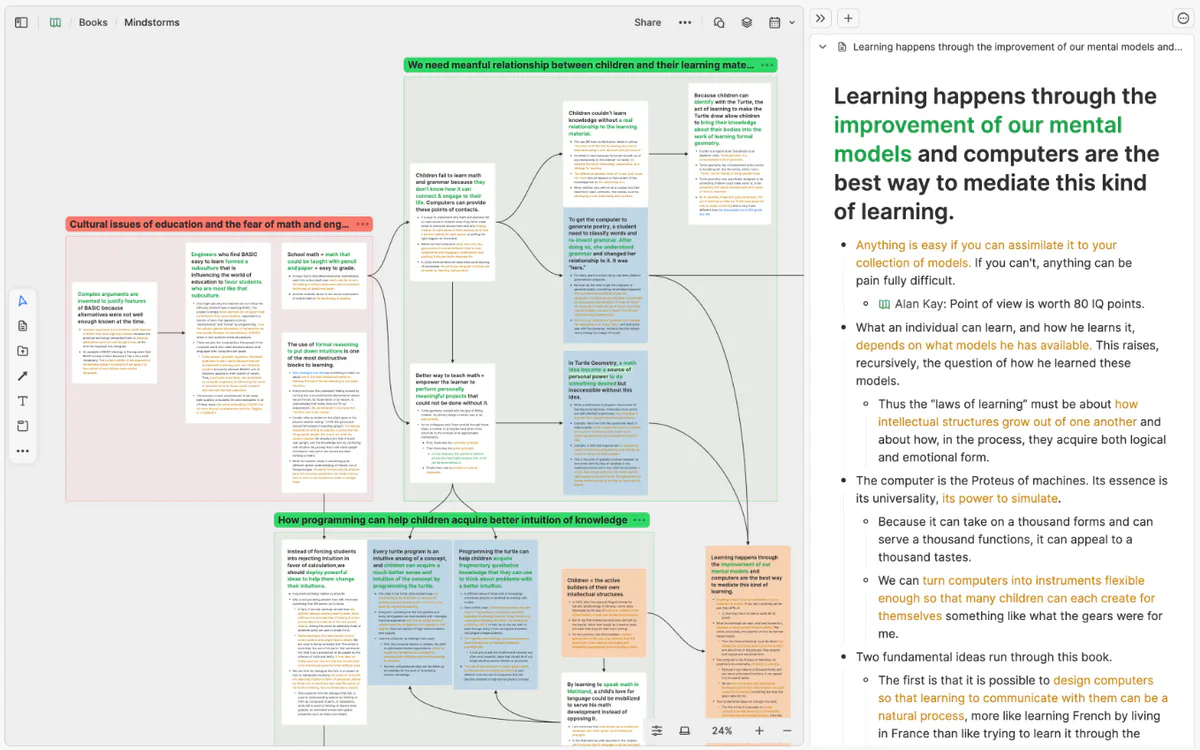
How Heptabase Works
Heptabase uses cards instead of long documents. Each card holds one idea. You can place cards on a whiteboard and connect them visually. Over time, your board becomes a map of your knowledge, making complex topics easy to understand and remember.
Heptabase for Study, Research, and Work
Heptabase is best for student subjects, researchers use it to organize papers. It is professionals application for planning and thinking. It is helpful for learning, writing, brainstorming, and long term projects.
Heptabase has a clean and modern interface. The app feels smooth on Windows systems and handles large boards without slowing down. Everything is designed to keep your focus on thinking, not formatting.
Best Alternatives to Heptabase
Obsidian: A text based note app that helps you connect ideas using links and markdown files.
Notion: An all in one workspace for notes, tasks, databases, and team collaboration.
Scrintal: A visual thinking tool that lets you connect notes on boards using links and cards.
Roam Research: A note taking app focused on linked notes and daily thinking.
Milanote: A visual board tool made for creatives to organize ideas, projects, and inspiration.
Final Verdict
It is the best visual note-taking and knowledge management tool. It is available for Windows. If you want to think clearly, connect ideas visually, and build long term knowledge. It is a powerful and smart choice.
How to Download and Use Heptabase
How to Download
- You can click on the download button
- Save the installation file on your system.
- After downloading, unzip with WinRAR.
- Run for installation and follow the screen instructions.
- Install the app on your computer.
- Create an account or sign in.
How to Use
- Open the app after installation.
- Create a new whiteboard to start.
- Add notes as cards for each idea.
- Move cards freely on the board.
- Connect cards to build visual knowledge.
- Write notes using simple markdown.
- Import PDFs or reference files if needed.
- Sync your data to access it on other devices.
- Use the mobile app to review notes anytime.
- Export notes or boards when finished.
Heptabase Pros and Cons
Pros
Excellent for deep thinking
Visual and intuitive design
Strong PDF and research tools
Offline support
Cons
No free permanent version
Learning curve for beginners
Heptabase System Requirements
OS: Windows 10 or later
RAM: 8 GB RAM
Network: Stable internet for syncing
Storage: 400 MB
Heptabase Frequently Asked Questions (FAQs)
1Is Heptabase free for Windows?
No, it is a paid tool with a trial option.
2Does Heptabase work offline?
Yes, it works offline and syncs later.
3Is Heptabase good for students?
Yes, it is excellent for studying and research.
4Can I import PDFs into Heptabase?
Yes, PDF annotation is supported.
5Is Heptabase better than Notion?
It is better for visual thinking, while Notion is better for general workspace use.
Package Size
177 MB
5.0
2 reviews
Direct & Safe Download
Buy License Officially
Virus FreeVerifiedFast
Product Information
File Name
Heptabase 1.83.0 for Windows (2026)
Developer
Heptabase Inc
License
Freeware
Total Downloads
4
Platform
Windows
2
Related Apps
Similar software you'll love
#1
TypingMaster Download 11.0.1.868 for Windows 2026
TypingMaster Download with a direct link is an easy typing learning software for Windows that helps you type faster and with fewer mistakes.
v11.0.1.868 5.0
#2
Microsoft Power BI 15.0.1120.113 Download for Windows 2026
Download Microsoft Power BI with a direct link is the best and most helpful tool that allows you turn your data into clear charts and reports. You can connect it to Excel databases and other data.
v15.0.1120.113 5.0
Heptabase 1.83.0 for Windows (2026) Tested & Verified
by FreewareLab Security Team
SECURE
0/72
VirusTotal
Jan 17
Test Date
Win 11
Platform
100%
Trust Score
No MalwareNo AdwareClean InstallFeatures Verified
A
Ash ColemanVerifiedTOP
Software Security Analyst at FreewareLab
Our Verification Process
Security Scan
Every file scanned with 72+ antivirus engines via VirusTotal
Installation Test
Clean install verified - no bundleware, adware, or PUPs
Feature Verification
All advertised features tested and confirmed working
5.0
Excellent
2 ratingsRating Breakdown
5
2(100%)
4
0
3
0
2
0
1
0
Write a Review
for Heptabase 1.83.0 for Windows (2026)
0 Reviews
Click to share your experience