Internet Download Manager 6.42 Build 60 for Windows (2026)
6.42 Build 60Updated
Virus FreeNo AdwareSafe DownloadLab Tested
Internet Download Manager (IDM) boosts download speeds up to 10x, supports resume and scheduling, and grabs streaming videos easily. Get the latest IDM version with a safe direct download link now!
Virus-free • Verified by FreewareLab
Download IDM Accelerate Your Downloads on Windows - Freewarelab
Internet Download Manager (IDM) boosts download speeds up to 10x, supports resume and scheduling, and grabs streaming videos easily. Get the latest IDM version with a safe direct download link now!
5.0(2)
13 downloads
Feb 19, 2026
Internet Download Manager 6.42 Build 60 for Windows (2026) Video Overview
Watch this video to learn more about Internet Download Manager 6.42 Build 60 for Windows (2026) features and how to use it.
Internet Download Manager
Internet Download Manager is a popular download manager for Windows. You can download and manage files quickly with IDM. You can easily pause and resume the download without losing anything. If you want to download the 4k resolution video heavy software and important documents in large size. IDM is perfect for your needs.
Internet Download Manager Overview
Internet Download Manager is a powerful Windows tool. It increases download speed up to 5 times and organizes downloads. It works by splitting files into multiple parts and downloading them at the same time. It helps users to get faster, more stable downloads than normal browser downloads.
IDM also supports the most popular web browsers and automatically captures download links. You can easily download your favorite content from any website, Facebook, YouTube, Daily Motion, and Venom. It offer the easy process.
Key Features of Download Internet Download Manager For Windows
- Internet Download Manager (IDM) increases download speed up to 5 times.
- It supports pause, resume, and recovery of broken downloads.
- You can download videos, music, documents, and other files easily.
- It works smoothly with the Windows operating system.
- Simple interface with large buttons and easy navigation.
- One-click download option for quick downloading.
- Built-in scheduler to set download time and date.
- Automatically scans files with antivirus software for security.
- Supports all major browsers like Chrome, Edge, and Firefox.
- Creates categories to organize downloads automatically.
- Supports HTTPS and secure authentication protocols.
- Grabber feature to download full websites or specific parts.
- Drag & drop option for easy file management.
- Supports downloading from video-sharing platforms like YouTube.
- Multilingual support for many international languages.
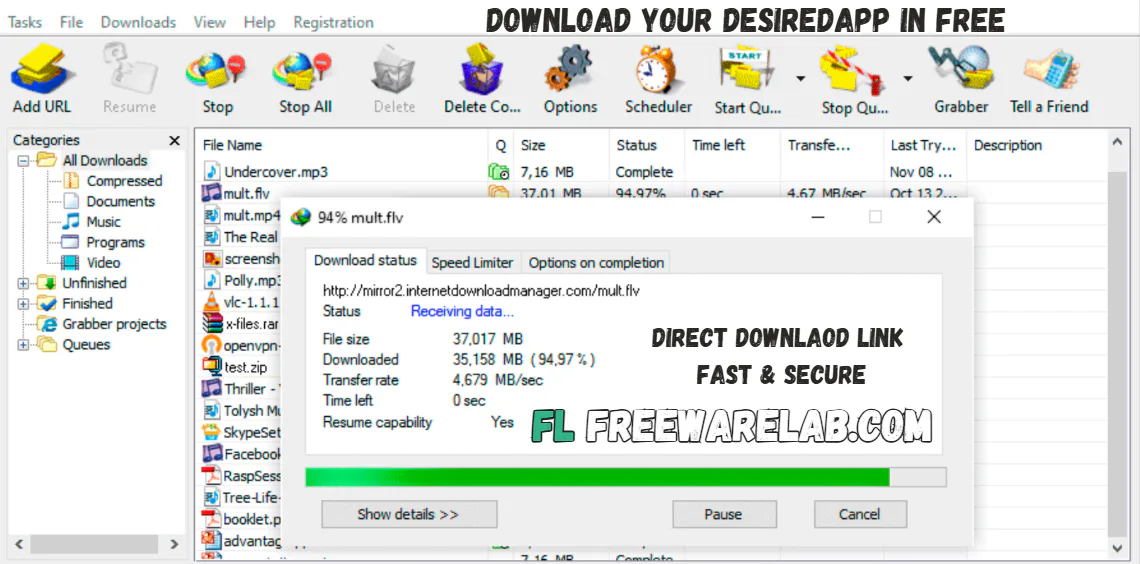
Benefits of Using Internet Download Manager
You can use it and save time and avoid download failures. If your internet connection drops. IDM allows you to resume downloads instead of starting over. It is very helpful for large files, videos, and software downloads. It can provide a simple interface. It is very suitable for new and advanced users alike.
You can also schedule downloads, set a custom filter, and resume files if an interruption happens. It supports many file types and runs smoothly on Microsoft Windows.
Internet Download Manager Alternatives
Free Download Manager: It is a popular tool. It helps you download files faster and supports many file types.
JDownloader: It is a powerful downloader. It is perfect for video download and works well with large files and links from many websites.
EagleGet: A simple and clean download manager. It can help you download any type of file. Best for video download and app.
Xtreme Download Manager: It is another strong option. It acceleration your download speed and supports video downloads from many sites.
Final Verdict
IDM is a powerful download accelerator with dynamic file segmentation. The smart downloader supports FTP, HTTP, and secure server connections, and works with proxy settings for better compatibility. IDM extension works with Google Chrome, Mozilla, and other websites.
How to Download and Use Internet Download Manager
How to Download
- You can click on the Download button.
- The IDM setup file will start downloading automatically.
- Save the file on your Windows PC.
- Double-click the downloaded IDM setup file.
- Click Next to start the installation.
- Accept the license agreement.
- Choose the installation location (or keep the default).
- Click Install and wait for the process to finish.
- Restart your browser if asked.
- After installation, Internet Download Manager will open automatically.
How to Use
- Using IDM is very easy, even for beginners:
- Open your web browser (Chrome, Edge, Firefox, etc.)
- IDM will automatically detect the link.
- A download window will appear.
- Choose the file location.
- Click Start Download.
- You can pause, resume, or cancel downloads at any time from the IDM main window.
Internet Download Manager Pros and Cons
Pros
Very fast download speed
Resume support for interrupted downloads
Easy browser integration
Simple and clean interface
Cons
Free trial only, paid after trial
Available for Windows only
Internet Download Manager System Requirements
OS: Windows 7, 8, 8.1, 10, 11
Processor: 1 GHz or faster processor
RAM: 2 GB
Storage: 50 MB free space
Network: Required for downloading files
Other: Chrome, Edge, Firefox, Opera and other popular browsers
Internet Download Manager Frequently Asked Questions (FAQs)
1Is Internet Download Manager free?
IDM is paid software, but it offers a 30-day trial period with full features.
2Does IDM work on Windows 11?
Internet Download Manager works properly in all operating systems including Windows 11.
3Can IDM really increase download speed?
Yes, IDM uses advanced acceleration technology to boost download speed.
4How to fix IDM not downloading files?
Remove the IDM extension from Chrome, and then reinstall it to see if the problem can be alleviated.
5Can I use IDM on multiple computers?
You can not use the IDM on different computers at the same time, but separate licenses for each computer.
IDM 6.42 Build 60 Changelog
Latest version changes and improvements
- Fixed issues with downloading various types of video streams.
- General bug fixes and stability improvements.
Previous Versions
Internet Download Manager 6.42 Build 58
Jan 2, 202624 MB
Package Size
23.8 MB
5.0
2 reviews
Direct & Safe Download
Buy License Officially
Virus FreeVerifiedFast
Product Information
File Name
Internet Download Manager 6.42 Build 60 for Windows (2026)
Developer
Tonec Inc
License
Freeware
Total Downloads
13
Platform
Windows
4
Related Apps
Similar software you'll love
#1

4K Video Downloader Plus 26.0.2 for Windows (2026)
Download 4K Video Downloader Plus to save high-quality videos, audio, playlists, and subtitles from YouTube and other websites. Get a fast, secure, ad-free direct download link for Windows.
v26.0.2245.0
#2

Allavsoft Video Downloader 3.28.8.9497 Ultimate Latest Version
Allavsoft Video Downloader Converter is a video downloader and converter for Windows. It allows you copy a video link paste it into the app download the file in your chosen format.
v3.28.8.949725.0
#3

TubeMate Video Downloader 6.1.2 for Windows (2026)
TubeMate Video Downloader for Windows is a powerful video downloading application. If you want to download videos from YouTube, Facebook, Dailymotion, and Instagram.
v6.1.215.0
#4

Free Download Manager 6.32.0.6586 for Windows 2026
Free Download Manager for Windows is the best and most useful software for downloading files faster on your computer. You can use it to download videos music documents software without any ttrouble.
v6.32.0.658625.0
Related Tags
Explore more software in these categories
Internet Download Manager 6.42 Build 60 for Windows (2026) Tested & Verified
by FreewareLab Security Team
SECURE
0/72
VirusTotal
Feb 19
Test Date
Win 11
Platform
100%
Trust Score
No MalwareNo AdwareClean InstallFeatures Verified
A
Ash ColemanVerifiedTOP
Software Security Analyst at FreewareLab
Our Verification Process
Security Scan
Every file scanned with 72+ antivirus engines via VirusTotal
Installation Test
Clean install verified - no bundleware, adware, or PUPs
Feature Verification
All advertised features tested and confirmed working
5.0
Excellent
2 ratingsRating Breakdown
5
2(100%)
4
0
3
0
2
0
1
0
Write a Review
for Internet Download Manager 6.42 Build 60 for Windows (2026)
0 Reviews
Click to share your experience