IObit Malware Fighter Pro 13.1.0.1617 for Windows (2026)
13.1.0.1617Updated
Virus FreeNo AdwareSafe DownloadLab Tested
Download IObit Malware Fighter PRO for windows is an advanced antivirus that delivers multi-layer protection against malware, spyware, ransomware, and online threats to keep your PC safe.
Virus-free • Verified by FreewareLab
Download IObit Malware Fighter Latest Version - Freewarelab
Download IObit Malware Fighter PRO for windows is an advanced antivirus that delivers multi-layer protection against malware, spyware, ransomware, and online threats to keep your PC safe.
5.0(2)
7 downloads
Jan 20, 2026
IObit Malware Fighter Pro 13.1.0.1617 for Windows (2026) Video Overview
Watch this video to learn more about IObit Malware Fighter Pro 13.1.0.1617 for Windows (2026) features and how to use it.
IObit Malware Fighter
IObit Malware Fighter Pro is a strong and reliable anti malware program. It can safe your system from many online threats. It can protect your system from many harmful viruses, ransomware, worms, and spyware. It works in real time and blocks harmful activities. It can safe your personal data when you use the internet.
How IObit Malware Fighter Pro Protects Your PC
It can scan your system for harmful activity. It can help stop online threats from damaging your system when you browse the internet. It blocks unsafe websites. It protects your personal data like passwords and banking details.
Features of IObit Malware Fighter for Windows
- It provides real time protection against malware and viruses
- Blocks ransomware and prevents files from being encrypted
- You can protects your system from spyware trojans worms and adware
- Uses an advanced anti ransomware engine for extra file safety
- Keeps important files safe with the Secure SafeBox feature
- Detects and removes millions of malware threats accurately.
- Blocks hidden cryptocurrency mining scripts
- Prevents high CPU usage caused by malicious activities
- Protects Chrome and Firefox from unsafe websites
- Blocks phishing links and dangerous web pages
- Removes annoying ads and tracking cookies
- Secures browser passwords with encryption
- Monitors system behavior to detect suspicious actions
- Stops harmful programs during system startup
- Blocks unknown apps from accessing your system
- Protects USB drives and external storage from viruses
- Works smoothly without slowing down your PC
- Easy-to-use interface for beginners
- Automatic updates for the latest threat protection
Benefits of Using IObit Malware Fighter latest Version
- It can keep your computer safe all the time
- It protects your privacy and personal information
- Helps avoid data loss caused by malware
- Easy to use for beginners
- Lightweight and fast performance
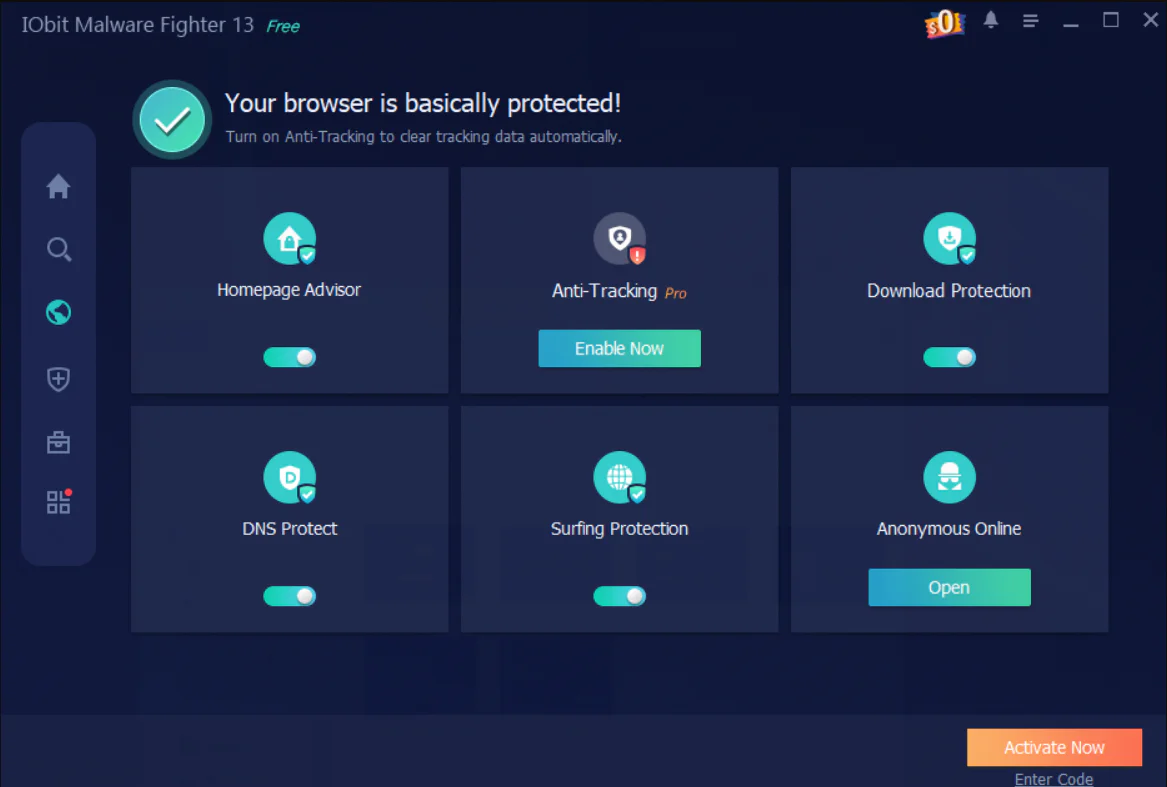
Free vs Pro Version – Key Differences
- Both versions offer real time protection, but the Pro version provides stronger and smarter threat blocking.
- The Pro version includes advanced ransomware protection to keep your files fully safe.
- The Pro version uses extra security technology for better detection and removal.
- Only the Pro version allows automatic scheduled scans.
- The Pro version encrypts browser passwords and blocks unauthorized access.
- The Pro version can remove complex and deeply hidden malware.
- The Pro version offers direct help from the support team.
Best Alternatives to IObit Malware Fighter Pro
Malwarebytes
It has a strong malware removal ability. It can find and remove threats such as spyware adware and hidden malware that other security tools may miss.
Bitdefender Antivirus
It can offer strong overall security for your computer. It provides real-time protection blocks dangerous websites and protects your data from online threats.
ESET Internet Security
It is lightweight and fast. It is ideal for older computers. It runs smoothly in the background and provides strong protection against viruses.
Kaspersky Antivirus
It is known for its advanced protection features. It uses smart technology to detect new and unknown threats.
Avast Premium Antivirus
It is the best antivirus application for Windows. It provides real time protection and blocks ransomware.
Final Thoughts
It is a simple yet powerful security tool. It offers strong protection against malware keeps your data safe, and helps you browse the internet securely. The free version is good for basic safety. The Pro version is best for full and advanced security.
How to Download and Use IObit Malware Fighter
How to Download
- You can click the Download button.
- Wait for the setup file to finish downloading.
- Double-click the downloaded file to start installation.
- After opening the setup file, click Install.
- Follow the on-screen instructions.
- Wait a few minutes while the software installs.
- Once installed, click Finish to open the program.
How to Use
- Open IObit Malware Fighter from the desktop or Start menu.
- On the main screen, click Scan.
- Choose Quick Scan for a fast check or Full Scan for deep protection.
- Wait until the scan is complete.
- Review the results shown on the screen.
- Click Remove or Quarantine to clean detected threats.
IObit Malware Fighter Pros and Cons
Pros
Strong real-time protection
Easy and clean interface
Good for low-end PCs
Cons
Full features require a paid license
Works only on Windows
IObit Malware Fighter System Requirements
OS: Windows 7, Windows 8, Windows 8.1, Windows 10, or Windows 11
Processor: 1 GHz or faster
RAM: 1 GB or more
Storage: At least 300 MB
Network: Required for updates and online protection
IObit Malware Fighter Frequently Asked Questions (FAQs)
1Is IObit Malware Fighter Pro free?
No, it is a paid version, but a free version is also available with limited features.
2Does it protect against ransomware?
Yes, it includes anti-ransomware protection.
3Is it safe to use?
Yes, it is developed by a trusted security company.
4Is IObit Malware Fighter compatible with other antivirus software?
Yes, it works well with other antivirus programs and adds an extra layer of protection.
5Does it slow down the computer?
No, it is lightweight and runs smoothly without affecting system speed.
6Can I schedule automatic scans?
Yes, you can set scans to run automatically at chosen times.
Package Size
70.94 MB
5.0
2 reviews
Direct & Safe Download
Buy License Officially
Virus FreeVerifiedFast
Product Information
File Name
IObit Malware Fighter Pro 13.1.0.1617 for Windows (2026)
Developer
IObit
License
Freeware
Total Downloads
7
Platform
Windows
4
Related Apps
Similar software you'll love
#1

Avast Premium Security 26.1.10738 for Windows (2026)
Avast Premium Security delivers award-winning antivirus with advanced protection against scams, ransomware, and online threats for complete peace of mind.
v26.1.10738165.0
#2

Malwarebytes Premium 5.4.6.227 For Windows (2026)
Download Malwarebytes Premium for Windows is a powerful anti-malware and security software. It is designed to protect your computer from viruses, ransomware, spyware, adware, and other online threats.
v5.4.6.22755.0
#3

Kaspersky VPN Download 21.23.6.614 for Windows 2026
Kaspersky VPN Download Full Version for Windows is the best software for keeping you safe and private online. Made by Kaspersky it hides your IP address protects your data while you browse online.
v1.23.6.61455.0
#4

Bitdefender Total Security 27.0.55.298 for Windows (2026)
Bitdefender Total Security is an award-winning security suite that protects Windows, macOS, Android, and iOS devices. Secure your data, block malware, stop online threats, and enjoy complete privacy
v27.0.55.29845.0
Related Tags
Explore more software in these categories
IObit Malware Fighter Pro 13.1.0.1617 for Windows (2026) Tested & Verified
by FreewareLab Security Team
SECURE
0/72
VirusTotal
Jan 20
Test Date
Win 11
Platform
100%
Trust Score
No MalwareNo AdwareClean InstallFeatures Verified
A
Ash ColemanVerifiedTOP
Software Security Analyst at FreewareLab
Our Verification Process
Security Scan
Every file scanned with 72+ antivirus engines via VirusTotal
Installation Test
Clean install verified - no bundleware, adware, or PUPs
Feature Verification
All advertised features tested and confirmed working
5.0
Excellent
2 ratingsRating Breakdown
5
2(100%)
4
0
3
0
2
0
1
0
Write a Review
for IObit Malware Fighter Pro 13.1.0.1617 for Windows (2026)
0 Reviews
Click to share your experience