Kaspersky Total Security 21.3.10.391 for Windows (2026)
21.3.10.391New
Virus FreeNo AdwareSafe DownloadLab Tested
Download Kaspersky Total Security for Windows to protect your PC from viruses, malware, ransomware, unsafe websites, and online threats with easy security tools.
Virus-free • Verified by FreewareLab
Download Kaspersky Total Security Latest Version - Freewarelab
Download Kaspersky Total Security for Windows to protect your PC from viruses, malware, ransomware, unsafe websites, and online threats with easy security tools.
5.0(1)
0 downloads
Jun 3, 2026
Kaspersky Total Security 21.3.10.391 for Windows (2026) Video Overview
Watch this video to learn more about Kaspersky Total Security 21.3.10.391 for Windows (2026) features and how to use it.
Kaspersky Total Security
If you find the trusted Windows security application? You have come to the right place. Kaspersky Total Security is the perfect software. It can keep your PC safe from Viruses and online dangers.
It is a strong security option and an easy way to protect users. It is still the best choice. It allows you to use safe internet browsing, online banking, password protection, and personal family data.
Overview of Kaspersky Plus Total Security
Kaspersky Total Security steps in like a guard who knows the rules well. Instead of just stopping viruses, it watches for shady sites trying to trick you. Clicking a suspicious link? It blocks that path before damage happens. Hackers looking to sneak in get turned away quietly.
Passwords stay safer because built in helpers store them properly. Families find relief through features meant to guide younger users. Privacy doesn’t vanish when ads follow every move online. Paying bills or shopping gets an extra lock others might miss. Windows runs smoother knowing threats hit a wall.
Why Use Kaspersky Total Security?
It is useful for people who use the internet daily. It helps keep your personal data safe while browsing, downloading, shopping, or banking online. The software has a clean design. It is best for beginners to use it without any problem. It gives complete security in one simple package.
Main Features of Kaspersky Premium Total Security
- Real-time protection against viruses and malware
- Blocks ransomware, spyware, and phishing attacks
- Safe browsing for online shopping and banking
- Password manager to store login details securely
- Parental control tools for family safety
- Privacy protection for webcam and personal data
- File backup and encryption options
- Secure payment protection for online transactions
- Automatic database updates for latest threat protection
- Easy-to-use dashboard for quick security control
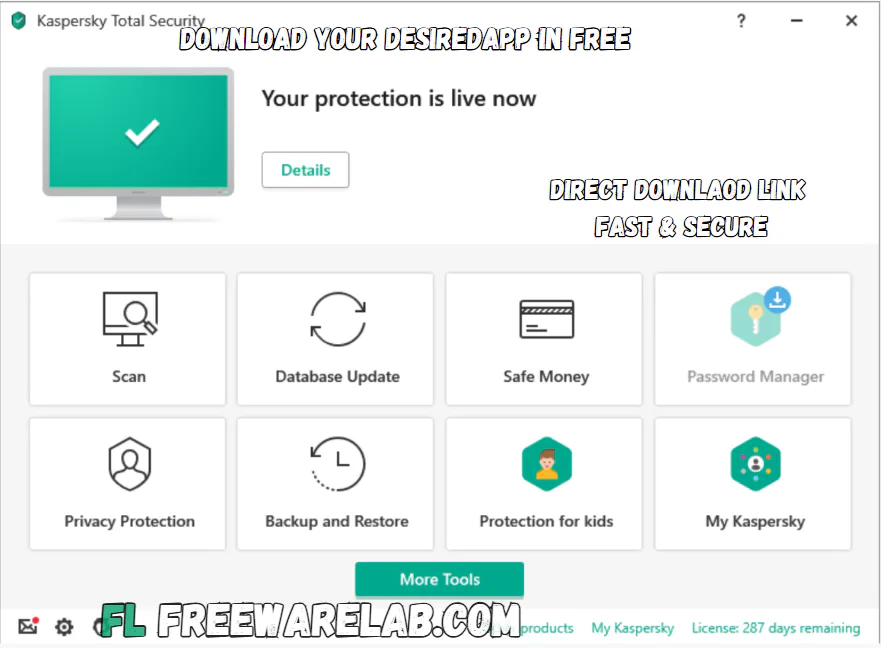
Security and Privacy Protection
It can give protection against different online and offline threats. It can scan all app websites and download to stop the harmful activity. It can save your system before it is damaged.
The privacy tools help protect your webcam, passwords, online accounts, and sensitive files. It is useful for people. Who use their PC for work, study, banking, and daily internet use.
Performance and User Experience
Most tools sit right there on the main screen, no need for tech skills to reach them. Running quietly behind things, it guards your setup without slowing you down. A quick check or one built just how you want either works fine here. Risk shows up? You get a notice straight away. That means moving fast falls on you now.
Best Alternatives to Kaspersky Total Security
Bitdefender Total Security: Strong antivirus with privacy and performance tools.
Norton 360: Good protection with VPN, password manager, and online security.
McAfee Total Protection: Complete security for PC, mobile, and family devices.
Avast Premium Security: Easy antivirus with web, email, and ransomware protection.
Final Words
It is a powerful and easy-to-use security software. It protects your PC from viruses, online threats, unsafe websites, and privacy risks. It also gives useful tools like a password manager and safe payment protection. If you want complete PC security in simple software. It is a good option to consider.
How to Download and Use Kaspersky Total Security
- Click on the Download button.
- Wait for the setup file to download.
- Open the downloaded setup file.
- Follow the installation steps on the screen.
- Update the antivirus database.
- Run a full scan of your PC.
- Keep real-time protection turned on.
- Use safe browsing and privacy tools for better security.
Kaspersky Total Security Pros and Cons
Pros
Strong antivirus and malware protection
Simple and clean user interface
Good privacy and safe browsing tools
Useful password manager included
Parental control features available
Regular security updates
Cons
Some features may need a paid license
Full scan can take time on older PCs
Advanced tools may feel extra for basic users
Kaspersky Total Security System Requirements
OS: Windows 10, 11, 8.1, 8, 7
Processor: 1 GHz or faster processor
RAM: 2 GB
Storage: Around 1.5 GB free disk space
Network: Required for activation and updates
Kaspersky Total Security Frequently Asked Questions (FAQs)
1Is Kaspersky Total Security good for Windows?
It is a good security program for Windows. It protects your PC from viruses and unsafe websites.
2Is Kaspersky Total Security free?
It is usually a paid software. However, some versions may offer a free trial for new users.
3Does it slow down the computer?
It works smoothly on most modern PCs. On older computers, a full scan may slow down performance for a short time.
4Can I use it for online banking?
It includes safe payment and secure browsing tools. These tools help protect your banking and shopping activities.
Package Size
158 MB
5.0
1 review
Direct & Safe Download
Virus FreeVerifiedFast
Product Information
File Name
Kaspersky Total Security 21.3.10.391 for Windows (2026)
Developer
Kaspersky Lab
License
Freeware
Total Downloads
0
Platform
Windows
4
Related Apps
Similar software you'll love
#1

Remote Desktop Manager for Windows (2026)
Download Remote Desktop Manager 2025.3.29 for Windows to securely centralise all remote connections, passwords, and credentials in one workspace. Built for IT teams, fast, secure, and easy to use.
v2025.3.295.0
#2

UltraViewer Download 6.6.124 Ultimate Free for Windows 2026
UltraViewer is the best remote desktop tool for connecting to another computer over the internet. It helps you control the screen share and chat while getting or giving online support.
v6.6.12425.0
#3

Dropbox Download 250.4.3245 for Windows 2026
Dropbox Download for Windows is the best software that can store photos videos documents and important files safely in one place. Dropbox works on computers and mobile devices.
v250.4.324525.0
#4

Super VPN Download for PC 3.1.2 Free VPN (2026)
Download Super VPN for PC Windows 10 and 11. Enjoy a fast, secure, and free VPN service with strong encryption, safe browsing, and easy one-click connection. Protect your internet connection.
v3.1.21454.0
Related Tags
Explore more software in these categories
Kaspersky Total Security 21.3.10.391 for Windows (2026) Tested & Verified
by FreewareLab Security Team
SECURE
0/72
VirusTotal
Jun 3
Test Date
Win 11
Platform
100%
Trust Score
No MalwareNo AdwareClean InstallFeatures Verified
A
Ash ColemanVerifiedTOP
Software Security Analyst at FreewareLab
Our Verification Process
Security Scan
Every file scanned with 72+ antivirus engines via VirusTotal
Installation Test
Clean install verified - no bundleware, adware, or PUPs
Feature Verification
All advertised features tested and confirmed working
5.0
Excellent
1 ratingRating Breakdown
5
1(100%)
4
0
3
0
2
0
1
0
Write a Review
for Kaspersky Total Security 21.3.10.391 for Windows (2026)
0 Reviews
Click to share your experience