Microsoft Office Picture Manager Download 14.0.2015.10 for Windows
14.0.2015.10New
Virus FreeNo AdwareSafe DownloadLab Tested
Microsoft Office Picture Manager is a simple and fast image viewer and editor for Windows. Install it via SharePoint Designer 2010 and manage, edit, organize, and share photos easily.
Virus-free • Verified by FreewareLab
Download MS Office Picture Manager Latest Version - Freewarelab
Microsoft Office Picture Manager is a simple and fast image viewer and editor for Windows. Install it via SharePoint Designer 2010 and manage, edit, organize, and share photos easily.
5.0(5)
2 downloads
Feb 4, 2026
Microsoft Office Picture Manager Download 14.0.2015.10 for Windows Video Overview
Watch this video to learn more about Microsoft Office Picture Manager Download 14.0.2015.10 for Windows features and how to use it.
Microsoft Office Picture Manager Download
Microsoft Office Picture Manager is a lightweight image viewer and editor. It includes many useful features that let you quickly edit a picture and use it. Windows users choose it for its fast speed and simple photo editing tools. It is a favourite application today. It is ideal for users. Who want quick edits without using complex photo editing software.
What Is Microsoft Office Picture Manager
It is a simple photo management and editing program. It is developed by Microsoft. It allows users to view, organize, crop, resize, rotate, and adjust images easily. It focuses on basic image tasks. It is perfect for beginners and office users.
Key Features of Microsoft Office Picture Manager
- Fast image viewing with smooth performance
- It can crop, flip, rotate, and resize images
- Auto correct brightness and contrast
- Remove red-eye from photos
- Compress pictures for email or web use
- Simple and clean user interface
- Batch editing for multiple images
Why People Still Use Picture Manager on Windows
It is lightweight and very easy to use. It is still like users Microsoft Office Picture Manager. It opens images quickly and uses little system memory. It does not confuse users with complex tools. It gets the job done perfectly for basic photo editing.
Microsoft Office Picture Manager was included in Office 2003 and Office 2013 and continues to work well on Windows 10. Users can also install it as a standalone app using SharePoint Designer 2010 or later versions. It is often used with Microsoft SharePoint to manage images and easily rename and edit picture files.
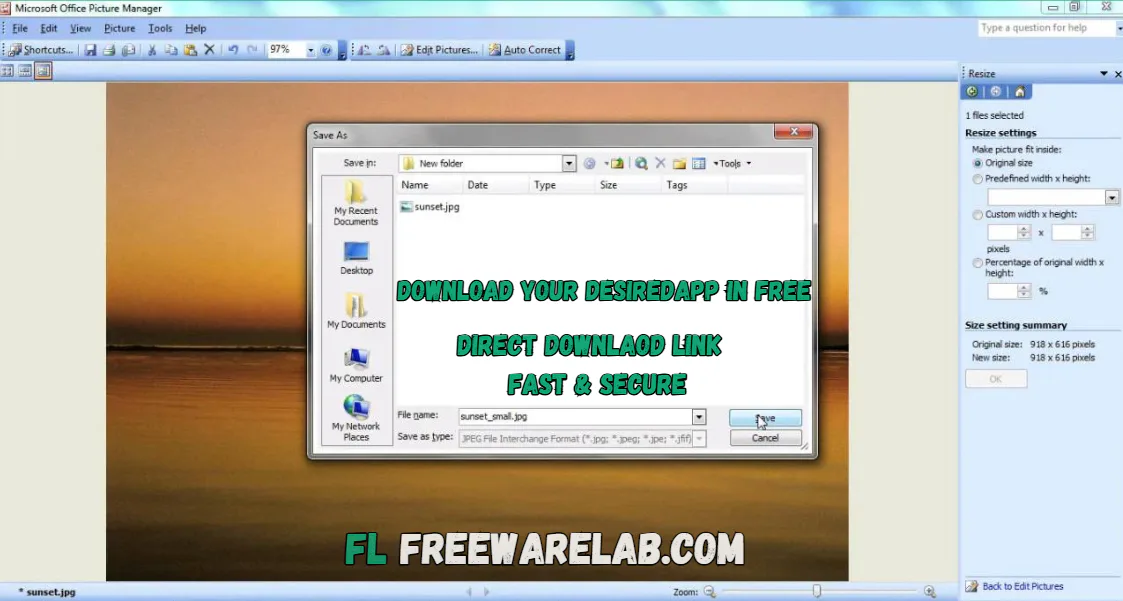
Microsoft Photos
It is an image viewer that also includes basic photo editing tools. You can easily zoom in and out. It is rotate pictures, crop images, delete files, and mark photos as favorites using the top menu.
It is also available as an Edit and Create option in the top right corner. You can edit photos, draw on images, add simple effects or text, and even create short videos with music. You can open your image in Paint 3D directly from this menu.
Supported Image Formats
- JPEG (JPG)
- PNG
- BMP
- TIFF
- GIF
Best Alternatives to Microsoft Office Picture Manager
Windows Photos App: A built in Windows app for viewing photos and doing basic edits like crop and rotate.
IrfanView: A fast and lightweight image viewer that supports many image formats and simple editing tools.
FastStone Image Viewer: An easy to use image viewer with basic editing features and smooth navigation.
Paint.NET: A simple but powerful image editing program, good for everyday photo editing.
GIMP: A free and advanced image editor for users who need professional-level editing tools.
Final Verdict
It remains a strong choice for users seeking a fast and reliable image viewer. It is the best editor on Windows. It is discontinued but its clean interface and useful features. It is a favorite among many users. If you only need basic photo editing without complications. It is still worth using.
How to Download & Use Microsoft Office Picture Manager
How to Download
- Download Microsoft SharePoint Designer 2010 from our website.
- Open the installer and choose Custom Install
- Select Microsoft Office Picture Manager only
- Accept the license terms and click Continue.
- On the Choose the installation you want page, click Customize.
- Click Install and wait for the process to finish
- Open it from the Start Menu after installation
How to Use
- Open Microsoft Office Picture Manager from the Start Menu
- Browse and select the folder that contains your images
- Click on any image to view it
- Use editing tools like crop, rotate, resize, or auto-correct
- Save the edited image or save it as a copy
- Close the app when done
Microsoft Office Picture Manager Pros & Cons
Pros
Very lightweight and fast
Easy for beginners
No learning curve
Works well on low-end PCs
Free with older Microsoft tools
Cons
No longer officially supported
Not included in modern Office versions
Limited advanced editing features
Microsoft Office Picture Manager System Requirements
OS: Windows 7, 8, 10, or 11
Processor: 1 GHz or faster
RAM: 1 GB minimum
Storage: 200 MB free space
Microsoft Office Picture Manager Frequently Asked Questions (FAQs)
1Is Microsoft Office Picture Manager free?
It is free to download and install from our website.
2Can I use it on Windows 11?
It works on Windows 11 using compatibility mode.
3Does it support batch image editing?
Yes, you can edit multiple images at once.
4Is it better than the Windows Photos app?
For simple and fast editing, many users prefer Picture Manager.
5Is it safe to use today?
It is safe if downloaded from our website.
Package Size
254 MB
5.0
5 reviews
Direct & Safe Download
Buy License Officially
Virus FreeVerifiedFast
Product Information
File Name
Microsoft Office Picture Manager Download 14.0.2015.10 for Windows
Developer
Microsoft
License
Freeware
Total Downloads
2
Platform
Windows
4
Related Apps
Similar software you'll love
#1

Microsoft Office 2007 Free Download for Windows (2026)
Microsoft Office 2007 Free Download is the most popular application. It is a widely used software developed by Microsoft. It offer the lightweight fast interface and easy to use.
v200725.0
#2
Wondershare PDFelement 12.1.9.4002 for Windows (2026)
Wondershare PDFelement is a fast, all-in-one PDF editor to create, edit, convert, merge, split, protect, and sign PDF files with ease. Edit any PDF in seconds and scan documents.
v12.1.9.4002135.0
#3

Foxit PDF Reader 14.0.2.33402 Free Download for Windows (Latest Version)
Foxit PDF Reader 14.0.2.33402 is the best and lightest PDF software for Windows. Foxit PDF help you open read and print PDF files easily. You can highlight text, add notes, fill forms, and sign a
v14.0.2.334025.0
#4
PDF-XChange Editor Plus 10.8.2 For Windows (2026)
PDF-XChange Editor Plus is a complete PDF editing solution for Windows. Create, edit, OCR, secure, and convert PDFs easily with fast performance and professional-grade tools.
v10.8.2.40725.0
Related Tags
Explore more software in these categories
Microsoft Office Picture Manager Download 14.0.2015.10 for Windows Tested & Verified
by FreewareLab Security Team
SECURE
0/72
VirusTotal
Feb 4
Test Date
Win 11
Platform
100%
Trust Score
No MalwareNo AdwareClean InstallFeatures Verified
A
Ash ColemanVerifiedTOP
Software Security Analyst at FreewareLab
Our Verification Process
Security Scan
Every file scanned with 72+ antivirus engines via VirusTotal
Installation Test
Clean install verified - no bundleware, adware, or PUPs
Feature Verification
All advertised features tested and confirmed working
5.0
Excellent
5 ratingsRating Breakdown
5
5(100%)
4
0
3
0
2
0
1
0
Write a Review
for Microsoft Office Picture Manager Download 14.0.2015.10 for Windows
0 Reviews
Click to share your experience