MobaXterm Download 26.0 For Windows (2026)
26.0New
Virus FreeNo AdwareSafe DownloadLab Tested
Download MobaXterm for Windows, the ultimate all-in-one remote computing toolbox. Connect easily using SSH, VNC, RDP, FTP, and Unix commands in one app. Get the direct download link, safe and fast.
Virus-free • Verified by FreewareLab
Download MobaXterm Free Latest Version - Freewarelab
Download MobaXterm for Windows, the ultimate all-in-one remote computing toolbox. Connect easily using SSH, VNC, RDP, FTP, and Unix commands in one app. Get the direct download link, safe and fast.
5.0(1)
4 downloads
Feb 10, 2026
MobaXterm Download 26.0 For Windows (2026) Video Overview
Watch this video to learn more about MobaXterm Download 26.0 For Windows (2026) features and how to use it.
MobaXterm Download
MobaXterm is your ultimate toolbox for remote computing. In a single Windows application. It provides loads of functions that are tailored for programmers, webmasters, IT administrators and pretty much all users. It combines many tools in one place. You do not need to install separate software for SSH, FTP, or terminal work.
It is used worldwide by developers, server administrators, students, and hosting users. It is simple, fast, and reliable.
MobaXterm: An All-in-One Remote Access Tool
You can connect to remote computers and servers from a single location. It accesses remote desktops using common connection types. It also comes with a built in Linux style terminal. You can run commands easily on Windows. It allows Windows users to run Linux commands easily.
Key Features of MobaXterm
- Secure SSH connection for remote servers
- Built-in SFTP file transfer with drag & drop
- Tabbed terminal interface for multiple sessions
- Supports X11-forwarding and XDMCP connections
- Built-in Unix/Linux commands (bash, grep, rsync, etc.)
- Portable version available (no installation required)
- Password and session manager for easy login
- Works as a powerful SSH client for connecting to remote servers
- Includes a built-in X server (XServer) to run graphical Linux apps on Windows
- Allows remote access using VNC, Telnet, SSH, and MOSH
- Comes with an integrated SFTP browser for easy file transfer
- Provides a full Unix-style terminal environment
- Supports common Unix commands like ls
- The Home Edition is free and suitable for everyday users
Why Use MobaXterm?
It saves time and effort. Instead of using multiple tools, everything is available in one window. You can manage servers, upload and download files. It run commands at the same time. It is especially useful for hosting platforms, VPS management, and development work.
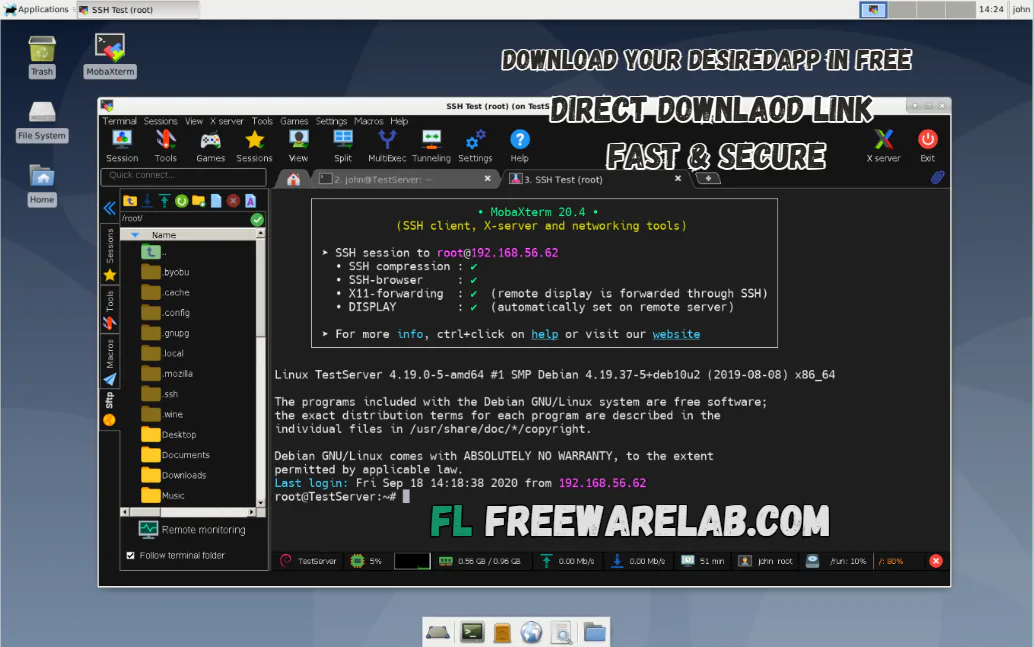
MobaXterm Free vs Professional
Free Version
- SSH, SFTP, RDP support
- X11 server included
- Enough for students and basic users
Professional Version
- Advanced SSH features
- Macros and automation
- Custom branding
- Suitable for businesses and power users
Best Alternatives to MobaXterm
PuTTY: A very simple tool mainly used for SSH connections.
WinSCP: Ideal for uploading and downloading files to and from servers.
Termius: A modern-looking app that lets you sync servers across devices.
SecureCRT: A powerful terminal tool with advanced features for professionals.
Remote Desktop Manager: It supports many connection types in one single program.
Final Words
It is the best remote access tool for Windows users. It is fast, secure, and easy to use. If you are a student, developer, or server admin. MobaXterm makes remote work simple and efficient. If you regularly manage servers or hosting. It is highly recommended.
How to Download and Use MobaXterm
How to Download
- Click the Download button
- Save the file on your computer
- Open the downloaded file
- Follow the on-screen instructions
- Finish the installation
- Launch MobaXterm from the desktop or the start menu
How to Use
- Open MobaXterm
- Click on Session
- Choose connection type (SSH, SFTP, RDP, VNC, or Telnet)
- Enter the server IP address and username
- Click OK to connect
- Use the terminal to run commands
- Use the side SFTP browser to upload or download files
MobaXterm Download Pros & Cons
Pros
All tools in one software
Easy to use for beginners
Strong security
Portable option available
Cons
Pro version is paid
Windows only
Interface may feel heavy for basic users
MobaXterm System Requirements
OS: Windows 7, 8, 10, 11
Processor: Any modern CPU
RAM: 2 GB minimum
Storage: 200 MB free space
Other: Internet connection for remote access
MobaXterm Frequently Asked Questions (FAQs)
1Is MobaXterm free?
The free version includes basic features.
2Can I use MobaXterm for VPS?
It is perfect for VPS and cloud servers.
3Does MobaXterm support file transfer?
Yes, it has built-in SFTP and FTP.
4Is MobaXterm safe to use?
Yes, it uses secure protocols like SSH.
5Can beginners use MobaXterm?
Yes, the interface is beginner-friendly.
Package Size
41.8 MB
5.0
1 review
Direct & Safe Download
Buy License Officially
Virus FreeVerifiedFast
Product Information
File Name
MobaXterm Download 26.0 For Windows (2026)
Developer
Mobatek
License
Freeware
Total Downloads
4
Platform
Windows
3
Related Apps
Similar software you'll love
#1

iTop VPN for Windows 7.2.0.6796 free Download (2026)
Download iTop VPN for Windows & Android to hide your IP, protect privacy, and access blocked websites. Fast, secure, and free VPN with one-click connection.
v7.2.0.67965.0
#2
FortiClient VPN Download for Windows 7.4.5 Free (2026)
Download FortiClient VPN for Windows with a fast, secure, and direct download link. Create encrypted SSL VPN or IPSec connections to FortiGate gateways for safe remote access.
v7.4.565.0
#3

AnyViewer Remote Desktop 5.5.0 For Windows (2026)
Download AnyViewer for Windows latest version 2026. A fast, secure, and easy remote desktop software that lets you access and control your PC from anywhere safely and smoothly.
v5.5.025.0
Related Tags
Explore more software in these categories
MobaXterm Download 26.0 For Windows (2026) Tested & Verified
by FreewareLab Security Team
SECURE
0/72
VirusTotal
Feb 10
Test Date
Win 11
Platform
100%
Trust Score
No MalwareNo AdwareClean InstallFeatures Verified
A
Ash ColemanVerifiedTOP
Software Security Analyst at FreewareLab
Our Verification Process
Security Scan
Every file scanned with 72+ antivirus engines via VirusTotal
Installation Test
Clean install verified - no bundleware, adware, or PUPs
Feature Verification
All advertised features tested and confirmed working
5.0
Excellent
1 ratingRating Breakdown
5
1(100%)
4
0
3
0
2
0
1
0
Write a Review
for MobaXterm Download 26.0 For Windows (2026)
0 Reviews
Click to share your experience