Movavi Video Editor 26.8.0 for Windows (2026)
26.8.0Updated
Virus FreeNo AdwareSafe DownloadLab Tested
Movavi Video Editor is a powerful and easy video editing tool for PC. Create professional videos with effects, transitions, and smart tools. Download Movavi Video Editor directly & secure link.
Virus-free • Verified by FreewareLab
Download Movavi Video Editor Easy Video Editing Software - Freewarelab
Movavi Video Editor is a powerful and easy video editing tool for PC. Create professional videos with effects, transitions, and smart tools. Download Movavi Video Editor directly & secure link.
4.5(2)
2 downloads
Feb 7, 2026
Movavi Video Editor 26.8.0 for Windows (2026) Video Overview
Watch this video to learn more about Movavi Video Editor 26.8.0 for Windows (2026) features and how to use it.
Movavi Video Editor
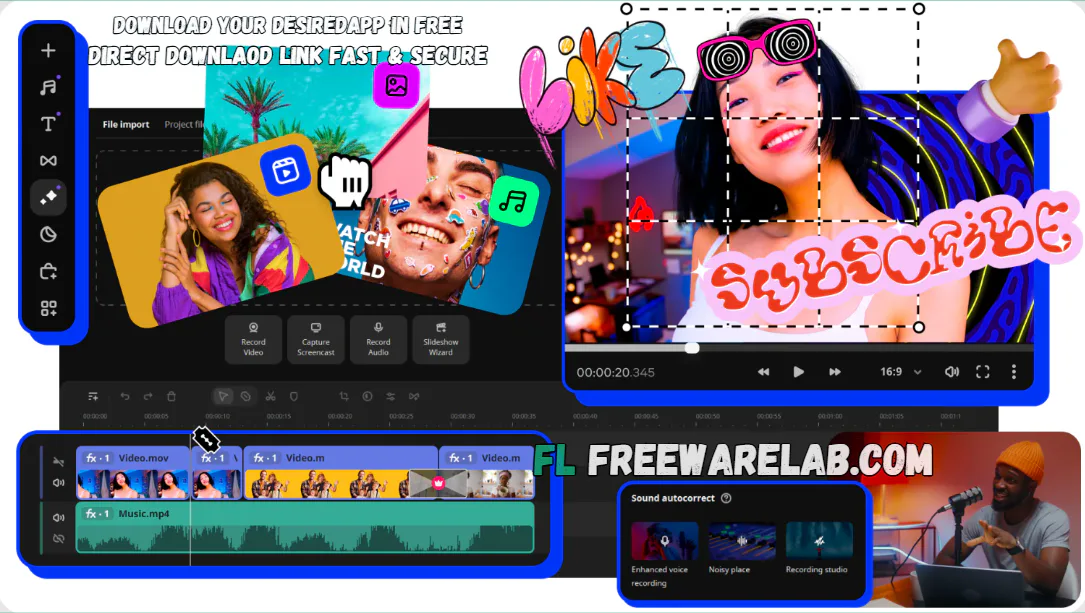
Movavi Video Editor is a powerful video editer application for Windows. It is perfect video editor for new and expert user. It can provide a simple interface, modern tools, and fast performance. You can create high quality videos without any technical stress.
If you are editing family videos, creating YouTube content, or preparing professional presentations. Movavi helps you get polished results quickly and easily.
Why Choose Movavi Video Editor for Windows
- It can give a clean and user-friendly interface.
- You can simply one-click AI auto subtitles.
- Ready-made templates for fast editing
- Smooth performance, even with 4K videos
- Perfect balance of simplicity and advanced features
Easy Video Editing Tools for Beginners
- Movavi makes video editing effortless with simple drag-and-drop controls. You can:
- You can easily cut, trim, and merge clips without quality loss.
- It allow to crop videos and adjust colors easily.
- If you want to change video speed (slow motion or fast motion)
- Add music, voiceovers, and sound effects
- Movavi helps you add sound effects, music, and Voiceover.
Movavi Effects, Filters, and Creative Elements
- Hundreds of filters, transitions, titles, and overlays
- Stylish animated text and subtitles
- Trending stickers and motion effects
- Hollywood-style effects like Chroma Key and Reverse Video
- These tools help your videos look modern, creative, and professional.
Audio & Media format Support
- Movavi supports almost all popular formats, including:
- Video: MP4, AVI, MOV, MKV
- Audio: MP3, WAV, AAC
- You can also: Remove background noise
- Use built-in music tracks
- Record voice with a microphone
- Capture webcam or screen footage
Movavi Slideshow & Special Effects
- Create beautiful slideshows in 3 easy steps using the Slideshow Wizard:
- Add photos
- Choose transitions
- Add music
- Movavi automatically syncs slides with music beats for a smooth result.
What’s New in Movavi Video Editor 2026? (Latest Updates)
- AI Auto Subtitles: It can generate and sync subtitles instantly.
- Hover Previews: It can preview effects and clips by hovering.
- SRT Export & Subtitles: Now you can export videos with subtitle files.
- New Free Effects: It can give the filters, transitions, titles, and stickers
- Silence Removal: You can easily remove silent parts from your audio clips.
- Snapping Tool: Perfect clip alignment on the timeline
- Effect Copying & Fast Playback: It can help you to copy paste video effects into diffecnt clips.
Key Features of Movavi Video Editor
- It offers hundreds of filters, effects, and smooth transitions for your video clip.
- Make your text pop using stylish titles, animations, and ready-made overlays.
- It can use the one-click auto subtitle tool to save yourself hours of work.
- You can add music, kill background noise, and sync everything up perfectly.
- Zero-stress exporting in HD or Full HD with presets already optimized for YouTube and TikTok.
- You can save your videos in high quality without having to guess the settings.
- It is designed specifically to help creators get more done in less time.
Alternatives to Movavi Video Editor
Wondershare Filmora
If you are just starting out or don’t want to spend hours watching tutorials. Filmora is probably your best bet. It’s designed to be super intuitive with a drag and drop layout that just makes sense. It comes loaded with built in music, transitions, and titles.
It is a powerhouse of video editing and color correction. It is mostly used to create Hollywood scenes. It offers full control for video editing and manages audio. If you want your videos to have that "cinema" look and feel, the learning curve is definitely worth it.
Adobe Premiere Pro
Premiere Pro is the "industry standard" software. It is most professional editors use for everything from TV shows to big budget movies. It is a very robust, traditional editor. It gives you total control over your timeline.
Topaz Video AI
It is famous for its ability to take old, grainy, or low resolution footage. It look incredibly sharp and modern using AI. It’s the go to choice if you have old family videos or low quality clips that you want to "upscale" to 4K.
Final word
It is an excellent choice. If you want easy, fast, and professional looking video editing on Windows. It is a high end editor for advanced users. Its simplicity powerful tools and affordable pricing. It is perfect for content creators.
How to Download and Use Movavi Video Editor
How to Download
- You can click on the Download button.
- After downloading, unzip with WinRAR.
- Double-click the downloaded setup file.
- Click Next and accept the license agreement.
- Select the install location c drive.
- You can click the Install button.
- Wait for the installation to finish.
- Click Launch to open the software.
How to Use
Adding your clips
- Open Movavi and click the Add Files button.
- Select the videos, photos, or music you want to use.
- Drag those files down onto the timeline at the bottom of the screen to start building your video.
Editing and styling
- Trim and Cut: Click on your clips to chop out the parts you don't want.
- Add Flair: Drag and drop transitions between clips or apply filters to change the look.
- Add Text: Pick a title style and type in your text to introduce your video.
- Fix Audio: Slide the volume bars up or down to get the sound just right.
Music and Voice overs
- Import a song to use as background music.
- If you want to narrate, you can record a voiceover directly into the timeline.
- Line everything up so the sound matches the action on screen.
Saving your work
- You can play the button in the preview window.
- If it looks good, click Export.
- You can choose your quality level, like HD.
- Hit Start and let the software save your finished video.
Movavi Video Editor Pros & Cons
Pros
It is the best application for a new user.
It gives the large effects and transition library
Affordable pricing for advanced users and a clean layout
Supports 4K videos and many other formats
It gives regular updates and support
Cons
The free version offers some basic featuers
Watermark in free trial
Slower exports on old systems
Movavi Video Editor System Requirements
OS: Windows 7, 8, 10, 11
Processor: Intel, AMD, processor at 1.5 GHz
RAM: 4 GB
Graphics: Intel HD Graphics 2000 or equivalent
Storage: 400 MB free space required for installation
Display: 1280 × 768 resolution display
Movavi Video Editor FAQs
1What is Movavi Video Editor?
It is a simple video editing application.
2Is Movavi Video Editor free?
Yes, a free trial is available, but exports include a watermark.
3Does it support many file formats?
Yes, it supports most popular video and audio formats.
4Is Movavi Video Editor good for beginners?
It is a simple interface, and anyone can use it without learn.
5Does Movavi Video Editor support 4K videos?
It can allow exporting video in various formats, including 4k.
Movavi Video Editor 26.8.0 Changelog
Latest version changes and improvements
- Improved overall performance and speed
- Fixed bugs causing crashes during video export
- Enhanced stability while editing large video projects
- Minor improvements to timeline responsiveness
- Better compatibility with Windows 10 & Windows 11
- Optimized rendering for smoother playback
- General UI refinements for a better editing experience
Previous Versions
Movavi Video Editor 25.3.0
Jan 3, 2026121 MB
Package Size
121.35 MB
4.5
2 reviews
Direct & Safe Download
Buy License Officially
Virus FreeVerifiedFast
Product Information
File Name
Movavi Video Editor 26.8.0 for Windows (2026)
Developer
Movavi
License
Freeware
Total Downloads
2
Platform
Windows
4
Related Apps
Similar software you'll love
#1
Wondershare Filmora 15.2.5.17803 for Windows (2026)
Wondershare Filmora is an easy-to-use, AI-powered video editor for Windows that helps anyone create professional videos fast. The direct download link is available on our website.
v15.2.5.17803395.0
#2

Adobe Premiere Elements v26.1.0 for Windows (2026)
Download Adobe Premiere Elements for Windows is an easy video editing software for beginners, featuring AI-powered tools, Guided Edits, and automated effects to create stunning videos fast.
v26.1.0324.8
#3
CyberLink PowerDirector 24.2.1404.0 Download for Windows 2026
Download CyberLink PowerDirector with a Direct Link is the best video editing software for easily creating videos. You can cut videos add music text effects and transitions without any hard steps.
v24.2.1404.025.0
#4
Adobe Premiere Pro Download 26.0.0 for Windows (2026)
Download the latest Adobe Premiere Pro for Windows. A powerful video editing software for beginners and professionals. Edit, cut, add effects, mix audio, and export high-quality videos easily.
v26.0.0295.0
Related Tags
Explore more software in these categories
Movavi Video Editor 26.8.0 for Windows (2026) Tested & Verified
by FreewareLab Security Team
SECURE
0/72
VirusTotal
Feb 7
Test Date
Win 11
Platform
100%
Trust Score
No MalwareNo AdwareClean InstallFeatures Verified
A
Ash ColemanVerifiedTOP
Software Security Analyst at FreewareLab
Our Verification Process
Security Scan
Every file scanned with 72+ antivirus engines via VirusTotal
Installation Test
Clean install verified - no bundleware, adware, or PUPs
Feature Verification
All advertised features tested and confirmed working
4.5
Excellent
2 ratingsRating Breakdown
5
1(50%)
4
1(50%)
3
0
2
0
1
0
Write a Review
for Movavi Video Editor 26.8.0 for Windows (2026)
0 Reviews
Click to share your experience