Parted Magic 12.32 for Windows (2026)
12.32Updated
Virus FreeNo AdwareSafe DownloadLab Tested
Parted Magic delivers powerful tools to get the job done. Direct Download Link safe & secure. Easily resize, move, copy, grow, or shrink partitions using trusted utilities like GParted and Parted, plu
Virus-free • Verified by FreewareLab
Download Parted Magic Disk Management Software - Freewarelab
Parted Magic delivers powerful tools to get the job done. Direct Download Link safe & secure. Easily resize, move, copy, grow, or shrink partitions using trusted utilities like GParted and Parted, plu
5.0(4)
20 downloads
Jan 24, 2026
Parted Magic 12.32 for Windows (2026) Video Overview
Watch this video to learn more about Parted Magic 12.32 for Windows (2026) features and how to use it.
Parted Magic
Parted Magic is a powerful management toolkit. It is designed for advanced partitioning, data recovery, disk cloning, and secure erase operations. It runs as a standalone Linux-based environment. It allows you to manage disks without installing anything on your system.
You can easily manage your disk partitions. You can resize copy move delete or create new partitions without losing data. It also allows you to grow or shrink your main system drive to make space for another operating system.
Recover Lost Data and Partitions
If you have lost files or partitions. It can help recover them. It can rescue data from disks with read errors recover deleted files and restore lost partitions. It a reliable choice for emergency data recovery.
Key Features of Disk Partitioning
- Resize, grow, or shrink partitions
- Expand or reduce the C: drive safely
- Create space for installing new operating systems
- Copy and move partitions without data loss
- Check, label, and manage partition UUIDs
- This makes it ideal for multi-boot systems and advanced disk layouts.
Data Recovery & Rescue Tools
- Parted Magic offers reliable tools to recover lost or inaccessible data.
- Recovery Capabilities
- Rescue data from lost or damaged partitions
- Recover deleted or lost files
- Access disks with read errors
- Reset or change Windows passwords
- Retrieve files from failing or corrupted storage devices
- Disk Cloning & Backup Options
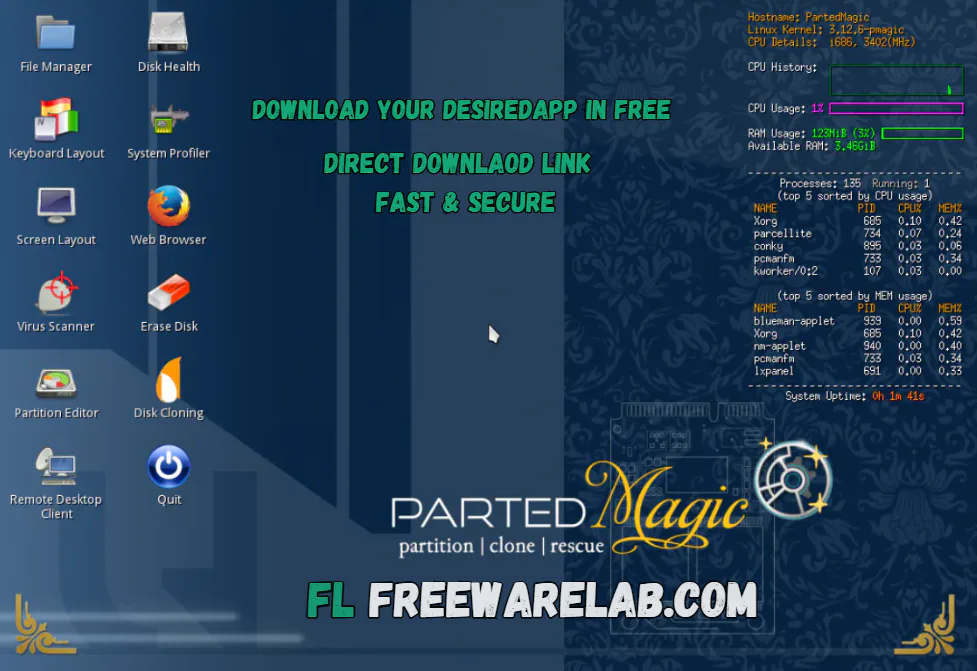
Clone disks or individual partitions
- Save cloned data as an image file or direct duplicate
- Store backups on:
- Local storage devices
- SSH servers
- Samba servers
- Network File System (NFS) shares
- Restore original data from saved clone files anytime
Secure Erase & Disk Wiping Tools
- Parted Magic includes professional-grade disk erasing solutions.
- Secure Erase Options
- Internal SSD Secure Erase
- Conventional overwrite methods
- Wipe only free space without affecting existing data
- Permanently mark SSD cells as empty for full data removal
Create Disk Copies for Backup
Parted Magic lets you clone an entire hard drive or a single partition. You can save the cloned data as an image file or as an exact copy. These backups can be stored on local drives network storage SSH servers or Samba shares and restored later when needed.
Benchmarking & Performance Testing
The software includes powerful benchmarking tools to test system performance. You can measure disk speed, test CPU and RAM stability, and check overall hardware health. Tools such as stress testers and hardware information utilities are included for detailed analysis.
Built-In Benchmarking Tools
- Test and analyze system performance using advanced benchmarking utilities.
- Included Tools
- Bonnie++
- IOzone
- HardInfo
- System Stability Tester
- mprime
- stress
Supported File Systems
ext2, ext3, ext4, FAT16, FAT32, NTFS, ReiserFS
Create, grow, shrink, move, copy, check, label, UUID
btrfs: Create, grow, shrink, move, copy, check, label
exFAT: Create, move, copy, check, label
HFS / HFS+: Create, shrink, move, copy, check
F2FS: Create, move, copy
Limited Support: jfs, Linux swap, lvm2 pv, nilfs, reiser4, ufs, xfs, zfs
Supported Storage Devices
- SATA, IDE, and SCSI hard drives
- SSDs (Solid State Drives)
- USB drives and flash memory
- Supports sector sizes: 512, 1024, 2048, 4096, and more
- Networking Capabilities
- Built-in Network Manager for wired and wireless connections
- Includes Firefox browser for internet access and downloads
Advanced Partition Management
- Supports MBR (msdos) and GPT partition tables
- MiB alignment or traditional cylinder boundaries
- Enable or disable partition flags such as: boot, hidden, raid
What Is Disk Partitioning?
Disk partitioning divides a physical hard drive into multiple logical sections called partitions. Each partition can use a different file system and even run a separate operating system improving organization and flexibility.
What Is SSD Secure Erase?
SSD Secure Erase permanently clears all data by marking every memory cell as empty. It ensures complete data removal and helps restore SSD performance.
What Is Benchmarking Software?
Benchmarking software measures computer performance by running standardized tests to evaluate speed stability and reliability of hardware components.
It is an excellent choice for users. Who need professional-level disk partitioning, secure erase, cloning, and recovery tools in a portable, no-installation environment. It is especially useful for technicians power users, and system administrators looking for reliable disk control.
Best Parted Magic Alternatives
Clonezilla
Clonezilla is a powerful free disk cloning and imaging tool. It’s perfect for backing up entire drives or restoring backups. Clonezilla supports many file systems and works well with large deployments.
AOMEI Partition Assistant
AOMEI Partition Assistant is a Windows-based partition manager with a user-friendly interface. It lets you resize, move, merge, or split partitions without data loss. It runs inside Windows.
EaseUS Partition Master
EaseUS provides a beginner-friendly disk partition manager with both free and paid versions. It allows resizing, merging, formatting, and migrating the OS to SSD.
How to Download and Use Parted Magic
How to Download
- Click the download link.
- Save the Parted Magic ISO file on your computer.
- This ISO file is what you will use to boot your PC.
- Use a USB drive (4GB or larger)
- Backup your USB data (it will be erased)
How to Use
- Create a bootable USB or burn the ISO to CD/DVD
- Insert the USB or CD into your PC
- Restart the system and enter BIOS/UEFI
- Change boot order to USB or CD
- Boot into the Parted Magic environment
- Launch the required tool (Partition Editor, Disk Eraser, etc.)
- Perform disk operations carefully
- Save logs or reports if needed
- Shut down and remove the bootable media
Parted Magic Pros and Cons
Pros
All-in-one disk management solution
Powerful secure erase features
Fast and lightweight boot environment
No installation required
Works on most hardware setups
Cons
May be confusing for beginners
Limited driver support for rare hardware
Network setup can be challenging for new users
Parted Magic System Requirements
OS: Windows 11, 10, 8, or 7
Processor: x86_64 (64-bit) processor
RAM: 2 GB
Storage: 2 GB free space for ISO or USB
Other: USB or CD/DVD drive
Parted Magic Frequently Asked Questions (FAQS)
1Is Parted Magic free?
No, Parted Magic is a paid tool, it offers advanced features worth the cost.
2Can Parted Magic recover deleted files?
Yes, it includes data recovery tools to restore deleted files and lost partitions.
3Does it support SSD secure erase?
Yes, Parted Magic supports internal secure erase for SSDs and HDDs.
4Is Parted Magic safe to use?
Yes, when used correctly, it is safe and widely trusted by professionals.
Parted Magic 12.32 Changelog (What’s New)
Latest version changes and improvements
- Updated Linux kernel for better hardware support
- Improved disk detection on newer SSDs and NVMe drives
- Updated GParted to the latest stable version
- Enhanced Secure Erase compatibility for modern drives
- Bug fixes for boot issues on some UEFI systems
- Performance improvements in disk cloning and imaging tools
Previous Versions
Parted Magic 12.31
Jan 1, 20262.25 GB
Package Size
3.16 GB
5.0
4 reviews
Direct & Safe Download
Buy License Officially
Virus FreeVerifiedFast
Product Information
File Name
Parted Magic 12.32 for Windows (2026)
Developer
Patrick Verner
License
Freeware
Total Downloads
20
Platform
Windows
4
Related Apps
Similar software you'll love
#1

EaseUS Partition Master 19.23.0 for Windows (2026)
EaseUS Partition Master 19.23.0 build 202512171740 is a powerful and easy-to-use disk partition management tool. It is best for Windows users.
v19.23.0175.0
#2
AOMEI Partition Assistant 10.10.01 For Windows (2026)
AOMEI Partition Assistant is a powerful and easy-to-use partition manager for Windows. Download AOMEI Partition Assistant now using the direct download link. This free disk management tool helps users
v10.10.015.0
#3

MiniTool Partition Wizard free 13.5 for Windows (2026)
MiniTool Partition Wizard is a free and powerful partition manager for Windows. Easily resize, create, format, and recover partitions to boost disk performance.
v13.5 75.0
#4
Hard Disk Sentinel Pro 6.30.8 Download for Windows 2026
Download Hard Disk Sentinel Pro with a Direct Link is the best software for checking the health temperature of your hard disk SSD. It runs in the background and monitors your drives continuously.
v6.30.845.0
Related Tags
Explore more software in these categories
Parted Magic 12.32 for Windows (2026) Tested & Verified
by FreewareLab Security Team
SECURE
0/72
VirusTotal
Jan 24
Test Date
Win 11
Platform
100%
Trust Score
No MalwareNo AdwareClean InstallFeatures Verified
A
Ash ColemanVerifiedTOP
Software Security Analyst at FreewareLab
Our Verification Process
Security Scan
Every file scanned with 72+ antivirus engines via VirusTotal
Installation Test
Clean install verified - no bundleware, adware, or PUPs
Feature Verification
All advertised features tested and confirmed working
5.0
Excellent
4 ratingsRating Breakdown
5
4(100%)
4
0
3
0
2
0
1
0
Write a Review
for Parted Magic 12.32 for Windows (2026)
0 Reviews
Click to share your experience