REAPER Download 7.60 For Windows (2026)
7.60Updated
Virus FreeNo AdwareSafe DownloadLab Tested
REAPER is a powerful digital audio workstation for Windows, offering full multitrack audio and MIDI recording, editing, mixing, and rendering. Download REAPER for Windows with a direct download link
Virus-free • Verified by FreewareLab
Download REAPER Audio Production Latest Version - Freewarelab
REAPER is a powerful digital audio workstation for Windows, offering full multitrack audio and MIDI recording, editing, mixing, and rendering. Download REAPER for Windows with a direct download link
5.0(2)
1 downloads
Feb 2, 2026
REAPER Download 7.60 For Windows (2026) Video Overview
Watch this video to learn more about REAPER Download 7.60 For Windows (2026) features and how to use it.
REAPER Download
REAPER Download is a powerful and lightweight digital audio workstation. It built for both new and professional music producers. It offers the audio recording with editing and mixing options. It is a popular choice for worldwide.
It is a fast performance and can easily run on a low end system. It gives deep customization options. It runs smoothly and delivering professional level results. It supports VST VST3 AU and JS plugins allowing users to work with thousands of third party effects and virtual instruments.
Main Features of REAPER 64-bit
- Record unlimited audio and MIDI tracks with non-destructive editing
- Piano roll editing, MIDI routing, and controller support
- Works with most third-party plugins and effects
- Automate tasks and customize functions using scripts
- Create complex signal chains with ease
- Control volume, pan, and effects precisely
- Optimized for smooth performance on low-end systems
- Run REAPER directly from a USB drive without installation
- Basic video editing and audio syncing features
- Regular improvements, new features, and bug fixes
Why Choose REAPER for Music Production
It is the top music production application. It supports audio recording and MIDI editing. It also allows the use of third party plugins. It works well on old and new systems. It is also affordable compared to other DAWs. It is flexible and customizable design. It allows users to create music in their own way without limits.
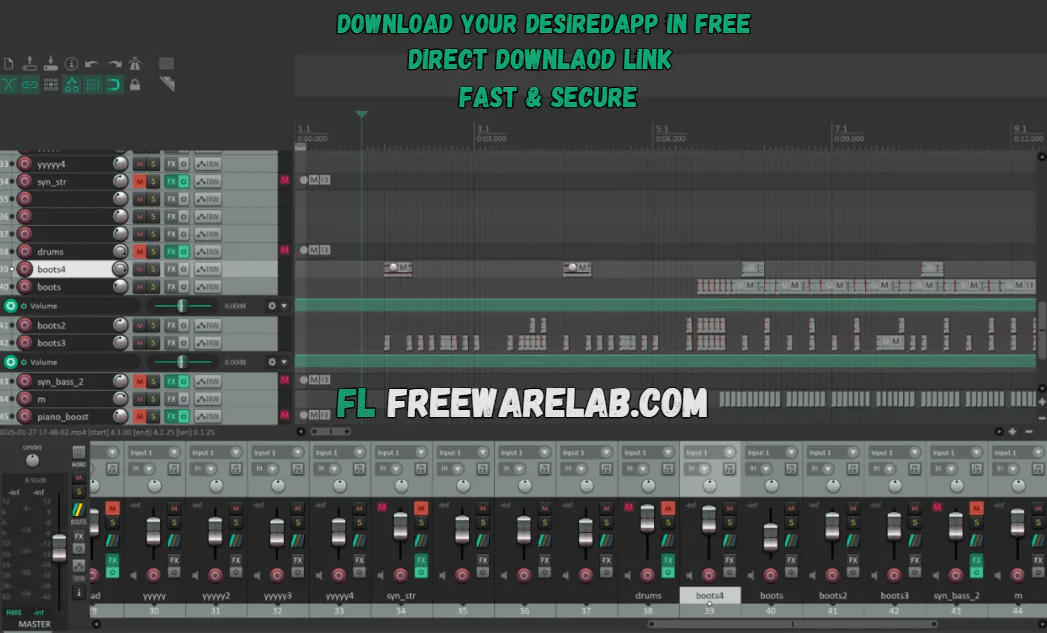
REAPER Workspace Overview
It offers a simple interface designed for efficiency and workflow optimization. It features a clean and highly customizable layout. It is a dark theme by default. Users can install custom themes to change their appearance.
Main interface sections include:
- Track Panel: Manage tracks and settings
- Mixer Panel: Control volume, panning, and effects
- Transport Bar: Play, stop, record, loop, and navigation controls
- MIDI Editor: Detailed MIDI note editing window
- FX Browser: Access built-in and third-party plugins
REAPER vs Other Digital Audio Workstations
If you can compare with other DAWs like Ableton Live FL Studio Pro Tools and Cubase. REAPER is a lightweight and simple application. It does not require a high quality system because it runs on an older one easily. It works well for many tasks such as music production podcast editing voice recording and mixing.
Best REAPER Alternatives
Pro Tools
It is a professional digital audio workstation widely used in recording studios. It is known for high-quality audio recording precise editing tools and strong mixing features.
Ableton Live
It is perfect for electronic music production and live performances. It allows users to create beats loops and tracks in real time.
Cubase
Cubase is a powerful DAW mainly used for MIDI editing and music composition. It is highly popular among composers. It works with orchestral music film scoring and complex arrangements.
Studio One
Modern and user friendly digital audio workstation. It offers a clean interface and smooth workflow that helps beginners and professionals work faster.
Final Thoughts on REAPER
It is a powerful flexible and budget friendly and suitable for all levels of music production. Its low system requirements, deep customization, and plugin support. It is an excellent alternative to expensive digital audio workstations.
How to Use & Installation of REAPER
How to Download
- Download REAPER from our website
- Run the installer on your Windows PC
- Choose Standard or Portable installation
- Configure audio interface, MIDI devices, and buffer size
- Install VST plugins if needed
- Create a new project and start working
How to Use REAPER
Create a New Project
Open REAPER and go to File → New Project. Set the sample rate and bit depth.
Record Audio
Insert a new track, arm it for recording, select an input source, and press Record.
Edit and Mix
Trim, split, and move clips easily. Add effects using the FX button and adjust levels in the mixer.
Export the Final Audio
Go to File → Render, choose the output format (MP3, WAV, FLAC), and export your mix.
REAPER Pros and Cons
Pros
Lightweight and fast
Affordable pricing
Extremely customizable
Regular updates and strong community
Advanced routing and automation
Cons
No built-in instruments or loops
Learning curve for beginners
Default UI looks outdated
MIDI tools less advanced than Cubase
REAPER System Requirements
OS: Windows 7 / 8 / 10 / 11
Processor: 1 GHz or higher
RAM: 4 GB minimum
Storage: 100 MB for installation
Other: ASIO-compatible device recommended
REAPER Frequently Asked Questions (FAQs)
1Is REAPER free to use?
REAPER offers a fully functional 60-day free trial. After that, users are encouraged to buy a license.
2Can REAPER run on old computers?
Yes, it is highly optimized and works well on older systems with low CPU and RAM usage.
3Does REAPER support third-party plugins?
Yes, it supports VST, VST3, AU (macOS), and JS plugins.
4Is REAPER Safe to Use?
It is safe to use if you download it from our website. It does not contain viruses malware or unwanted software. REAPER is the trusted application for daily audio work worldwide.
REAPER 7.60 Changelog
Latest version changes and improvements
- Fixed UI scaling problems on high-DPI Windows screens
- Improved window resizing and layout stability
- Fixed rare FX-related crashes on Windows
- Made audio rendering more stable
- Fixed file import errors on Windows
- Improved font and language handling on Windows
Package Size
33.3 MB
5.0
2 reviews
Direct & Safe Download
Buy License Officially
Virus FreeVerifiedFast
Product Information
File Name
REAPER Download 7.60 For Windows (2026)
Developer
Cockos
License
Freeware
Total Downloads
1
Platform
Windows
4
Related Apps
Similar software you'll love
#1

FL Studio Download 25.1.6.4997 Latest Version
Create beats, record vocals, and produce professional music with FL Studio for Windows. Download the latest version with powerful tools, virtual instruments, and lifetime free updates.
v25.1.6.49975.0
#2
Virtual DJ Download 2026 BUILD 9004 for Windows
Download the latest VirtualDJ for Windows and start mixing like a pro. Create powerful DJ sets, add effects, and stream live using just your PC.
vBUILD 9004125.0
#3

Adobe Audition 26.0.0 Download Ultimate for Windows 2026
Adobe Audition Download is the most powerful software for recording and editing audio. Many YouTubers podcasters and music creators use it to make their sound clear and professional.
v26.0.05.0
#4
Serato DJ Pro 4.0.2 Download for Windows 2026
Download Serato DJ Pro Full Version is the trusted DJ software for Windows users. It is designed for professional DJs for stable performance accurate beat matching and smooth mixing.
v4.0.225.0
Related Tags
Explore more software in these categories
REAPER Download 7.60 For Windows (2026) Tested & Verified
by FreewareLab Security Team
SECURE
0/72
VirusTotal
Feb 2
Test Date
Win 11
Platform
100%
Trust Score
No MalwareNo AdwareClean InstallFeatures Verified
A
Ash ColemanVerifiedTOP
Software Security Analyst at FreewareLab
Our Verification Process
Security Scan
Every file scanned with 72+ antivirus engines via VirusTotal
Installation Test
Clean install verified - no bundleware, adware, or PUPs
Feature Verification
All advertised features tested and confirmed working
5.0
Excellent
2 ratingsRating Breakdown
5
2(100%)
4
0
3
0
2
0
1
0
Write a Review
for REAPER Download 7.60 For Windows (2026)
0 Reviews
Click to share your experience