RustDesk Download 1.4.6 For Windows (2026)
1.4.6New
Virus FreeNo AdwareSafe DownloadLab Tested
Download RustDesk for Windows to access remote PCs safely, transfer files, and get fast remote support with a free, simple, secure, and reliable desktop tool for personal and office use now.
Virus-free • Verified by FreewareLab
Download RustDesk Remote Desktop Latest Version - Freewarelab
Download RustDesk for Windows to access remote PCs safely, transfer files, and get fast remote support with a free, simple, secure, and reliable desktop tool for personal and office use now.
5.0(1)
0 downloads
Jun 4, 2026
RustDesk Download 1.4.6 For Windows (2026) Video Overview
Watch this video to learn more about RustDesk Download 1.4.6 For Windows (2026) features and how to use it.
RustDesk Download
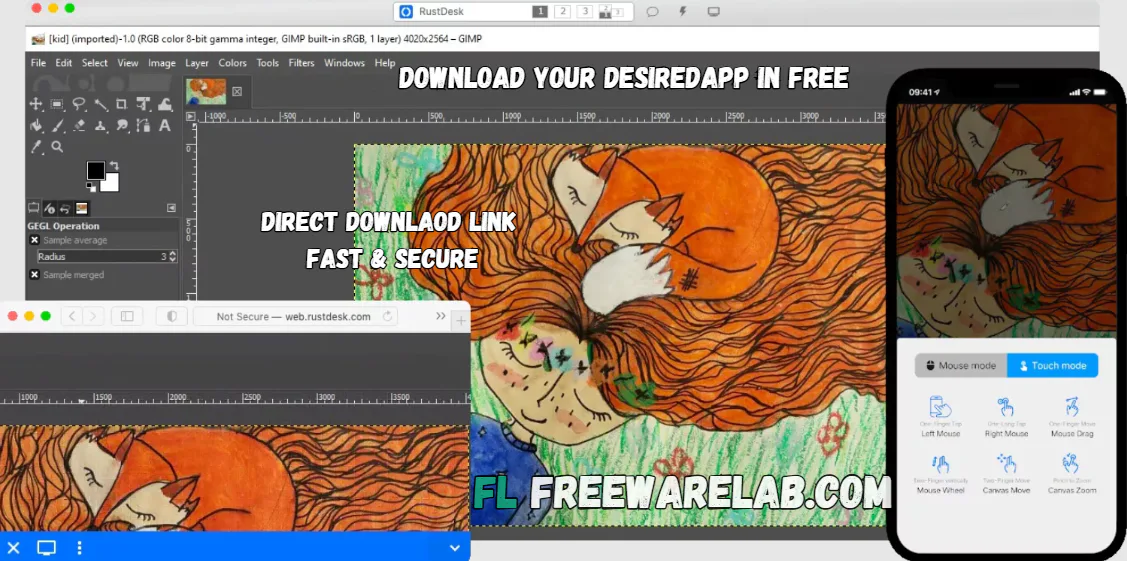
RustDesk Download is a powerful remote desktop software. It helps you access and control another computer from anywhere. It is a great choice for users who want a simple and secure way to provide remote support. It is the best way to manage office PCs or access their home computer while traveling. It is also popular. It gives users full control over their remote connections.
Complete Overview of RustDesk Remote Desktop
It is a free remote desktop application. It allows you to connect to another computer over the internet. You can view the remote screen and move the mouse. You can easily transfer files and help someone fix computer problems without being physically there.
It works on Windows, macOS, Linux, Android, and iOS. It useful for both personal and professional users. It is designed as a secure remote desktop solution with the option to use your own self-hosted servers.
Why Windows Users Prefer RustDesk
It is a good choice for Windows users. It is easy to install and does not need a complicated setup. You can open the app, share your ID and password, and allow another trusted person to connect to your PC.
It is also useful for people who care about privacy. RustDesk allows users to use public servers or set up their own server for better control. The official GitHub page also says RustDesk works out of the box and gives users control over their data.
RustDesk for Remote Support
RustDesk is very helpful for remote support. If your friend, customer, or team member has a computer problem, they can share their RustDesk ID and password with you. After that, you can connect to their PC and help them directly.
This makes RustDesk useful for IT workers, online support teams, freelancers, teachers, and small businesses. It saves time because you do not need to visit the user’s location to fix basic computer issues.
Security and Privacy in RustDesk
It is the best feature of focus on control and privacy. Many remote desktop tools depend fully on company servers, but RustDesk gives users the option to self host. This means advanced users and businesses can run their own RustDesk server and manage their remote connection data more privately.
RustDesk documentation describes it as a full-featured open-source remote control alternative for self-hosting and security with minimal configuration.
Main Features of RustDesk
- Easy remote desktop access for Windows PCs
- Fast screen sharing and smooth remote control
- Secure connection for remote support
- File transfer between connected devices
- Works on Windows, Mac, Linux, Android, and iOS
- Open-source software with active development
- Self-hosted server option for more privacy
- Good alternative to TeamViewer and AnyDesk
- Simple interface for beginners
- Useful for IT support, office work, and personal use
Best Alternatives to RustDesk
TeamViewer: Popular remote support software for business users.
AnyDesk: Fast remote desktop tool with a simple interface.
Chrome Remote Desktop: Free browser-based remote access tool.
Microsoft Remote Desktop: Best for Windows professional environments.
UltraViewer: Simple remote support tool for Windows users.
Final Words
It is the smart choice for users to get a free remote desktop for Windows. It is easy to use and a lightweight application. It is useful for remote support, file transfer, and personal PC access. The biggest advantage of RustDesk is its open source nature and self hosted server option. It gives users more control over privacy and data.
How to Download and Use RustDesk for Windows
How to Download
- Click the download button
- Save the setup file.
- Open the installer and follow the steps.
- Launch RustDesk after installation.
- Allow permissions if Windows asks.
How to Use
- Open RustDesk on both computers.
- Copy the ID from the computer you want to control.
- Enter that ID on your own RustDesk app.
- Click connect.
- Enter the password shown on the remote PC.
- After approval, you can control the remote computer.
- Use file transfer if you need to send or receive files.
- End the session when the work is complete.
RustDesk Pros and Cons
Pros
Free and open-source remote desktop tool
Easy to use for beginners
Fast and smooth remote access
Supports file transfer
Works on many platforms
Self-hosting option available
Good privacy control
Cons
Self-hosting setup may be hard for beginners
Some advanced features may need technical knowledge
Performance depends on the internet speed
The interface is simple, not very fancy
RustDesk System Requirements
OS: Windows 10 or Windows 11
Processor: Dual-core processor or better
Storage: Around 100 MB free space
RAM: 2 GB
Network: Stable internet connection required
Display: Standard screen resolution or higher
RustDesk Frequently Asked Questions (FAQs)
1What is RustDesk?
It is a remote desktop software that helps you control another computer from your own device.
2Is RustDesk free to use?
It is free to use, and it also offers advanced options for business users.
3Can I use RustDesk on Windows?
It works well on Windows 10 and Windows 11.
4Is RustDesk safe?
It is safe when downloaded from our website.
5Does RustDesk support file transfer?
It allows you to send and receive files between connected computers.
Package Size
23.3 MB
5.0
1 review
Direct & Safe Download
Virus FreeVerifiedFast
Product Information
File Name
RustDesk Download 1.4.6 For Windows (2026)
Developer
RustDesk
License
Freeware
Total Downloads
0
Platform
Windows
4
Related Apps
Similar software you'll love
#1
Remote Desktop Manager for Windows (2026)
Download Remote Desktop Manager 2025.3.29 for Windows to securely centralise all remote connections, passwords, and credentials in one workspace. Built for IT teams, fast, secure, and easy to use.
v2025.3.295.0
#2
UltraViewer Download 6.6.124 Ultimate Free for Windows 2026
UltraViewer is the best remote desktop tool for connecting to another computer over the internet. It helps you control the screen share and chat while getting or giving online support.
v6.6.12425.0
#3
Dropbox Download 250.4.3245 for Windows 2026
Dropbox Download for Windows is the best software that can store photos videos documents and important files safely in one place. Dropbox works on computers and mobile devices.
v250.4.324525.0
#4
Super VPN Download for PC 3.1.2 Free VPN (2026)
Download Super VPN for PC Windows 10 and 11. Enjoy a fast, secure, and free VPN service with strong encryption, safe browsing, and easy one-click connection. Protect your internet connection.
v3.1.21464.0
Related Tags
Explore more software in these categories
RustDesk Download 1.4.6 For Windows (2026) Tested & Verified
by FreewareLab Security Team
SECURE
0/72
VirusTotal
Jun 4
Test Date
Win 11
Platform
100%
Trust Score
No MalwareNo AdwareClean InstallFeatures Verified
A
Ash ColemanVerifiedTOP
Software Security Analyst at FreewareLab
Our Verification Process
Security Scan
Every file scanned with 72+ antivirus engines via VirusTotal
Installation Test
Clean install verified - no bundleware, adware, or PUPs
Feature Verification
All advertised features tested and confirmed working
5.0
Excellent
1 ratingRating Breakdown
5
1(100%)
4
0
3
0
2
0
1
0
Write a Review
for RustDesk Download 1.4.6 For Windows (2026)
0 Reviews
Click to share your experience