Universal Media Server 15.3.0 Download for Windows 2026
15.3.0New
Virus FreeNo AdwareSafe DownloadLab Tested
Download Universal Media Server for Windows is a simple media streaming tool that allows you play videos music and photos from your computer on TVs and other devices at home.
Virus-free • Verified by FreewareLab
Download Universal Media Server Latest Version for Windows 2026
Download Universal Media Server for Windows is a simple media streaming tool that allows you play videos music and photos from your computer on TVs and other devices at home.
5.0(2)
2 downloads
Jan 16, 2026
Universal Media Server 15.3.0 Download for Windows 2026 Video Overview
Watch this video to learn more about Universal Media Server 15.3.0 Download for Windows 2026 features and how to use it.
Universal Media Server
Download Universal Media Server for Windows is the best software for playing videos music and photos from your computer on your TV and other devices at home. It works with smart TVs PlayStation Xbox and Chromecast without any hard setup. You do not need to change or convert files because it supports many formats. The program runs smoothly in the background does not slow down your computer.
Overview Universal Media Server
Universal Media Server is a simple media streaming tool that allows you play videos music and photos from your computer on TVs and other devices at home. It is easy to set up supports many file formats and works smoothly over your home network. This makes it a good choice for anyone who wants easy and trouble-free media streaming.
Universal Media Server Key Features
- Streams videos music and photos from your computer.
- Works with Smart TVs PlayStation Xbox and Chromecast.
- Supports many media formats without file conversion.
- Easy and quick setup for beginners.
- Runs smoothly in the background with low system usage.
- Automatic device detection on the same network.
- Free and open source media server software.
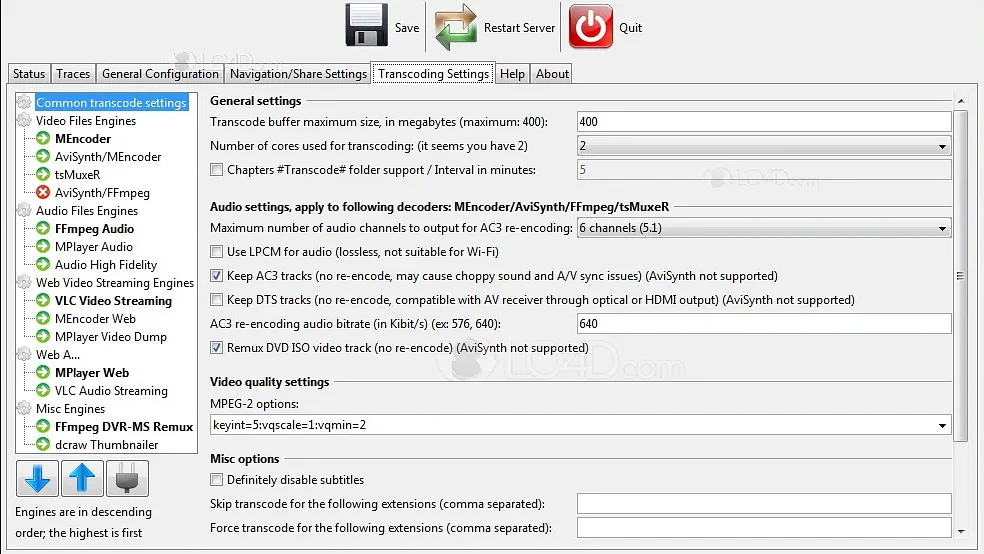
Smooth Playback on Smart TVs and Consoles
Universal Media Server works well with smart TVs PlayStation Xbox and other media player devices. It provides smooth playback so you can watch and listen without buffering or errors.
Universal Media Server What’s New 2026
- Improved support for more smart TVs and devices.
- Faster streaming with better performance and stability.
- Updated web interface for easier media browsing.
- Bug fixes and better compatibility with modern media formats.
Works Seamlessly on Home Networks
The program connects easily through your home Wi-Fi or local network. Once connected it finds your devices automatically and starts sharing media smoothly.
Best Alternatives to Universal Media Server
- Plex: Popular media server for organizing and streaming movies music upnp linux and photos to many devices.
- Jellyfin: Free and open source server that streams your media to phones vlc TVs mencoder avisynth and computers.
- Emby: Flexible media server with extra features like parental controls ums dlna and live TV support.
- Kodi: Free media hub software that plays your videos and music on many screens.
- Serviio: A simple streaming server that supports many media formats ffmpeg transcodes lg on your home network.
How to Download and Use Universal Media Server
How to Download
- You can click on the Download button.
- Save the setup file on your computer.
- Open the downloaded setup file and unzip it with WinRAR.
- Follow the simple on-screen steps.
- Wait until the installation finishes.
How to Use
- Open Universal Media Server after installation.
- Make sure your computer and TV or device are on the same Wi-Fi network.
- The server will automatically detect your media devices.
- Add your video music or photo folders in the settings.
- Open the media app on your TV or device and start streaming your files.
Universal Media Server Pros & Cons
Pros
Easy to use and simple setup.
Supports many video and audio formats.
Works with most smart TVs and devices.
Runs smoothly with low system usage.
Free and open-source software.
Cons
User interface looks basic.
Needs Java installed.
Advanced features are limited.
Setup options may confuse new users.
Universal Media Server System Requirements
OS: Windows, macOS, or Linux
Processor: Dual-core processor or higher
RAM: Minimum 1 GB RAM
Storage: Free disk space for media files
Network: Local network or Wi-Fi connection
Other: Java installed
Universal Media Server Frequently Asked Questions (FAQs)
1Is Universal Media Server free to use?
Yes it is completely free and open source.
2Does it work with smart TVs?
Yes it works with most smart TVs consoles and media devices.
3Do I need to convert media files before streaming?
No it supports many formats and plays files directly.
4Does it require an internet connection?
No it works on your local home network.
5Is it easy for beginners?
Yes it has a simple setup and is easy to use for new users.
Package Size
157.49 MB
5.0
2 reviews
Direct & Safe Download
Virus FreeVerifiedFast
Product Information
File Name
Universal Media Server 15.3.0 Download for Windows 2026
Developer
Universal Media Server
License
Freeware
Total Downloads
2
Platform
Windows
2
Related Apps
Similar software you'll love
#1

Adobe Dreamweaver Free Download 21.7 Latest Version
Download Adobe Dreamweaver for Windows. A powerful web design software to create responsive websites using HTML, CSS, JavaScript, and more. Ideal for beginners and professional web developers.
v21.725.0
#2
Microsoft Visual Basic 6.0 Download for Windows
Visual Basic 6.0 is a classic event-driven programming language and IDE by Microsoft, widely used for Windows desktop applications. Download Visual Basic 6.0 with a direct download link for Windows.
v6.025.0
Universal Media Server 15.3.0 Download for Windows 2026 Tested & Verified
by FreewareLab Security Team
SECURE
0/72
VirusTotal
Jan 16
Test Date
Win 11
Platform
100%
Trust Score
No MalwareNo AdwareClean InstallFeatures Verified
A
Alan PageVerifiedTOP
Software Security Analyst at FreewareLab
Our Verification Process
Security Scan
Every file scanned with 72+ antivirus engines via VirusTotal
Installation Test
Clean install verified - no bundleware, adware, or PUPs
Feature Verification
All advertised features tested and confirmed working
5.0
Excellent
2 ratingsRating Breakdown
5
2(100%)
4
0
3
0
2
0
1
0
Write a Review
for Universal Media Server 15.3.0 Download for Windows 2026
0 Reviews
Click to share your experience