VEGAS Pro 23.0.0.356 Video Editing Software
23.0.0.356New
Virus FreeNo AdwareSafe DownloadLab Tested
Download VEGAS Pro for Windows is a professional video editing software with advanced editing, color grading, audio mixing, and fast rendering for creators.
Virus-free • Verified by FreewareLab
Download VEGAS Pro for Windows Latest Version - Freewarelab
Download VEGAS Pro for Windows is a professional video editing software with advanced editing, color grading, audio mixing, and fast rendering for creators.
5.0(4)
6 downloads
Jan 6, 2026
VEGAS Pro 23.0.0.356 Video Editing Software Video Overview
Watch this video to learn more about VEGAS Pro 23.0.0.356 Video Editing Software features and how to use it.
VEGAS Pro
VEGAS Pro is a flexible video editing software for Windows users. It can help you to edit video in resolution up to 4k and is best for audio production. It is easy to manage your project from start to finish. It can provide a smooth, fast, and timeline-based workflow.
It can offer the advanced color grading AI tool, professional audio editing, and support for DVD. It is the top choice of new and experienced users. It gives fast speed, full control, and creativity in freehand.
Why Choose VEGAS Pro for Video Editing?
VEGAS Pro is a professional video editing program designed for Windows users. It is a power hose and offers multiple features in one place, like video editing, audio, and pro production. It allows you to cut, trim, edit video and add color-grade. You can export videos in differnt formats. It is known for its fast workflow, drag-and-drop editing, and real-time previews.
Key Reasons Creators Choose VEGAS Pro 2026
- Single-timeline video and audio editing
- Powerful AI tools for faster workflows
- Professional color grading and LUT support
- Advanced audio tools built directly into the editor
- Flexible export options for beginners and professionals
What’s New in VEGAS Pro Version 23? (latest version)
- Version 23 introduces a brand-new VEGAS Core Engine, delivering major performance and stability improvements.
- DirectX 11/12 acceleration with in-VRAM processing
- Much smoother previews with fewer dropped frames
- Accurate color handling with ACES 1.3 and OpenColor IO
- Native support for Windows on ARM using NPU power
- Refreshed modern UI with familiar workflow
- Unified Explorer for easy access to all media locations
New Editing & Workflow Improvements
- Text-based editing directly from transcripts
- Effect animation using envelope keyframes in the timeline
- Reusable VFX packages with saved animations
- VEGAS Capture for screen, webcam, and audio recording
- Mobile LUT support for Apple and Samsung footage
- Modern integrated Equalizer for precise audio control
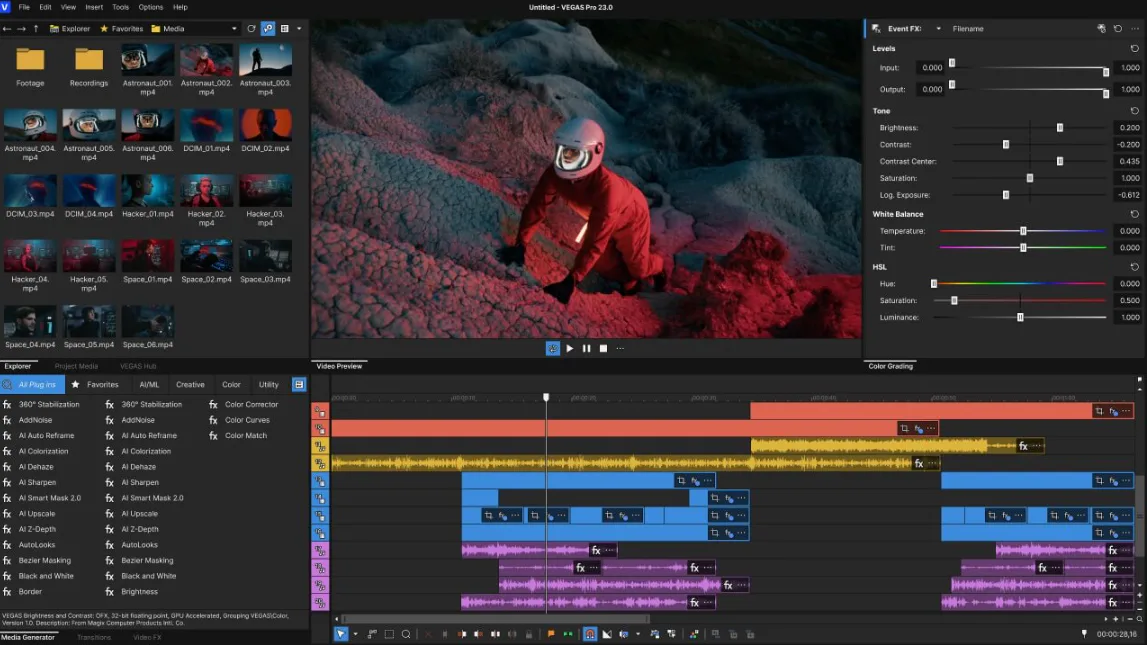
AI-Powered Features That Save Time
- Automatically isolate people or objects without green screens. AI tracks movement frame by frame, making masking fast and accurate.
- Turn speech into text and edit your video like a document. Remove filler words, mistakes, and silences in seconds.
- Convert audio tracks into accurate subtitles, perfect for interviews, YouTube videos, and social media content.
- Create natural-sounding voiceovers directly from written text prompts.
- Automatically adjust aspect ratios for different platforms without manual cropping.
- Fine-tune hue, saturation, and luminance to achieve consistent and cinematic color results. LUT support helps you match looks quickly.
- Edit, mix, and master soundtracks using professional tools. Sync multi-camera audio, detect tempo, and apply effects using VST-3 plugins.
Visual Effects & Compositing
- Z-Depth compositing for realistic layering
- 2D and 3D compositing with masks and layers
- Over 390 built-in effects, transitions, and filters
Footage Restoration
- Fix common video issues such as:
- Video noise
- Shaky footage
- Flickering lights
- Black bars on the sides
Who Should Use VEGAS Pro?
- VEGAS Pro is ideal for users who want powerful video editing without complicated workflows. It is designed to support a range of skill levels and creative needs.
- YouTubers & Content Creators: It is perfect for creating high-quality videos quickly with advanced effects and fast rendering.
- Freelancers & Video Editors: If you have a client project and want professional video editing with a smooth timeline. Vegas Pro is the best.
- Filmmakers & Videographers: It gives full control in your hands for color grading, audio mixing, and cinematic edits.
- Beginners Who Want to Grow: It is a very simple application and easy to learn. If you are a new user or do not have tech experience. You can edit videos easily.
- Windows Users Only: It is the best option for Windows users. It allows you to create exclusive work.
VEGAS Pro Editions Comparison
VEGAS Pro Edit
It is best for creators who need strong core video editing with AI Smart Mask, Z-Depth compositing, and creative effects.
VEGAS Pro Suite
A complete video and audio production solution with HDR grading, AI compositing, and advanced sound design tools.
VEGAS Pro Post
An all-in-one production hub including VEGAS Effects, VEGAS Image, SOUND FORGE Pro, and more for motion graphics and audio professionals.
Supported Formats Vegas Pro 23
- Supports video files up to 8K resolution
- Works with popular video formats such as MP4, ProRes, HEVC, RAW, XAVC, and MXF
- Supports audio formats including intuitive, WAV, MP3, FLAC, and AAC
- Allows image files like PNG, JPG, TIFF, and OpenEXR
- Offers project compatibility with editors like Premiere Pro, Final Cut Pro, and DaVinci Resolve
VEGAS Pro vs Competitors
Adobe Premiere Pro
It is a professional video editor widely used in the film and media industry. It works smoothly with Adobe Creative Cloud apps like After Effects and Photoshop. It is ideal for advanced and team-based projects.
DaVinci Resolve
It is the best video editing tool known for its industry-leading color grading features. It also offers a strong free version. It is great for users who want professional results without paying.
HitFilm
It is a top choice for creators who focus on visual effects and motion graphics. It combines video editing with advanced VFX tools. It is popular among YouTubers and filmmakers.
Pinnacle Studio
It is a simple video editor that still offers advanced controls. It is easy to learn and suitable for users. Who want smooth editing without a steep learning curve.
Wondershare Filmora
Filmora is simpler and beginner-focused. It is a simple video editor. But VEGAS Pro offers more professional tools, better audio control, and advanced effects.
Final Verdict
It is a complete, professional video editing solution. It combines speed, power, and creative flexibility. With its new AI tools, improved performance engine, and advanced audio and color features. It is an excellent choice for YouTubers, filmmakers, and professional editors. Who wants full control without switching between multiple applications.
How to Download and Use VEGAS Pro on Windows
How to Download
- You can click the Download button.
- Get the installation file and unzip it with WinRAR.
- Double-click to run the setup file after unzipping.
- Follow the on-screen installation steps.
- Activate VEGAS Pro or start the free trial.
How to Use
- Open VEGAS Pro and create a new project.
- It allows you to import your video, audio, or image files.
- Drag media files onto the timeline.
- Add effects, transitions, and text.
- Adjust colors and audio if needed.
- Export your video in your preferred format.
Vegas Pro Free Download Pros and Cons
Pros
Brand-new VEGAS Core Engine
Professional video and audio tools
AI-powered editing and masking
High-resolution 4K and 8K support
Cloud-based collaboration
Cons
Takes time to master advanced features
Requires powerful hardware
Windows-only (no macOS version)
Vegas Pro System Requirements for Windows
OS: Windows 7, 8, 10, and 11
Processor: Intel Core i7 or newer / AMD Ryzen 7 2000+
Graphics: NVIDIA GTX 900 / AMD Radeon 4GB / Intel HD 630+
RAM: 32 GB
Storage: 1.5GB for installation + fast drives for media
VEGAS Pro Frequently Asked Questions (FAQs)
1What is VEGAS Pro used for?
It is used for professional video editing audio production compositing and post-production.
2Is there a free trial available?
It is paid version and offer the 30 days free trial.
3Is VEGAS Pro good for beginners?
It is customizable interface and tutorials make it beginner-friendly.
4Does it support third-party plugins?
Yes, it supports OFX and VST-3 plugins.
5Is VEGAS Pro better than Premiere Pro?
VEGAS Pro is easier for beginners, while Premiere Pro is more common in large studios.
Package Size
850 MB
5.0
4 reviews
Direct & Safe Download
Buy License Officially
Virus FreeVerifiedFast
Product Information
File Name
VEGAS Pro 23.0.0.356 Video Editing Software
Developer
MAGIX
License
Freeware
Total Downloads
6
Platform
Windows
4
Related Apps
Similar software you'll love
#1
Wondershare Filmora 15.2.5.17803 for Windows (2026)
Wondershare Filmora is an easy-to-use, AI-powered video editor for Windows that helps anyone create professional videos fast. The direct download link is available on our website.
v15.2.5.17803395.0
#2

Adobe Premiere Elements v26.1.0 for Windows (2026)
Download Adobe Premiere Elements for Windows is an easy video editing software for beginners, featuring AI-powered tools, Guided Edits, and automated effects to create stunning videos fast.
v26.1.0324.8
#3
CyberLink PowerDirector 24.2.1404.0 Download for Windows 2026
Download CyberLink PowerDirector with a Direct Link is the best video editing software for easily creating videos. You can cut videos add music text effects and transitions without any hard steps.
v24.2.1404.025.0
#4
Movavi Video Editor 26.8.0 for Windows (2026)
Movavi Video Editor is a powerful and easy video editing tool for PC. Create professional videos with effects, transitions, and smart tools. Download Movavi Video Editor directly & secure link.
v26.8.024.5
VEGAS Pro 23.0.0.356 Video Editing Software Tested & Verified
by FreewareLab Security Team
SECURE
0/72
VirusTotal
Jan 6
Test Date
Win 11
Platform
100%
Trust Score
No MalwareNo AdwareClean InstallFeatures Verified
A
Ash ColemanVerifiedTOP
Software Security Analyst at FreewareLab
Our Verification Process
Security Scan
Every file scanned with 72+ antivirus engines via VirusTotal
Installation Test
Clean install verified - no bundleware, adware, or PUPs
Feature Verification
All advertised features tested and confirmed working
5.0
Excellent
4 ratingsRating Breakdown
5
4(100%)
4
0
3
0
2
0
1
0
Write a Review
for VEGAS Pro 23.0.0.356 Video Editing Software
0 Reviews
Click to share your experience