Videopad Video Editor 18.06 for Windows (2026)
18.06Updated
Virus FreeNo AdwareSafe DownloadLab Tested
Download VideoPad Video Editor is a fast and easy video editing software for Windows. Edit videos, add effects, music, text, and export high-quality content in minutes.
Virus-free • Verified by FreewareLab
Download VideoPad Video Editor Free Latest Version - Freewarelab
Download VideoPad Video Editor is a fast and easy video editing software for Windows. Edit videos, add effects, music, text, and export high-quality content in minutes.
5.0(2)
2 downloads
Jan 21, 2026
Videopad Video Editor 18.06 for Windows (2026) Video Overview
Watch this video to learn more about Videopad Video Editor 18.06 for Windows (2026) features and how to use it.
Videopad Video Editor
VideoPad Video Editor is a simple and powerful video editing software. It is designed for Windows users. If you want to create high quality videos without learning. It is a great choice for beginners, students, YouTubers, and anyone. It offers fast and smooth video editing. It gives useful features and a simple layout. It helps you edit videos quickly and export them in many formats.
Overview of VideoPad Video Editor
VideoPad gives the best performance for importing videos, images, and audio files. You can easily place them on the timeline and start editing right away. It supports drag and drop editing. It allows real-time previews and uses the ready effects. It works well even on low to mid-range Windows systems. It is suitable for most users.
Why Choose VideoPad Video Editor for Windows
If you want the professional result without learning VideoPas is made for you. It provides a simple interface. You can cut clips, add transitions, and apply beautiful effects. It supports multiple video export formats. It is ideal for social media videos, school projects, presentations, and basic professional work.
Key Features of VideoPad Video Editor Professional
- Easy drag and drop timeline editing
- Support for many video, audio, and image formats
- Built-in video effects and smooth transitions
- Text titles, captions, and overlays
- Audio tools for music, voice, and sound effects
- Fast video export with preset profiles
Supported Video Formats
It support popular formats such as MP4, AVI, MOV, WMV, MKV, and more. You can also export videos for YouTube, Facebook, Instagram, and other platforms with optimized settings.
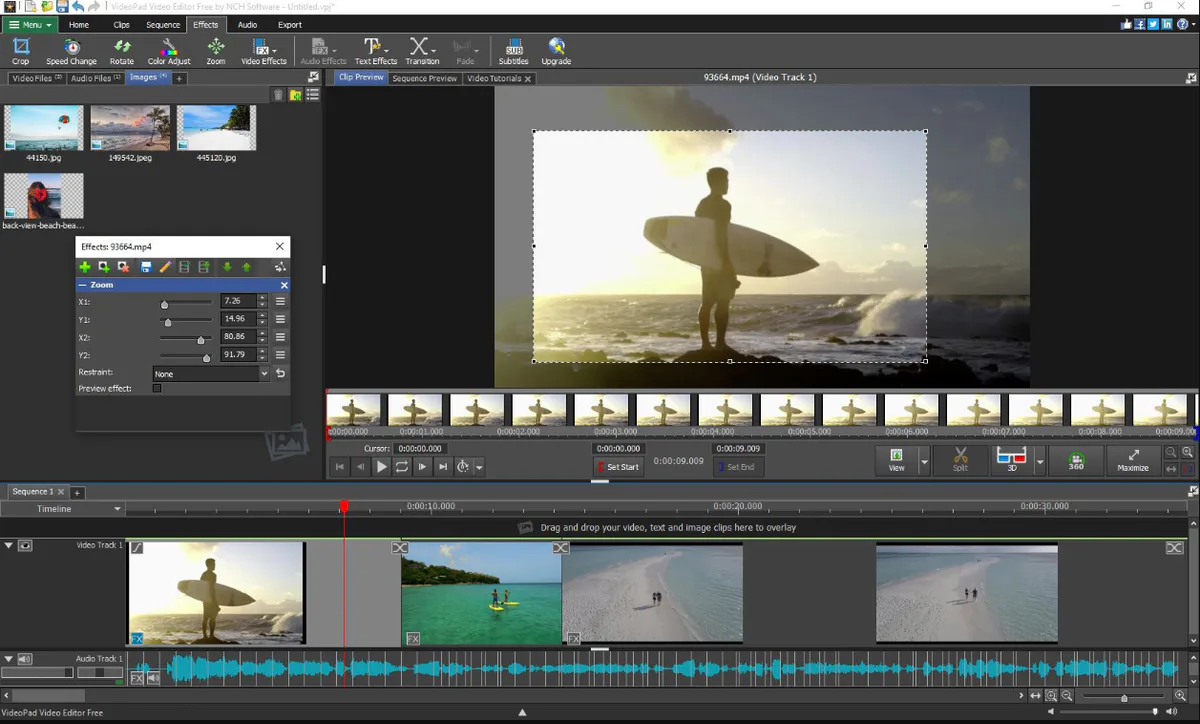
Simple and Intuitive Video Editing Tool
It makes video editing easy for everyone. You can cut clips, arrange sequences, and apply visual effects using simple controls. The program works smoothly on most processors. NCH Software develops simple and user-friendly programs for video and media editing.
Main Highlight Video Editing Software
- The free version is available for non-commercial use. It is perfect for students, beginners, and personal projects.
- Users can edit movies, create slideshows, and export videos without paying.
- The software includes basic visual effects, filters, and fade functions.
- These tools help improve video quality and give your content a clean and professional look. Effects can be applied with just a few clicks.
- You can easily create slideshows using images, music, and video clips.
- The sequence editor allows smooth transitions between clips.
- It is ideal for presentations and simple movie projects.
- After editing, videos can be uploaded online or shared directly on platforms like YouTube.
- The program supports DVD burn features, allowing users to save videos to discs.
- You can also export files in common formats for playback on different devices.
Best Alternatives to VideoPad Video Editor
Adobe Premiere Pro: It is a powerful video editing program. It is best for professionals who need advanced tools, precise control, and high-quality results.
Filmora Video Editor: It is a user friendly video editor with a clean interface. It is ready made effects and simple tools for fast editing.
DaVinci Resolve: A professional video editing software. It has excellent color grading, strong editing features, and output quality.
Final Thoughts
It is a reliable Windows video editing software for users. It provides the simple tools and fast results. It is perfect for beginners and casual editors. It helps to clean video editing without spending much time learning. If you want a lightweight and effective video editor for Windows. It is a solid choice for everyday video editing needs.
How to Download and Use VideoPad Video Editor
How to Download
- You can click the download button.
- Wait for the download complete and open it with WinRAR.
- Run for installation and follow the on-screen instructions.
- The installation takes only a few minutes.
How to Use
- Open VideoPad Video Editor from your desktop or start menu.
- Click on the import option to add videos, images, and audio files from your device.
- Drag files to the timeline.
- Cut clips, arrange sequences, add text, effects, filters, and fade transitions easily.
- Play the video inside the editor to check edits and make changes if needed.
- Choose an export format or upload directly for online use such as YouTube.
VideoPad Video Editor Pros and Cons
Pros
Very easy to use for beginners
Lightweight and fast on Windows PCs
Good range of basic editing tools
Multiple export options
Cons
Advanced features are limited
Free version has some restrictions
Not ideal for complex professional projects
Videopad Video Editor System Requirements
OS: Windows 7, 8, 10, or 11
Processor: Intel or AMD processor
RAM: 2 GB
Storage: At least 100 MB for installation
Graphics: Basic graphics support
VideoPad Video Editor Frequently Asked Questions (FAQs)
1Is VideoPad Video Editor free to use
It offers a free version for non commercial use. It is suitable for personal projects, but the paid version is best for big projects and 4k support.
2Is VideoPad Video Editor good for beginners?
It is a user friendly. It is a simple interface and most tools are easy to understand and use.
3Can I make YouTube videos with VideoPad Video Editor?
You can edit and export videos in formats. It work well for YouTube and other online platforms.
4Does VideoPad Video Editor work on low-end PCs?
It runs smoothly on most Windows computers with basic system requirements.
5Can I add effects and music to my videos?
You can easily add visual effects, filters, text, transitions, and background music.
Previous Versions
Videopad Video Editor 18.03
Jan 15, 202612.3 MB
Package Size
12.9 MB
5.0
2 reviews
Direct & Safe Download
Buy License Officially
Virus FreeVerifiedFast
Product Information
File Name
Videopad Video Editor 18.06 for Windows (2026)
Developer
NCH Software
License
Freeware
Total Downloads
2
Platform
Windows
4
Related Apps
Similar software you'll love
#1
Wondershare Filmora 15.2.5.17803 for Windows (2026)
Wondershare Filmora is an easy-to-use, AI-powered video editor for Windows that helps anyone create professional videos fast. The direct download link is available on our website.
v15.2.5.17803395.0
#2

Adobe Premiere Elements v26.1.0 for Windows (2026)
Download Adobe Premiere Elements for Windows is an easy video editing software for beginners, featuring AI-powered tools, Guided Edits, and automated effects to create stunning videos fast.
v26.1.0324.8
#3
CyberLink PowerDirector 24.2.1404.0 Download for Windows 2026
Download CyberLink PowerDirector with a Direct Link is the best video editing software for easily creating videos. You can cut videos add music text effects and transitions without any hard steps.
v24.2.1404.025.0
#4
Movavi Video Editor 26.8.0 for Windows (2026)
Movavi Video Editor is a powerful and easy video editing tool for PC. Create professional videos with effects, transitions, and smart tools. Download Movavi Video Editor directly & secure link.
v26.8.024.5
Related Tags
Explore more software in these categories
Videopad Video Editor 18.06 for Windows (2026) Tested & Verified
by FreewareLab Security Team
SECURE
0/72
VirusTotal
Jan 21
Test Date
Win 11
Platform
100%
Trust Score
No MalwareNo AdwareClean InstallFeatures Verified
A
Ash ColemanVerifiedTOP
Software Security Analyst at FreewareLab
Our Verification Process
Security Scan
Every file scanned with 72+ antivirus engines via VirusTotal
Installation Test
Clean install verified - no bundleware, adware, or PUPs
Feature Verification
All advertised features tested and confirmed working
5.0
Excellent
2 ratingsRating Breakdown
5
2(100%)
4
0
3
0
2
0
1
0
Write a Review
for Videopad Video Editor 18.06 for Windows (2026)
0 Reviews
Click to share your experience