vMix for Windows 29.0.0.45 Live Production (2026)
29.0.0.45New
Virus FreeNo AdwareSafe DownloadLab Tested
Download vMix for Windows and create professional live streams with ease. Mix video, audio, cameras, and graphics to broadcast high-quality live productions on all major streaming platforms.
Virus-free • Verified by FreewareLab
Download vMix Desktop Capture Latest Version - Freewarelab
Download vMix for Windows and create professional live streams with ease. Mix video, audio, cameras, and graphics to broadcast high-quality live productions on all major streaming platforms.
5.0(2)
31 downloads
Jan 20, 2026
vMix for Windows 29.0.0.45 Live Production (2026) Video Overview
Watch this video to learn more about vMix for Windows 29.0.0.45 Live Production (2026) features and how to use it.
vMix for Windows
vMix for Windows is a powerful live video production and streaming software. It is designed for broadcasters, YouTubers, gamers, churches, event organizers, and online educators. It allows you to create professional quality live streams.
It offers multiple cameras, videos, images, graphics, and audio sources all from a single Windows PC. It is a smooth performance and advanced tools. It is trusted by beginners and professionals worldwide.
Overview of vMix for Windows
It is a live production software. It turns your computer into a complete video studio. You can mix live camera feeds and add videos. It is best for presentations and includes lower third titles. It can help to stream directly from YouTube, Facebook, Twitch, and custom RTMP servers. It supports HD, 4K, and even 8K workflows.
Key Features of vMix Live Production Software
- Live video mixing with multiple inputs
- Support for webcams, capture cards, IP cameras, and NDI
- Built-in live streaming to major platforms
- Professional transitions, overlays, and effects
- Advanced audio mixing with live monitoring
- Instant replay and slow-motion support
- Virtual sets and green screen (chroma key)
- Recording while streaming at the same time
What Makes vMix a Top Choice for Live Streaming
It offers broadcast level tools at a lower cost compared to traditional hardware studios. It is fast and fully customizable. If you are running a small live show or a large virtual event. It gives you full control over your production without complex hardware setups.
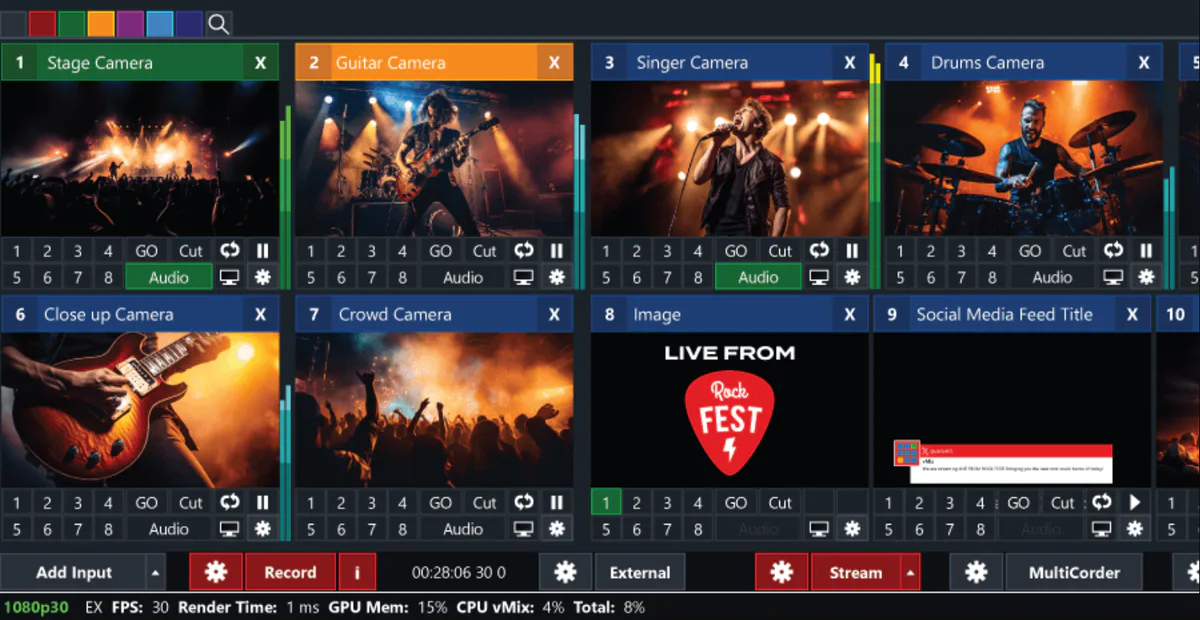
Top Benefits of vMix for Windows PC
- vMix works as a powerful mixer for live video production.
- You can use vMix Call to bring remote guests into your live stream.
- vMix 4K and Pro versions are ideal for high-quality and professional broadcasts.
- vMix supports SRT for secure and stable video streaming.
- You can try all features with a free 60 day trial before buying a license.
- vMix lets you control video and audio in one simple workspace.
- It supports many format types for recording and streaming.
- You can stream directly to popular streaming providers like YouTube and Facebook.
- The built-in audio mixer helps manage sound levels clearly.
- You can add and play different video files during live production.
- vMix also allows you to show PowerPoint slides in live streams.
vMix What’s New in 2026
- Improved performance and stability on Windows 11
- Better NDI and IP camera integration
- Enhanced audio sync and noise handling
- UI improvements for faster live control
- More reliable streaming for long live sessions
Best Alternatives to vMix
OBS Studio: A free and open source streaming tool that is widely used by beginners and professionals.
Wirecast: A professional live streaming software with advanced production features.
Streamlabs Desktop: It is a user friendly option, ideal for gamers and live creators.
XSplit Broadcaster: A reliable streaming software with simple controls and powerful tools.
Ecamm Live: It is a great vMix alternative for macOS users who want high quality live streams.
Final Thoughts
It is the best live streaming and video production software. It combines professional features, flexibility, and performance into one powerful tool. If you want high quality live streams and recordings. It give the full control over your production. It is a smart and reliable choice for 2026.
How to Download and Use vMix on Windows
How to Download
- You can click on the download button.
- Choose the Windows version and download the setup file.
- Run the installer and follow the on-screen steps to complete the installation.
- Start the 60-day free trial to explore all features.
How to Use
- Launch vMix on your Windows PC.
- Add inputs like cameras, video files, images, or PowerPoint slides.
- Use the built-in video and audio mixer to manage sound and visuals.
- Select your streaming provider (YouTube, Facebook, or custom RTMP).
- Click Stream or Record to go live.
vMix Pros and Cons
Pros
Professional live production tools
Supports many input types
Smooth streaming and recording
Scalable for small and large projects
Cons
Windows only (no macOS version)
Advanced features may feel complex for beginners
Requires a powerful PC for best results
vMix System Requirements
OS: Windows 10 or Windows 11 (64-bit)
Processor: Intel i5 processor or equivalent
RAM: 8 GB RAM
Storage: 500 MB
Graphics: Dedicated GPU recommended
vMix Frequently Asked Questions (FAQs)
1Is vMix free to use?
vMix offers a free trial but full features require a paid license.
2Can vMix stream to YouTube and Facebook?
Yes, vMix supports direct streaming to both platforms.
3Does vMix support 4K streaming?
Yes, higher licenses support 4K and advanced workflows.
4Is vMix good for churches and events?
It is widely used for live church services and events.
5Can I record while streaming in vMix?
You can record and stream at the same time.
Previous Versions
vMix for Windows 29.0.0.44
Jan 20, 2026485.7 MB
Package Size
485.7 MB
5.0
2 reviews
Direct & Safe Download
Buy License Officially
Virus FreeVerifiedFast
Product Information
File Name
vMix for Windows 29.0.0.45 Live Production (2026)
Developer
vMix Pty Ltd
License
Freeware
Total Downloads
31
Platform
Windows
4
Related Apps
Similar software you'll love
#1

Bandicam 8.3.0.2533 Latest Version Free Download
Bandicam 8.3.0.2533 is the best screen recording software for Windows helping you record your computer screen games and webcam.
v8.3.0.253335.0
#2
Wondershare UniConverter 17.2.1.497 Download for Windows 2026
Download Wondershare UniConverter with a Direct Link is the best software for working with videos without any trouble. You can change videos into different formats make large files smaller.
v17.2.1.49725.0
#3
Topaz Video Enhance AI 7.1.6.01 For Windows (2026)
Experience high-quality video enhancement with Topaz Video Enhance AI. Instantly turn blurry videos into crystal-clear HD and 4K using advanced AI. Download the latest version via a fast, direct link
v7.1.6.0125.0
#4
Adobe Dimension 4.1.7.4712 Download for Windows 2026
Download Adobe Dimension with a Direct Link is the best 3D design software for creating realistic product images packaging designs and brand visuals. It allows you place your own logos and graphics.
v4.1.7.47125.0
Related Tags
Explore more software in these categories
vMix for Windows 29.0.0.45 Live Production (2026) Tested & Verified
by FreewareLab Security Team
SECURE
0/72
VirusTotal
Jan 20
Test Date
Win 11
Platform
100%
Trust Score
No MalwareNo AdwareClean InstallFeatures Verified
A
Ash ColemanVerifiedTOP
Software Security Analyst at FreewareLab
Our Verification Process
Security Scan
Every file scanned with 72+ antivirus engines via VirusTotal
Installation Test
Clean install verified - no bundleware, adware, or PUPs
Feature Verification
All advertised features tested and confirmed working
5.0
Excellent
2 ratingsRating Breakdown
5
2(100%)
4
0
3
0
2
0
1
0
Write a Review
for vMix for Windows 29.0.0.45 Live Production (2026)
0 Reviews
Click to share your experience