WavePad Audio Editor 24.23 For Windows (2026)
24.23New
Virus FreeNo AdwareSafe DownloadLab Tested
Download WavePad Sound Editor for Windows PC and edit audio files easily with powerful tools, sound effects, noise reduction, and multi-format support. Perfect for beginners and podcasters.
Virus-free • Verified by FreewareLab
Download WavePad Audio Editor Latest Version - Freewarelab
Download WavePad Sound Editor for Windows PC and edit audio files easily with powerful tools, sound effects, noise reduction, and multi-format support. Perfect for beginners and podcasters.
5.0(1)
2 downloads
May 14, 2026
WavePad Audio Editor 24.23 For Windows (2026) Video Overview
Watch this video to learn more about WavePad Audio Editor 24.23 For Windows (2026) features and how to use it.
WavePad Audio Editor
WavePad Sound Editor is the best audio editing software for Windows users. You can record, trim, cut, copy, and clean up your audio with hardly any fuss. If you are a total beginner, running a podcast, or making music. Building a YouTube channel, or just working on any sort of content. It is all simple and smooth.
It is compatible with various audio file formats and has some effects such as noise removal, echo, amplification, and normalization, among others. It features an elegant interface that enables anyone to edit audio easily without requiring complicated tools.
Why Choose WavePad Sound Editor in 2026
It is the best audio editor for Windows. It is a perfect application for pc and runs smoothly on every system. It is the ideal software for editing voice tracks of music, podcasts, interviews, and soundtracks of videos.
It provides features like those used by professionals but with an easy-to-use interface. WavePad gives you the complete toolkit. From simple fixes to advanced tweaks. It delivers everything you need for pro-level audio work.
Key Features of WavePad Audio Editor Free
- Easy audio cutting, trimming, and merging tools
- Record voice and sound directly from the microphone
- Supports MP3, WAV, FLAC, AAC, OGG, and more formats
- Built-in sound effects like echo, reverb, and amplification
- Noise reduction for cleaner audio quality
- Batch processing for editing multiple files together
- Audio restoration tools to improve old recordings
- Fade in and fade out effects for smooth transitions
- Normalize audio volume automatically
- Voice changer and sound enhancement features
- Create ringtones and custom audio clips easily
- Simple and beginner-friendly interface
- Fast exporting and saving options
- Works smoothly on Windows PCs
- Supports professional audio editing for podcasts and music
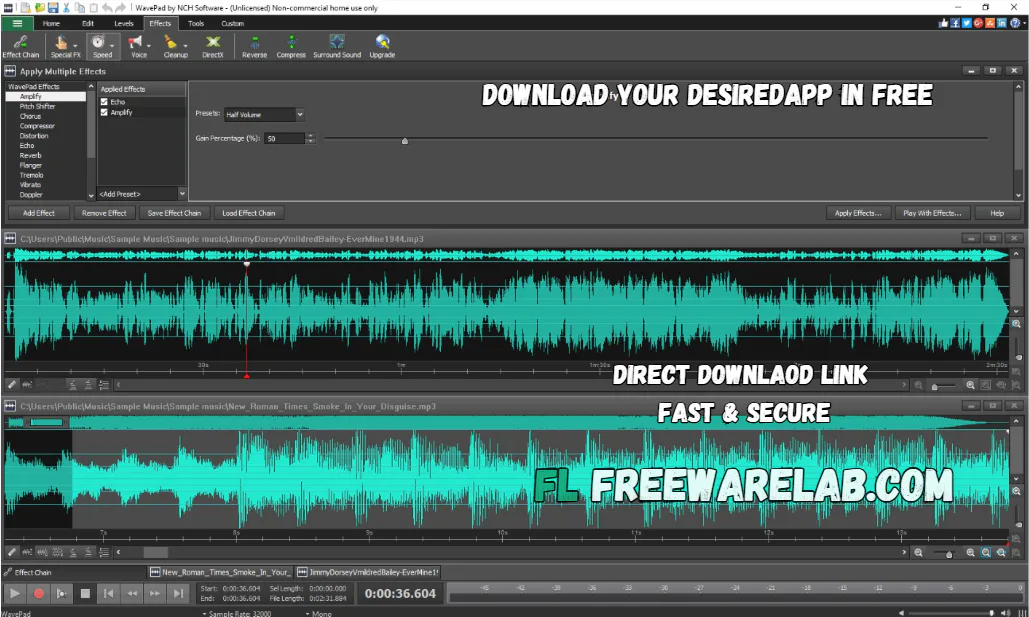
Benefits of Using WavePad Audio Editing Software
- Beginner-friendly interface
- Fast and lightweight software
- Supports many audio formats
- Professional editing tools
- High-quality audio effects
- Good for podcasts and music editing
- Works smoothly on Windows PCs
WavePad Sound Editor for Content Creators
WavePad makes an ideal choice for YouTubers, TikTokers, podcasters, or any streamers. One can remove unwanted noise, enhance voice quality, and even edit audio files for video or social media posts using WavePad. The application also serves as handy voice recording software for students and teachers.
Best Alternatives to WavePad Sound Editor
Audacity: A free and simple audio editor for recording and editing sound files.
Adobe Audition: A professional audio editing software for music, podcasts, and voice recording.
Ocenaudio: Simple audio editor with fast performance and useful sound effects.
FL Studio: A popular music creation software for making beats and songs.
Reaper: A lightweight and powerful audio editing and music production tool.
Final Thoughts
It is a reliable audio editing software. It offers powerful editing tools, useful sound effects, and support for many audio formats. If you need simple voice editing or professional audio improvements. WavePad is a great choice for new and experienced users.
How to Download and Use WavePad Sound Editor
- Click the “Download Now” button
- Wait for the setup file to download
- Open the downloaded installer file
- Follow the installation steps on the screen
- Launch WavePad Sound Editor after installation
- Import or record an audio file
- Use tools like cut, trim, copy, and effects to edit audio
- Save or export the edited file in your preferred format
- Enjoy simple and fast audio editing on your Windows PC
WavePad Sound Editor Pros and Cons
Pros
Simple and easy interface
Fast audio editing performance
Supports many file formats
Includes useful sound effects
Great for beginners and professionals
Cons
Some advanced features require paid version
Interface design looks slightly old
Limited advanced mixing tools compared to premium DAWs
WavePad Sound Editor System Requirements
OS: Windows 7, 8, 10, 11
Processor: Intel or AMD processor
RAM: 2 GB
Storage: 200 MB free disk space
Network: Internet connection for activation and updates
Frequently Asked Questions (FAQs)
1Is WavePad Sound Editor free?
It offers a free version with basic features. Advanced tools are available in the paid version.
2Can WavePad edit MP3 files?
It fully supports MP3 editing along with many other audio formats.
3Is WavePad good for beginners?
It is designed with a simple interface that is easy for beginners.
4Does WavePad support Windows 11?
It works smoothly on all Windows versions.
5Can I record audio with WavePad?
You can record audio directly using a microphone or recording device.
Package Size
52 MB
5.0
1 review
Direct & Safe Download
Buy License Officially
Virus FreeVerifiedFast
Product Information
File Name
WavePad Audio Editor 24.23 For Windows (2026)
Developer
NCH Software
License
Freeware
Total Downloads
2
Platform
Windows
4
Related Apps
Similar software you'll love
#1
REAPER Download 7.71 For Windows (2026)
REAPER is a powerful digital audio workstation for Windows, offering full multitrack audio and MIDI recording, editing, mixing, and rendering. Download REAPER for Windows with a direct download link
v7.71115.0
#2

FL Studio Download 25.1.6.4997 Latest Version
Create beats, record vocals, and produce professional music with FL Studio for Windows. Download the latest version with powerful tools, virtual instruments, and lifetime free updates.
v25.1.6.4997165.0
#3
Virtual DJ Download 2026 BUILD 9004 for Windows
Download the latest VirtualDJ for Windows and start mixing like a pro. Create powerful DJ sets, add effects, and stream live using just your PC.
vBUILD 9004395.0
#4
Adobe Audition 26.0.0 Download Ultimate for Windows 2026
Adobe Audition Download is the most powerful software for recording and editing audio. Many YouTubers podcasters and music creators use it to make their sound clear and professional.
v26.0.055.0
Related Tags
Explore more software in these categories
WavePad Audio Editor 24.23 For Windows (2026) Tested & Verified
by FreewareLab Security Team
SECURE
0/72
VirusTotal
May 14
Test Date
Win 11
Platform
100%
Trust Score
No MalwareNo AdwareClean InstallFeatures Verified
A
Ash ColemanVerifiedTOP
Software Security Analyst at FreewareLab
Our Verification Process
Security Scan
Every file scanned with 72+ antivirus engines via VirusTotal
Installation Test
Clean install verified - no bundleware, adware, or PUPs
Feature Verification
All advertised features tested and confirmed working
5.0
Excellent
1 ratingRating Breakdown
5
1(100%)
4
0
3
0
2
0
1
0
Write a Review
for WavePad Audio Editor 24.23 For Windows (2026)
0 Reviews
Click to share your experience