WinRAR 7.20 Final Download for Windows (2026)
7.20 FinalUpdated
Virus FreeNo AdwareSafe DownloadLab Tested
Download WinRAR for Windows to compress and extract RAR, ZIP, 7Z, ISO, and more. Fast, secure, and perfect for large files, backups, and quick sharing.
Virus-free • Verified by FreewareLab
Download WinRAR File Compression Software - Freewarelab
Download WinRAR for Windows to compress and extract RAR, ZIP, 7Z, ISO, and more. Fast, secure, and perfect for large files, backups, and quick sharing.
5.0(4)
9 downloads
Feb 4, 2026
WinRAR 7.20 Final Download for Windows (2026) Video Overview
Watch this video to learn more about WinRAR 7.20 Final Download for Windows (2026) features and how to use it.
WinRAR
WinRAR is a popular file compression software. It is best for file compression, extraction, and managing archives. It focuses on improving speed stability and overall performance. WinRAR offers a simple interface. It is designed for users. Who want to test new improvements before they arrive in the final stable release.
WinRAR is the best option for millions of people. It can handle large files, protect data with strong encryption, and reduce the storage space. It can provide a smooth operation and better compatibility for the Windows system.
New Improvements and Changes in WinRAR 7.20 Final
It comes with several internal improvements and fixes. It makes file compression more efficient. It can come with fixes for bugs from earlier beta builds and enhance stability when working with large or complex archives. It is still a beta version. It delivers noticeable improvements compared to older releases.
Key Features of WinRAR Download
- High compression performance that helps reduce file size while keeping data safe and original.
- It supports multiple archive formats for creating files including RAR and ZIP and many formats for extraction.
- Strong AES-256 encryption to protect and keep private data secure.
- Faster compression and extraction speed especially noticeable when working with large files.
- Split large archives into smaller parts making them easier to share or store on limited media.
- Recovery record feature that helps repair damaged or corrupted archive files.
- Easy right click menu integration, allowing quick compress and extract actions directly from Windows Explorer.
- It is best for new users while offering advanced options for experienced users.
- It comes with bug fixes compared to earlier beta versions for smoother performance.
Interface and Ease of Use
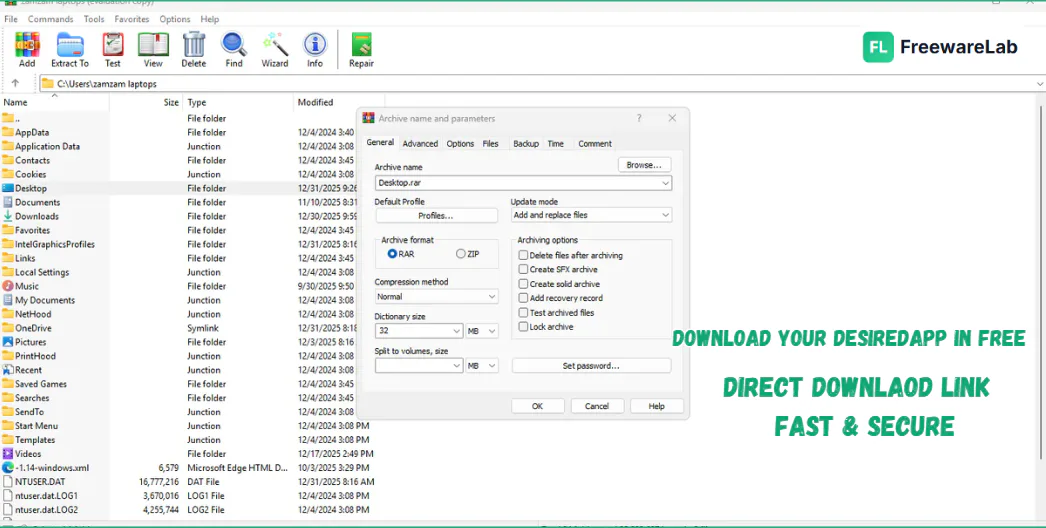
It offers a user friendly interface for new and professional users. Everyone can easily compress or extract files using simple right click options. Advanced users will appreciate the detailed settings available for compression level archive format and security options.
Performance and Speed of WinRAR 64 bit
WinRAR 7.20 improves compression and extraction speed especially when handling large files. It uses system resources efficiently. It can help keep your PC responsive during long compression tasks. It is suitable for both low end and high end Windows systems.
Security and Encryption
Security is one of the strongest points of WinRAR. The latest version 7.20 Final continues to use AES-256-bit encryption for password protected archives. It safe your personal and professional data remains protected from unauthorized access.
Supported File Formats of WinRAR Free Download
- RAR: Create and extract WinRAR’s native archive format with high compression efficiency.
- ZIP: Fully supports creating and extracting ZIP files used widely across platforms.
- 7Z: Extract files compressed with the popular 7-Zip format easily.
- TAR: Open and extract TAR archives commonly used on Linux systems.
- GZ & TGZ: Supports extraction of GZIP-compressed files.
- BZ2: Extract BZIP2 archives with ease.
- ISO: Open and extract disc image files without mounting them.
- CAB: Extract Microsoft Cabinet files often found in Windows installers.
- ARJ: Supports older ARJ archive files.
- LZH & LHA: Extract legacy compression formats.
- Z: Open Unix compressed files.
- UUE & XXE: Decode and extract encoded archive files.
Best Alternatives to WinRAR Latest Version
7 Zip
7 Zip is the best free alternative to WinRAR. It offers very high compression using its own 7Z format and also supports ZIP, TAR, and many other archive types. It is a lightweight, open source application. It is ideal for users. Who want powerful compression without a license.
PeaZip
PeaZip is a feature rich archive manager with a clean interface. It supports strong encryption, secure file deletion, and many archive formats. PeaZip is ideal for users who care about privacy and security while managing compressed files.
Bandizip
Bandizip is a fast and modern compression tool with a simple design. It supports multi core compression for better speed and works smoothly with large files. It is great for newbies who want speed and ease of use.
WinRAR 7.20 Final vs Stable Version
The beta version offers early access to new improvements. It may still contain minor bugs. The stable version is more reliable for critical work. WinRAR download free is best for users. Who likes testing new features and improvements.
Final Verdict
It is a powerful and improved version. It is the best file compression tool available for Windows. It is ideal for users. Who want better speed, improved stability, and early access to new enhancements. If you enjoy testing new versions. This beta release is definitely worth trying.
How to Download and Use WinRAR 7.20 Final
How to Download
- Click the Download button.
- Choose the correct version (32-bit or 64-bit) based on your system.
- Wait for the setup file to finish downloading.
- Double-click the downloaded setup file.
- Click Install and keep the default settings.
- WinRAR will automatically add options to the right-click menu.
- Click Done to finish the installation.
How to Use
To Compress Files
- Select the files or folder you want to compress.
- Right-click and choose Add to archive.
- Select archive format (RAR or ZIP) and click OK.
To Extract Files
- Right-click on the archive file.
- Choose Extract Here or Extract to Folder.
- Files will be extracted in seconds.
To Set a Password
- While creating an archive, click Set password.
- Enter your password and confirm it.
- Click OK to secure your files.
WinRAR Pros and Cons
Pros
High compression efficiency that helps reduce file size without losing data quality.
Supports many file formats, including RAR, ZIP, and extraction of multiple archive types.
Strong AES-256 encryption to keep files secure with password protection.
Fast compression and extraction speed, especially useful for large files and folders.
Cons
Beta version may contain bugs, making it less stable than the final release.
Not fully recommended for critical data, especially without backups.
Trial reminders appear frequently, which some users may find annoying.
WinRAR System Requirements for PC
OS: Windows 7 or later (Windows 10, Windows 11 supported)
Processor: Any modern Intel/AMD CPU
RAM: 1 GB or more
Storage: ~50 MB free disk space for installation
Display: Standard resolution (no special GPU needed)
WinRAR Frequently Asked Questions (FAQs)
1Is WinRAR 7.20 Final free?
Yes, you can use WinRAR in trial mode for free, but a license is recommended for long-term use.
2Is WinRAR 7.20 Final safe to use?
Yes, it is safe when downloaded from our website.
3Can I install it over an older version?
Yes, you can install it over an existing WinRAR version without issues.
4Does WinRAR expire?
The trial version shows reminders, but the software continues to work.
WinRAR 7.20 Final Changelog
Latest version changes and improvements
- Faster deletion of files from solid RAR archives
- Reduced recompression when removing files
- Improved performance for semi-solid archives
- New options added to archive name masks
- Support for weekday and full month names in archive names
- Extra characters in name masks are now ignored
- Improved command-line switch handling
- Cleaner and more consistent command-line syntax
- Minor bug fixes and stability improvements
Previous Versions
WinRAR 7.20 beta 3
Jan 23, 202610 MB
Package Size
3.8 MB
5.0
4 reviews
Direct & Safe Download
Buy License Officially
Virus FreeVerifiedFast
Product Information
File Name
WinRAR 7.20 Final Download for Windows (2026)
Developer
RARLAB
License
Freeware
Total Downloads
9
Platform
Windows
Related Tags
Explore more software in these categories
WinRAR 7.20 Final Download for Windows (2026) Tested & Verified
by FreewareLab Security Team
SECURE
0/72
VirusTotal
Feb 4
Test Date
Win 11
Platform
100%
Trust Score
No MalwareNo AdwareClean InstallFeatures Verified
A
Ash ColemanVerifiedTOP
Software Security Analyst at FreewareLab
Our Verification Process
Security Scan
Every file scanned with 72+ antivirus engines via VirusTotal
Installation Test
Clean install verified - no bundleware, adware, or PUPs
Feature Verification
All advertised features tested and confirmed working
5.0
Excellent
4 ratingsRating Breakdown
5
4(100%)
4
0
3
0
2
0
1
0
Write a Review
for WinRAR 7.20 Final Download for Windows (2026)
0 Reviews
Click to share your experience