Wondershare Filmora 15.2.5.17803 for Windows (2026)
15.2.5.17803Updated
Virus FreeNo AdwareSafe DownloadLab Tested
Wondershare Filmora is an easy-to-use, AI-powered video editor for Windows that helps anyone create professional videos fast. The direct download link is available on our website.
Virus-free • Verified by FreewareLab
Download Wondershare Filmora Latest Version - Freewarelab
Wondershare Filmora is an easy-to-use, AI-powered video editor for Windows that helps anyone create professional videos fast. The direct download link is available on our website.
5.0(4)
39 downloads
Feb 9, 2026
Wondershare Filmora 15.2.5.17803 for Windows (2026) Video Overview
Watch this video to learn more about Wondershare Filmora 15.2.5.17803 for Windows (2026) features and how to use it.
Wondershare Filmora
Wondershare Filmora is the best video editing software for Windows. It helps anyone create beautiful videos without difficulty. It is a powerful editing tool with a clean and simple interface. You can make video editing easy if you are a new or experienced user.
It brings many professional style features. It was once only available in expensive editing programs. You can edit videos smoothly add effects and creatively tell your story without needing advanced skills.
Create & Edit Videos with Wondershare Filmora
It can allow you to create and edit videos easily. If you are a new user or do not have advanced skills. You can easily cut trim and join video clips. You can add text in your video titles and subtitles and apply effects filters and transitions. You can make your videos look beautiful.
It allows you to add background music and sound effects. It uses green screen to change backgrounds, and controls video speed for slow or fast motion.
Why Filmora Is a Great Choice for Video Editing
- Filmora is designed for people who want fast, easy, and high-quality video editing.
- Simple drag-and-drop editing
- 10+ billion stock media assets
- Over 200 instant templates and presets
- 800+ effects and support for 50+ formats
- Text, transitions, stickers, and animations
- Music and sound effects are built into the app
- Full 4K video support
Advanced Editing Made Simple
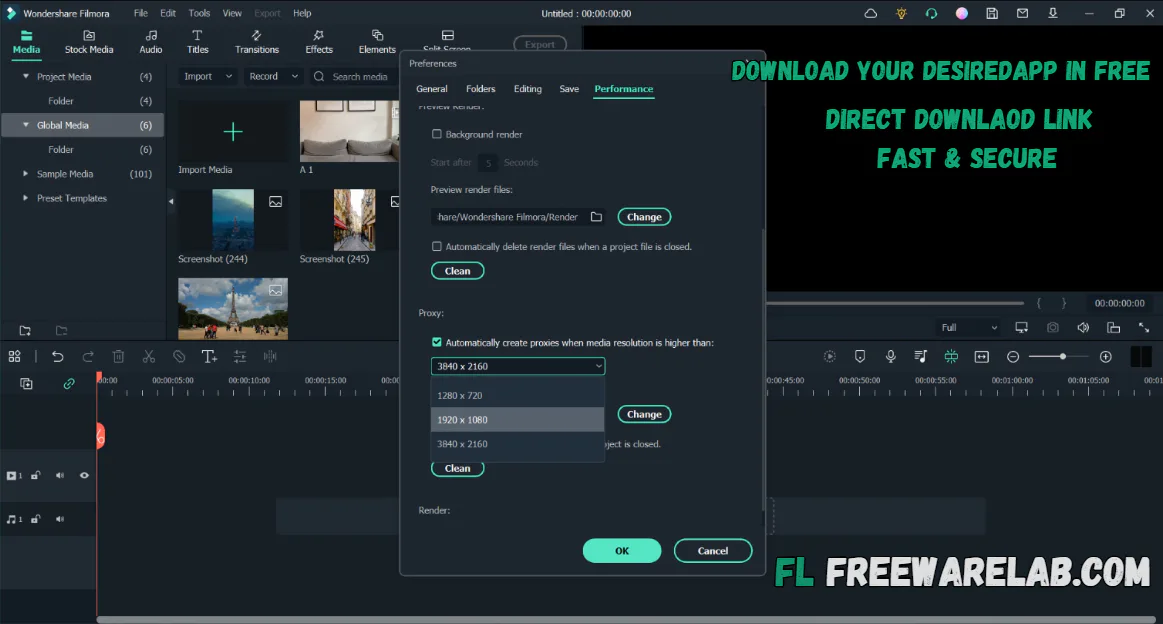
- Fast processing with proxy files
- Adjustable preview quality
- Fix the fisheye lens and camera shake
- Slow motion and reverse video effects
- One-click filters and professional 3D LUTs
- Green screen effects for creative scenes
- Clear audio with noise removal and keyframing
New Features Added in Filmora 15
- Smart Short Clips: AI turns long videos into short vertical clips with subtitles
- Multi-Camera Editing: Edit videos from different camera angles in one place
- Planar Tracking: Stick text or images to moving objects
- AI Sound Effects: Create sound effects by typing text
- AI Face Mosaic: Automatically blur faces while they move
- AI Video Enhancer: Make low-quality videos clearer
- Video Denoise: Remove noise from dark or low-light videos
- AI Voice Enhancer: Make voices clean and easy to hear
- AI Translation & Lip Sync: Translate videos with matching lip movement
- Advanced Compression: Make videos smaller without losing quality
- Keyframe Path Curve: Create smooth motion and animations
- AI Color Palette: Add cinematic colors while keeping skin natural
- Filmora Copilot 2.0: AI helper for faster video editing
- Magnetic Timeline: Clips snap together automatically
- AI Portrait Cutout: Remove backgrounds cleanly with fine details
Filmora Key Features & Highlights
- It can create animated titles and text using ready-made designs
- Add royalty-free music and sound effects inside the app
- Improve videos with creative overlays and stylish filters
- Use motion graphics to make content more engaging
- Edit video and audio frame by frame for better control
- It creates slow-motion and time-lapse videos easily
- Play videos backward for fun and creative effects
- Enjoy HD and 4K video quality support
- Connect clips smoothly with simple transitions
- Separate audio, remove noise, and adjust sound levels
- Import, edit, and export animated GIF files
- Import media directly from Facebook and Instagram
Best Filmora Alternatives
Adobe Premiere Pro: It is a professional video editing software used by experts who need advanced tools and full creative control. It is powerful but takes time to learn.
Camtasia: It is perfect for making tutorials, screen recordings, and educational videos. It is easy to use and great for newbies and teachers.
InVideo: It can help you make videos quickly using ready made templates. It is ideal for social media creators and users who want fast results without complex editing.
DaVinci Resolve: It is known for best color grading and advanced editing features. If you want the cinematic video, it is a good choice for users.
VEGAS Pro: It offers strong editing tools for professionals. Who want flexible timelines effects and audio control for serious video projects.
Final Thoughts
It is an excellent video editing software for Windows users. Who want powerful tools without complexity. It offers a smooth editing experience smart AI features, and a large media library all at an affordable price.
If you are a beginner a student a YouTuber or a content creator. It helps you create high quality videos quickly and easily. If you want simple editing with professional-looking results. Filmora is a great choice.
How to Download and Use Wondershare Filmora
How to Download
- You can click on the Download button.
- Wait for the setup file to finish downloading
- Open the downloaded setup file with WinRAR
- Double-click the Filmora installer
- Choose the install location (or keep the default)
- Click Install and wait a few minutes
- Launch Filmora after installation
- Sign in or start the free version
How to Use Filmora
- Open Filmora and create a new project.
- Import your videos, photos, and audio files.
- Drag and drop clips onto the timeline.
- Add effects, text, music, and transitions.
- Preview your video, make final changes, and export it in your preferred format or upload it online.
Wondershare Filmora Pros & Cons
Pros
Very easy to use, even for newbies.
Clean and simple interface
Many ready-made effects, filters, and transitions
Works smoothly on most computers
Supports HD and 4K video export
Cons
Free version adds a watermark to videos
Not suitable for professional-level editing
Some advanced features require a paid plan
Limited control compared to high-end editors
Wondershare Filmora System Requirements
OS: Windows 7/8/10/11 (64-bit recommended)
Processor: Intel i3 or better
RAM: 4 GB (8 GB recommended)
Storage: At least 10 GB of free disk space
Graphics: Intel HD Graphics 5000 or better
Wondershare Filmora Frequently Asked Questions (FAQs)
1Is Filmora free for PC?
Filmora offers a free trial, but exported videos include a watermark.
2Is Filmora easy to use?
Yes, it is beginner-friendly and easy to learn.
3Does Filmora support 4K video?
Yes, it supports full 4K video editing and export.
4Can I edit audio in Filmora?
You can adjust audio, remove noise, and add effects.
5Does Filmora include effects and filters?
It includes many built-in effects, transitions, and filters.
6Can I export videos in different formats?
Yes, formats like MP4, MOV, and AVI are supported.
Wondershare Filmora 15.2.5.17803 Changelog
Latest version changes and improvements
- Improved AI-powered editing tools, including smarter automation and creative effects.
- Improved dual-timeline editing for more flexible multi-clip workflows.
- Upgraded source & timeline preview to help you edit faster with clearer visual feedback.
- Better dynamic captions and text animation controls for modern social media videos.
- Overall stability improvements for smoother editing and fewer crashes.
- Speed and export enhancements to help finalize videos faster.
Package Size
733.3 MB
5.0
4 reviews
Direct & Safe Download
Buy License Officially
Virus FreeVerifiedFast
Product Information
File Name
Wondershare Filmora 15.2.5.17803 for Windows (2026)
Developer
Wondershare
License
Freeware
Total Downloads
39
Platform
Windows
4
Related Apps
Similar software you'll love
#1

Adobe Premiere Elements v26.1.0 for Windows (2026)
Download Adobe Premiere Elements for Windows is an easy video editing software for beginners, featuring AI-powered tools, Guided Edits, and automated effects to create stunning videos fast.
v26.1.0324.8
#2
CyberLink PowerDirector 24.2.1404.0 Download for Windows 2026
Download CyberLink PowerDirector with a Direct Link is the best video editing software for easily creating videos. You can cut videos add music text effects and transitions without any hard steps.
v24.2.1404.025.0
#3
Movavi Video Editor 26.8.0 for Windows (2026)
Movavi Video Editor is a powerful and easy video editing tool for PC. Create professional videos with effects, transitions, and smart tools. Download Movavi Video Editor directly & secure link.
v26.8.024.5
#4
Adobe Premiere Pro Download 26.0.0 for Windows (2026)
Download the latest Adobe Premiere Pro for Windows. A powerful video editing software for beginners and professionals. Edit, cut, add effects, mix audio, and export high-quality videos easily.
v26.0.0295.0
Related Tags
Explore more software in these categories
Wondershare Filmora 15.2.5.17803 for Windows (2026) Tested & Verified
by FreewareLab Security Team
SECURE
0/72
VirusTotal
Feb 9
Test Date
Win 11
Platform
100%
Trust Score
No MalwareNo AdwareClean InstallFeatures Verified
A
Ash ColemanVerifiedTOP
Software Security Analyst at FreewareLab
Our Verification Process
Security Scan
Every file scanned with 72+ antivirus engines via VirusTotal
Installation Test
Clean install verified - no bundleware, adware, or PUPs
Feature Verification
All advertised features tested and confirmed working
5.0
Excellent
4 ratingsRating Breakdown
5
4(100%)
4
0
3
0
2
0
1
0
Write a Review
for Wondershare Filmora 15.2.5.17803 for Windows (2026)
0 Reviews
Click to share your experience