Wondershare PDFelement 12.1.9.4002 for Windows (2026)
12.1.9.4002Updated
Virus FreeNo AdwareSafe DownloadLab Tested
Wondershare PDFelement is a fast, all-in-one PDF editor to create, edit, convert, merge, split, protect, and sign PDF files with ease. Edit any PDF in seconds and scan documents.
Virus-free • Verified by FreewareLab
Download PDFelement Professional PDF Editor Software - Freewarelab
Wondershare PDFelement is a fast, all-in-one PDF editor to create, edit, convert, merge, split, protect, and sign PDF files with ease. Edit any PDF in seconds and scan documents.
5.0(3)
13 downloads
Feb 2, 2026
Wondershare PDFelement 12.1.9.4002 for Windows (2026) Video Overview
Watch this video to learn more about Wondershare PDFelement 12.1.9.4002 for Windows (2026) features and how to use it.
Wondershare PDFelement
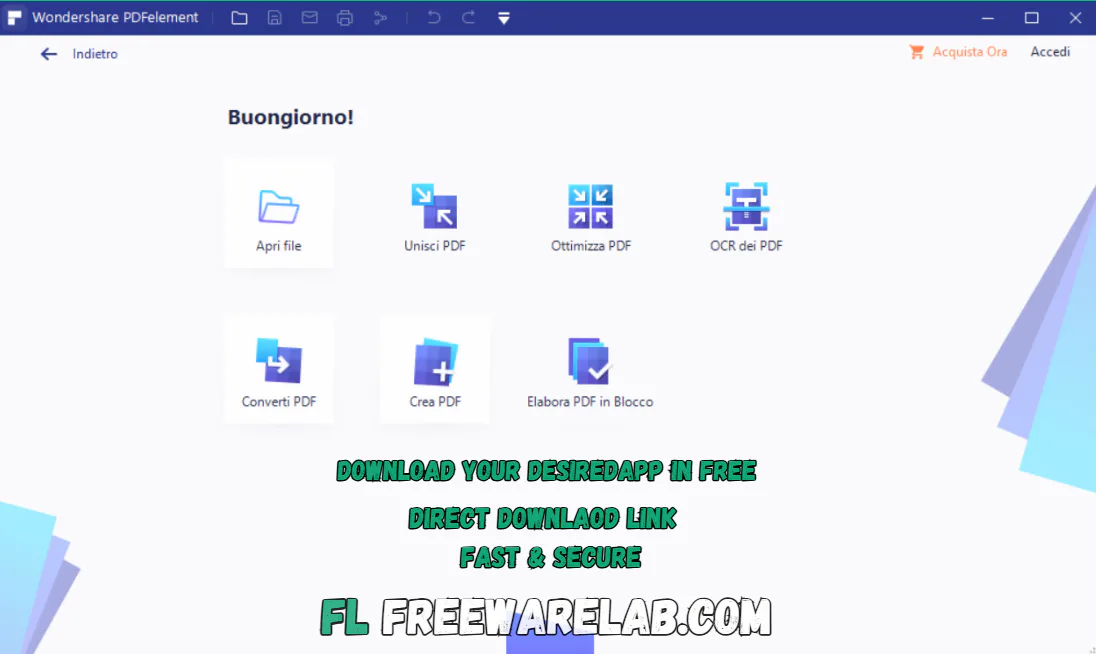
Wondershare PDFelement is a simple and powerful PDF editor. It was developed by Wondershare. It helps users edit convert organize and protect PDF files without any technical skills. The clean interface and smart tool. It is perfect for students, office workers, and business users who work with PDFs every day.
Overview of Wondershare PDFelement
It is an all in one PDF software. It allows you to edit text and images convert PDFs into other formats, and manage pages easily. You can also create forms add digital signatures and use OCR to edit scanned documents. Everything is designed to be fast simple and user-friendly.
Key Features of Wondershare PDFelement 2026
- You can edit text fonts colors and images directly inside your PDF file.
- It works just like a word processor but for PDF.
- It lets you convert PDFs to Word Excel PowerPoint HTML and image formats while keeping the original layout.
- The built-in OCR feature helps turn scanned PDFs into editable and searchable text saving time on manual typing.
- You can create interactive forms, fill existing forms and automatically detect form fields with one click.
- You can easily add highlights, stamps, shapes, add comments, and notes to review documents clearly.
- Sign PDFs digitally, add passwords, and restrict printing or editing for better document protection.
- It can be merge, split, compress, rotate, and reorder PDF pages easily.
Benefits of Wondershare PDFelement
It can offers advanced PDF tools at a lower cost compared to many premium PDF editors. It is easy to use, fast, and suitable for both beginners and professionals. Who want reliable PDF editing without complexity.
Best Alternatives to Wondershare PDFelement
Adobe Acrobat Pro: It is a powerful PDF editor with advanced editing and security features
Foxit PDF Editor: A fast and lightweight PDF tool for everyday use
Nitro PDF Pro: It is the best and most professional PDF solution for creating and editing documents
Smallpdf Desktop: An easy to use PDF tool for basic editing and conversions
Final thought
It is a reliable and easy PDF editor that covers all essential PDF tasks. If you want a simple affordable and powerful alternative to complex PDF software. PDFelement is a smart and practical choice.
How to Download and Use Wondershare PDFelement
How to Download
- Click on the Download button.
- The setup file will start downloading automatically
- After the download is complete, open the setup file
- Click Install and wait for the process to finish
- Once installed, click Start Now
- PDFelement will open on your screen
How to Use
Open a PDF File
- Launch Wondershare PDFelement
- Click Open PDF
- Select your PDF file from your computer
Edit a PDF
- Click on Edit
- Edit text, images, font size, or colors easily
- Changes are applied instantly
Convert a PDF
- Click Convert
- Choose the format (Word, Excel, PowerPoint, Image, etc.)
- Save the converted file
- Edit Scanned PDFs (OCR)
Open a scanned PDF
- Click OCR
- Choose the language and start OCR
- Now you can edit the scanned text
Add Signature or Comments
- Click Comment to add notes or highlights
- Click Protect or Sign to add a digital signature
Save the File
- Click File → Save or Save As
- Your edited PDF is now ready
Wondershare PDFelement Pros & Cons
Pros
Very easy to use interface
Powerful editing and conversion tools
Good OCR accuracy
Affordable pricing plans
Supports Windows and macOS
Cons
Free version adds watermark
Advanced OCR needs a paid plan
Wondershare PDFelement System Requirements
OS: Windows 7, Windows 8, Windows 10, Windows 11
Processor: 1 GHz or faster
RAM: 2 GB minimum
Storage: 1.5 GB free space or more
Display: 1024 × 768 resolution or higher
Wondershare PDFelement Frequently Asked Questions (FAQs)
1Is Wondershare PDFelement free to use?
It is a free version with limitations. Paid plans unlock all features.
2Can I edit scanned PDFs?
Yes OCR allows you to edit scanned documents.
3Does it support digital signatures?
You can add and manage digital signatures easily.
4Is Wondershare PDFelement good for beginners?
It is designed to be simple and user-friendly.
5Can I use it on Mac and Windows?
It supports both platforms.
Wondershare PDFelement 12.1.9.4002 Changelog
Latest version changes and improvements
- Improved overall performance for faster PDF opening and editing
- Fixed minor bugs to make the software more stable
- Better accuracy in PDF editing, converting, and annotating tools
- Improved OCR and text recognition results
- Small UI improvements for a smoother user experience
Previous Versions
Wondershare PDFelement 12.1.8.3995
Jan 30, 2026221.47 MB
Wondershare PDFelement 12.1.7.3970
Jan 23, 2026209.8 MB
Wondershare PDFelement 12.1.6.3963
Jan 16, 2026219.05 MB
Wondershare PDFelement 12.1.5.3940
Dec 31, 2025218 MB
Wondershare PDFelement Professional 12.1.4.3916
Dec 20, 2025218 MB
Package Size
206 MB
5.0
3 reviews
Direct & Safe Download
Buy License Officially
Virus FreeVerifiedFast
Product Information
File Name
Wondershare PDFelement 12.1.9.4002 for Windows (2026)
Developer
Wondershare
License
Freeware
Total Downloads
13
Platform
Windows
4
Related Apps
Similar software you'll love
#1

Microsoft Office 2007 Free Download for Windows (2026)
Microsoft Office 2007 Free Download is the most popular application. It is a widely used software developed by Microsoft. It offer the lightweight fast interface and easy to use.
v200725.0
#2

Foxit PDF Reader 14.0.2.33402 Free Download for Windows (Latest Version)
Foxit PDF Reader 14.0.2.33402 is the best and lightest PDF software for Windows. Foxit PDF help you open read and print PDF files easily. You can highlight text, add notes, fill forms, and sign a
v14.0.2.334025.0
#3
PDF-XChange Editor Plus 10.8.2 For Windows (2026)
PDF-XChange Editor Plus is a complete PDF editing solution for Windows. Create, edit, OCR, secure, and convert PDFs easily with fast performance and professional-grade tools.
v10.8.2.40725.0
#4

Microsoft Office 2019 for Windows Download
Microsoft Office 2019 for Windows with Word, Excel, PowerPoint, and Outlook. One-time purchase, offline use, and trusted productivity tools.
v201954.7
Related Tags
Explore more software in these categories
Wondershare PDFelement 12.1.9.4002 for Windows (2026) Tested & Verified
by FreewareLab Security Team
SECURE
0/72
VirusTotal
Feb 2
Test Date
Win 11
Platform
100%
Trust Score
No MalwareNo AdwareClean InstallFeatures Verified
A
Ash ColemanVerifiedTOP
Software Security Analyst at FreewareLab
Our Verification Process
Security Scan
Every file scanned with 72+ antivirus engines via VirusTotal
Installation Test
Clean install verified - no bundleware, adware, or PUPs
Feature Verification
All advertised features tested and confirmed working
5.0
Excellent
3 ratingsRating Breakdown
5
3(100%)
4
0
3
0
2
0
1
0
Write a Review
for Wondershare PDFelement 12.1.9.4002 for Windows (2026)
0 Reviews
Click to share your experience