ZD Soft Screen Recorder 12.0.9 for Windows (2026)
12.0.9New
Virus FreeNo AdwareSafe DownloadLab Tested
ZD Soft Screen Recorder lets you record full screen, custom region, webcam, system audio, microphone voice, webinars, tutorials, demos, and gameplay on Windows PC easily.
Virus-free • Verified by FreewareLab
Download ZD Soft Screen Recorder Latest Version - Freewarelab
ZD Soft Screen Recorder lets you record full screen, custom region, webcam, system audio, microphone voice, webinars, tutorials, demos, and gameplay on Windows PC easily.
5.0(1)
0 downloads
Jun 2, 2026
ZD Soft Screen Recorder 12.0.9 for Windows (2026) Video Overview
Watch this video to learn more about ZD Soft Screen Recorder 12.0.9 for Windows (2026) features and how to use it.
ZD Soft Screen Recorder
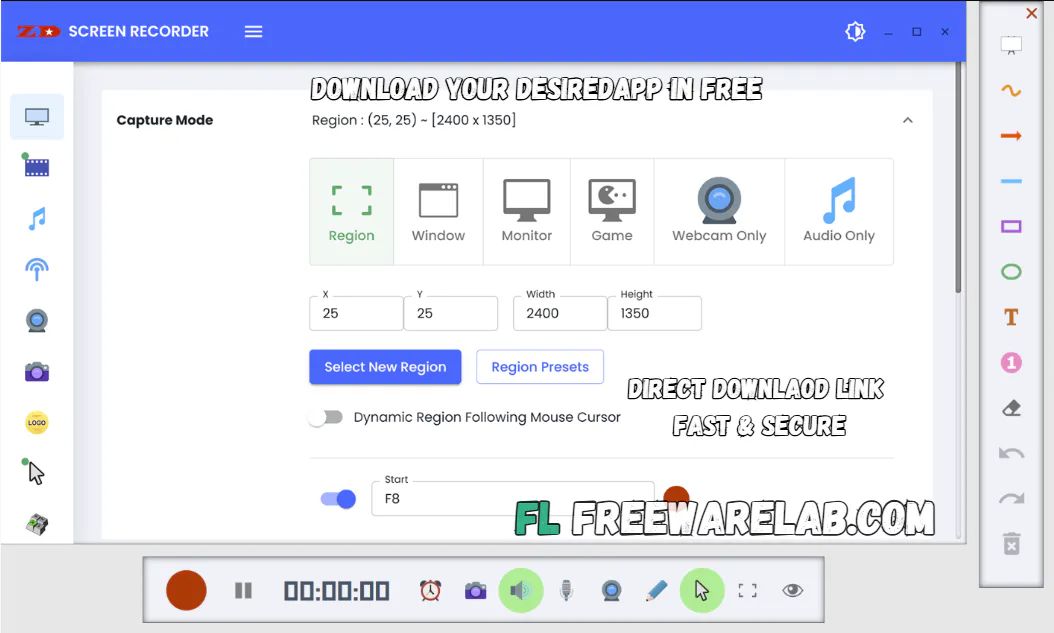
ZD Soft Screen Recorder is a simple screen recording software. It helps you record anything shown on your PC screen. You can use it to make video tutorials, record online classes, save important meetings, capture gameplay, and create videos for YouTube. It is useful for students and content creators.
It gives simple recording options. Recording works on the entire display or just one chosen part. It grabs footage from your camera, too. The system picks up what you say through the mic along with sounds coming from the machine itself. Clear results come easier here than wrestling with programs that do too much.
Overview of ZD Soft Screen Recorder
It is a Windows screen capture tool. Recording happens straight from your display, captured like a movie. As the visuals play out, spoken words get pulled in, letting you talk through what's happening right alongside.
Start by capturing what happens on your display while explaining each move out loud. Someone learning software might follow better when they see it alongside clear talk. You can record the lesson for later study. If you are playing a game. You can record your gameplay and share it with others.
Key Features of ZD Soft Screen Recording Software
- You can record full screen easily.
- Record a custom region of the screen.
- Add on-screen annotation while recording.
- Annotate important points with drawing tools.
- Record system audio from the computer.
- Use the microphone input to record your voice.
- Add a webcam overlay to show your face.
- Save recorded videos in a useful format.
- Record webinars and online classes.
- Create software demo videos.
- Make step-by-step tutorial videos.
- Watch playback of recorded videos.
- Works on Windows 7 and newer versions.
Why Use ZD Soft Screen Recorder?
It is helpful because it saves your screen activity in video form. You do not need to explain everything again and again. You can record once and share the video with others.
It is also useful for making learning videos. Teachers can record lessons, students can record online lectures, and YouTubers can make tutorial videos. It can also be used to record gameplay moments.
Benefits of ZD Screen Recorder
- Easy to use for beginners
- Good for online classes and meetings
- Helpful for making tutorials
- Can record screen, sound, voice, and webcam
- Useful for YouTube videos
- Good option for gameplay recording
- Saves time by recording important work
- Works on Windows computers
ZD Soft Screen Recorder for Students
It allows for recording online classes, lectures, and study videos for students. If they miss any important point during class. They can watch the recording later. It is also useful for making school projects and presentations.
ZD Soft Screen Recorder for Teachers
It is the best for teachers. It can make video lessons for students. They can record PowerPoint slides, explain topics, and add their voice. This makes online teaching easier and more useful.
ZD Soft Screen Recorder for Gamers
Gamers can record their gameplay and save important gaming moments. It can also add voice commentary while playing. It is useful for gaming channels and social media clips.
Best Alternatives to ZD Soft Screen Recorder
OBS Studio: It is a free and powerful screen recording tool. It is good for live streaming and gameplay recording.
Bandicam: It is a popular screen recorder for Windows. It is useful for games and PC screen videos.
Camtasia: It is a professional screen recorder and video editor. It is good for high-quality tutorials and training videos.
ShareX: It is a free screen capture tool. It is good for screenshots GIFs and basic screen recording.
Movavi Screen Recorder: It is an easy tool for recording screen videos and online calls.
Final Words
It is a useful screen recording software for Windows users. It is simple and helpful for many tasks. You can use it to record tutorials, online classes, meetings, gameplay webcam microphone voice and system sound. It is perfect for a screen recorder for daily use.
How to Download ZD Soft Screen Recorder
How to Download
- Click on the download button.
- Wait for the setup file to download.
- Open the setup file after downloading.
- Follow the installation steps.
- Launch the software after installation.
How to Use
- Open ZD Soft Screen Recorder on your PC.
- Choose what you want to record.
- Select full screen, window, or custom area.
- Add a webcam if you want to show your face.
- Click the record button to start recording.
- Click stop when your recording is complete.
- Save the video on your computer.
ZD Soft Screen Recorder Pros and Cons
Pros
Simple and easy to use
Records screen with sound
Supports webcam recording
Good for tutorials and classes
Useful for gameplay videos
Can record selected screen area
Cons
Mainly made for Windows only
Some advanced features may need a paid version
Free trial may have limits
ZD Soft Screen Recorder System Requirements
OS: Windows 7, 8, 8.1, 10, or 11
Processor: 2.0 GHz or faster CPU
RAM: 2 GB
Storage: At least 20 MB free space for installation
Graphics: Intel, AMD, or NVIDIA graphics support
Other: Microphone and webcam needed for voice and face recording
ZD Soft Screen Recorder Frequently Asked Questions (FAQs)
1Is ZD Soft Screen Recorder easy to use?
It is easy to use. Beginners can record their screen with simple steps.
2Can I record my voice with ZD Soft Screen Recorder?
You can record your voice using a microphone while recording the screen.
3Can ZD Soft Screen Recorder record gameplay?
It can record gameplay videos on Windows computers.
4Does ZD Soft Screen Recorder record webcam?
It can record webcam video with your screen recording.
5Is ZD Soft Screen Recorder good for online classes?
It is useful for recording online classes, lessons, and webinars.
Package Size
7.3 MB
5.0
1 review
Direct & Safe Download
Buy License Officially
Virus FreeVerifiedFast
Product Information
File Name
ZD Soft Screen Recorder 12.0.9 for Windows (2026)
Developer
ZD Soft
License
Freeware
Total Downloads
0
Platform
Windows
4
Related Apps
Similar software you'll love
#1
IObit Uninstaller Pro 15.4.0.1 free for Windows (2026)
IObit Uninstaller Pro helps you fully remove unwanted programs and browser extensions, clean leftovers, and keep your PC fast. Download the latest version with a direct link.
v15.4.0.1 35.0
#2

Glary Utilities Pro 6.38.0.42 For Windows (2026)
Glary Utilities Pro is an all-in-one Windows utility with 20+ tools to clean junk files, fix errors, manage startup apps, and optimize your PC for faster, smoother performance.
v6.38.0.42125.0
#3
Advanced SystemCare 19.3.0.200 Download for Windows 2026
Download Advanced SystemCare with a Direct Link is the best software for keeping your Windows PC clean fast and safe. Advanced removes unwanted files fixes small system problems helps your pc.
v19.3.0.200215.0
#4

CCleaner Pro 7.04.1172 for Windows (2026)
CCleaner Pro is the world’s #1 PC optimization tool to remove junk files, free up space, boost speed, and fix PC issues. Download CCleaner Professional Plus full version with direct link, standalone o
v7.04.11721445.0
Related Tags
Explore more software in these categories
ZD Soft Screen Recorder 12.0.9 for Windows (2026) Tested & Verified
by FreewareLab Security Team
SECURE
0/72
VirusTotal
Jun 2
Test Date
Win 11
Platform
100%
Trust Score
No MalwareNo AdwareClean InstallFeatures Verified
A
Ash ColemanVerifiedTOP
Software Security Analyst at FreewareLab
Our Verification Process
Security Scan
Every file scanned with 72+ antivirus engines via VirusTotal
Installation Test
Clean install verified - no bundleware, adware, or PUPs
Feature Verification
All advertised features tested and confirmed working
5.0
Excellent
1 ratingRating Breakdown
5
1(100%)
4
0
3
0
2
0
1
0
Write a Review
for ZD Soft Screen Recorder 12.0.9 for Windows (2026)
0 Reviews
Click to share your experience